 | Chapter 13 The Abstract Window Toolkit |  |

| Chapter 13 The Abstract Window Toolkit | |
If you've been waiting for a more detailed discussion of the applet class,
here it is. An Applet is something like a
Panel with a mission.
It is a GUI container that has some extra structure to allow it to be used
in an "alien" environment like a Web browser or appletviewer.
Applets also have a life cycle that lets them act more like
an application than a static component.
Although applets tend to be relatively simple, there's no inherent
restriction on their complexity. There's no reason you couldn't write
an air traffic control system (well, let's be less ambitious--a word
processor) as an applet.
Structurally, an applet is a sort of wrapper for your Java code. In
contrast to a standalone graphical Java application, which starts up
from a main() method and creates a GUI, an
applet is itself a Component that expects to be dropped into someone
else's GUI. Thus, an applet can't run by itself; it runs in the
context of a Web browser or appletviewer. Instead of having your
application create a Frame to hold your
GUI, you stuff your application inside an
Applet (which is itself a Container), and let someone else
add the applet to their GUI.
Pragmatically, an applet is an intruder into someone else's environment, and therefore has to be treated with suspicion. The Web browsers that run applets impose restrictions on what the applet is allowed to do. The restrictions are enforced by a security manager, which the applet is not allowed to change. The browser also provides an "applet context," which is additional support that helps the applet live within its restrictions.
Aside from that top level structure and the security restrictions, there is no difference between an applet and an application. If your application can live within the restrictions imposed by a browser's security manager, you can easily structure it to function as an applet and a standalone application. (We'll show an example of an Applet that can also be run as a standalone below.) Conversely, if you can supply all of the things that an applet requires from its environment, you can use applets within your stand-alone applications and within other applets (though this requires a bit of work).
As we said a moment ago, an Applet
expects to be embedded in GUI (perhaps a document) and used in a viewing
environment that provides it with special resources.
In all other respects,
however, applets are just ordinary Panel
objects. As Figure 13.8 shows, an applet is a kind of Panel. Like any other
Panel, an Applet
can contain user interface components and use all the basic
drawing and event-handling capabilities of the
Component class. We draw on an
Applet by overriding its paint()
method; we respond to events in the
Applet's display area by providing the
appropriate event listeners. Applets have additional structure that helps them interact with the viewer environment.
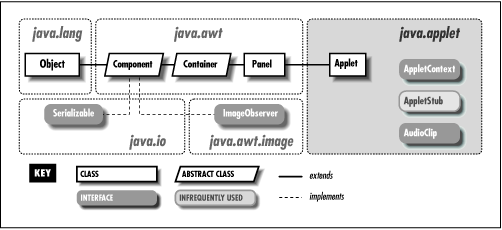
The Applet class contains four methods an
applet can override to guide it through its life cycle. The
init(), start(),
stop(), and destroy() methods are
called by the appletviewer or a Web browser, to direct the
applet's behavior. init() is called once,
after the applet is created. The init() method
is where you perform basic setup like parsing parameters, building a
user interface, and loading resources. Given what we've said
about objects,
you might expect the Applet's constructor would
be the right place
for such initialization. However, the constructor is meant to be
called by the applet's environment, for simple creation of the applet.
This might happen before the applet has access to certain resources,
like information about its environment. Therefore, an applet doesn't normally
do any work in its constructor; it relies on the default constructor for the
Applet class and does its initialization in the
init() method.
The start() method is called whenever the
applet becomes visible; it shouldn't be a surprise then that the
stop() method is called whenever the applet becomes
invisible. init() is only called once in
the life of an applet, but start()
and stop() can be called any number of times (but always in the logical
sequence).
For example, start() is called when the
applet is displayed, such as when it
scrolls onto the screen; stop() is called if
the applet scrolls off the screen or the viewer leaves the
document. start() tells the applet
it should be active. The applet may want to create threads, animate, or
otherwise perform useful (or annoying)
activity. stop() is called to let the applet know
it should go dormant.
Applets should cease CPU-intensive or
wasteful activity when they are stopped and resume it when (and if)
they are restarted. However, there's no requirement that an
invisible applet stop computing; in some applications, it may be
useful for the applet to continue running in the background. Just be
considerate of your user, who doesn't want an invisible applet
dragging down system performance. And for the users: be aware of the tools
that will develop to let you monitor and squash rogue applets in
your Web browser.
Finally, the destroy() method is called to give the
applet a last chance to clean up before it's removed--some time
after the call to stop(). For example, an applet
might want to close down suspended communications channels or remove
graphics frames. Exactly when destroy() is called
depends on the browser; Netscape Navigator calls
destroy() just prior to deleting the applet from
its cache. This means that although an applet can cling to life after
being told to stop(), how long it can go on
is unpredictable. If you want to maintain your applet as the
user progresses through other activities, consider putting
it in an HTML frame.
Applets are quarantined within the browser by an applet
SecurityManager. The
SecurityManager is part of the application
that runs the applet--for example, the Web browser or applet viewer. It is
installed before the browser loads any applets and implements the
basic restrictions that let you run untrusted applets safely.
Remember, aside from basic language robustness, there are no
inherent security restrictions on a standalone Java application. It
is the browser's responsibility to install a special security
manager and limit what applets are allowed to do.
Most browsers impose the following restrictions on untrusted applets:
Untrusted applets cannot read or write files on the local host.
Untrusted applets can only open network connections (sockets) to the server from which they originated.
Untrusted applets cannot start other processes on the local host.
Untrusted applets cannot have native methods.
The motivation for these restrictions should be fairly obvious: you clearly wouldn't want a program coming from some random Internet site to access your files or run arbitrary programs. Although untrusted applets cannot directly read and write files on the client side or talk to arbitrary hosts on the network, applets can work with servers to store data and communicate. For example, an applet can use Java's RMI (Remote Method Invocation) facility to do processing on its server. An applet can communicate with other applets on the Net by proxy through its server.
The latest version of Java makes it possible to sign archive files that contain applets. Because a signature identifies the applet's origin unambiguously, we can now distinguish between "trusted" applets (i.e., applets that come from a site or person you trust not to do anything harmful) and run of the mill "untrusted" applets. In Web browsers that support signing, trusted applets can be granted permission to "go outside" of the applet security sandbox. Trusted applets can be allowed to do most of the things that standalone Java applications can do: read and write files, open network connections to arbitrary machines, and interact with the local operating system by starting processes. Trusted applets still can't have native methods, but including native methods in an applet would make it unportable, and would therefore be a bad idea.
Chapter 3 discussed how to package your applet's class files and resources into a JAR file and sign it with your digital signature. Currently, HotJava is the only browser that supports signing, but Netscape Navigator, Internet Explorer, and others will probably catch up soon.
An applet needs to communicate with its applet viewer. For example, it needs
to get its parameters from the HTML document in which
it appears. An applet may also need to load images, audio clips, and other
items. It may also want to ask the viewer about other applets on the same
HTML
page in order to communicate with them.
To get resources from the applet viewer environment, applets use the
AppletStub and AppletContext
interfaces. Unless you're writing a browser or some other
application that loads and runs applets, you won't have to implement these
interfaces, but you do use them within your applet.
An applet gets its parameters from the parameter tags
placed inside the <applet> tag in the
HTML document. For example, the code below reads
the "sheep" parameter from its HTML page:
String imageName = getParameter( "imageName" );
try  {
    int numberOfSheep = Integer.parseInt(getParameter( "sheep" ));
} catch ( NumberFormatException e ) { // use default }
A friendly applet will provide information about the parameters it
accepts through its getParameterInfo() method. getParameterInfo() returns
an array of string arrays, listing and describing the applet's parameters.
For each parameter, three strings are provided: the parameter name, its
possible values or value types, and a verbose description. For example:
public String [][] getParameterInfo() {
    String [][] appletInfo =
        {"logo",   "url",  "Main logo image"}
        {"timer", "int",   "Time to wait before becoming annoying"},
        {"flashing", "constant | intermittant",  "Flag for how to flash"},
    return appletInfo;
}
An applet can find where it lives by calling the
getDocumentBase() and
getCodeBase()
methods. getDocumentBase() returns the base
URL of the document in which the applet appears;
getCodeBase() returns the base
URL of the Applet's class
files. An applet can use these to construct relative
URLs from which to load other resources like images,
sounds, and other data.
The getImage() method takes a URL and asks for
an image from the viewer environment. The image may be pulled from a cache
or loaded asynchronously when later used. The
getAudioClip() method, similarly, retrieves sound
clips.
The following example uses
getCodeBase() to construct a
URL and load a properties configuration file, located
at the same location as the applet's class file:
Properties props = new Properties();
try {
    URL url = new URL(getCodeBase(), "appletConfig.props");
    props.load( url.openStream() );
} catch ( IOException e ) { // failed }
A better way to load resources is by calling the getResource()
and getResourceAsStream() methods of the Class class, which search
the applet's JAR files (if any) as well as its codebase. The following
code loads
the properties file appletConfig.props:
Properties props = new Properties();
try {
    props.load( getClass().getResourceAsStream("appletConfig.props") );
} catch ( IOException e ) { // failed }
The status line is a blurb of text that usually appears somewhere in the
viewer's display, indicating a current activity. An applet can
request that some text be placed in the status line with the
showStatus() method. (The browser isn't
required to do anything in response to this call, but most browsers
will oblige you.)
An applet can also ask the browser to show a new document.
To do this, the
applet makes a call to the showDocument(url) method of the
AppletContext.
You can get a reference to the AppletContext with
the applet's getAppletContext() method.
showDocument() can take an additional
String argument to tell the browser where to
display the new URL:
getAppletContext().showDocument( url, name );
The name argument can be the name of an
existing labeled HTML frame; the document referenced by the URL
will be displayed in that frame. You can use this method to create
an applet that "drives" the browser to new locations dynamically, but stays
active on the screen in a separate frame.
If the named frame doesn't exist, the browser will create
a new top-level window to hold it. Alternatively, name can have one
of the following special values:
selfShow in the current frame
_parentShow in the parent of our frame
_topShow in outermost (top-level) frame
_blankShow in a new top-level browser window.
Both showStatus() and
showDocument()
requests may be ignored by a cold-hearted viewer or Web browser
Applets that are embedded in documents loaded from the same location on
a Web site can use a simple mechanism to locate one another (rendezvous).
Once an applet has a reference to another applet, it can communicate with
it, just as with any other object, by invoking methods and sending events. The getApplet() method of the applet context looks for an applet by name:
Applet clock = getAppletContext().getApplet("theClock");You give an applet a name within your HTML document using the
name attribute of the <APPLET> tag.
Alternatively, you can use the getApplets() method to enumerate
all of the available applets in the pages.
The tricky thing with applet communications is that applets run inside of the security sandbox. An untrusted applet can only "see" objects that were loaded by the same class loader. That means that only applets that share a class loader can communicate. Currently, the only reliable criterion for when applets share a class loader is when they share a common base URL. For example, all of the applets contained in Web pages loaded from the base URL of http://foo.bar.com/mypages/ should share a class loader and should be able to see each other. This would include documents like mypages/foo.html and mypages/bar.html, but not mypages/morestuff/foo.html.
When applets do share a class loader, other techniques are possible too. As with any other class, you can call static methods in applets by name. So you could use static methods in one of your applets as a "registry" to coordinate your activities. In the future, applets which are also Java Beans will be able to use the more general communications mechanisms that are part of the upcoming Java Beans specifications. There are also proposals that would allow you to have more control over when applets share a class loader and how their life cycles are managed.
The following list summarizes the methods of the applet API:
// from the AppletStub
boolean isActive();
URL getDocumentBase();
URL getCodeBase();
String getParameter(String name);
AppletContext getAppletContext();
void appletResize(int width, int height);

// from the AppletContext
AudioClip getAudioClip(URL url);
Image getImage(URL url);
Applet getApplet(String name);
Enumeration getApplets();
void showDocument(URL url);
public void showDocument(URL url, String target);
void showStatus(String status);
These are the methods that are provided by the applet viewer
environment. If your applet doesn't happen to use any of them or if
you can provide alternatives to handle special cases (such as loading
images), your applet could be made able to function as
a standalone application as well as an applet. For example, our
HelloWeb applet from Chapter 2 was very
simple. We can easily give it a main()
method to allow it to be run as a standalone application:
public class HelloWeb extends Applet {

    public void paint( java.awt.Graphics gc ) {
        gc.drawString( "Hello Web!", 125, 95 );
    }

    public static void main( String [] args ) {
        Frame theFrame = new Frame();
        Applet helloWeb = new HelloWeb();
        theFrame.add("Center", helloWeb);
        theFrame.setSize(200,200);
        helloWeb.init();
        helloWeb.start();

        theFrame.show();
    }
}
Here we get to play "appletviewer" for a change. We have created an
instance of HelloWeb using its constructor--something we don't normally do--and added it to our own
Frame. We call its
init() method to give the applet a chance
to wake up and then call its start()
method. In this example, HelloWeb doesn't
implement these, init() and
start(), so we're calling methods
inherited from the Applet class. This is
the procedure that an applet viewer would use to run an applet. (If we
wanted to go further, we could implement our own
AppletContext and
AppletStub, and set them in the
Applet before startup.)
Trying to make your applets into applications as well often doesn't make sense and is not always this trivial. We show this example only to get you thinking about the real differences between applets and applications. It is probably best to think in terms of the applet API until you have a need to go outside it. Remember that trusted applets can do almost all of the things that applications can. It may be wiser to make an applet that requires trusted permissions than an application.
|  | |
| 13.3 AWT Performance and Lightweight Components |  | 13.5 Events |
