 | Chapter 3 |  |

| Chapter 3 | |
Contents:
The Java Interpreter
The Class Path
The Java Compiler
The Applet Tag
Packaging: Java Archive (JAR) Files
Code and Data Signing
You have many options for Java development environments. By the time you read this book, fancy graphical development tools should even be available. The examples in this book were developed using the Solaris version of the Java Development Kit (JDK), so I'm going to describe those tools here. When I refer to the compiler or interpreter, I'll be referring to the command-line versions of these tools, so the book is decidedly biased toward those of you who are working in a UNIX or DOS-like environment with a shell and filesystem. However, the basic features I'll be describing for Sun's Java interpreter and compiler should be applicable to other Java environments as well.
In this chapter, I'll describe the tools you'll need
to compile and run Java applications. I'll also cover the
HTML <APPLET> tag and other
information you'll need to know to incorporate Java applets
in your Web pages.
Roughly the last half of the chapter discusses how to pack Java class files into Java archives (JAR files). In itself, this topic is simple enough; but JAR files give you the ability to "sign" classes, and to give greater privileges to classes with a signature that you trust. This capability requires a detour into cryptography, certificate authorities, and related concepts. While there's a lot to digest, signed classes are among the most important recent extensions to Java.
A Java interpreter is software that implements the Java virtual machine and runs Java applications. It can be a separate piece of software like the one that comes with the JDK, or part of a larger application like the Netscape Navigator Web browser. It's likely that the interpreter itself is written in a native, compiled language for your particular platform. Other tools, like Java compilers and development environments, can (and one could argue, should) be written in Java.
The Java interpreter performs all of the activities of the Java run-time system. It loads Java class files and interprets the compiled byte-code. It verifies compiled classes that are loaded from untrusted sources. In an implementation that supports dynamic, or "just in time," compilation, the interpreter also serves as a specialized compiler that turns Java byte-code into native machine instructions.
Throughout the rest of this book, we'll be building both standalone Java programs and applets. Both are kinds of Java applications run by a Java interpreter. The difference is that a standalone Java application has all of its parts; it's a complete program that runs independently. An applet is more like an embeddable program module; it relies on appletviewer or a Web browser for support. Although Java applets are, of course, compiled Java code, the Java interpreter can't directly run them because they are used as part of a larger application. To run an applet, you can use a Web browser like Sun's HotJava or Netscape Navigator, or appletviewer that comes with Sun's Java Development Kit. All of Sun's tools, including HotJava, are written entirely in Java. Both HotJava and appletviewer are standalone Java applications run directly by the Java interpreter; these programs implement the additional structure needed to run Java applets.
Sun's Java interpreter is called java. To start a standalone application with it, you specify an initial class to be loaded. You can also specify options to the interpreter, as well as any command-line arguments that are needed for the application:
% java [interpreter options]class name[program arguments]
The class should be specified as a fully qualified class name including the class package, if any. Note, however, that you don't include the .class file extension. Here are a few examples:
% java animals.birds.BigBird
% java test
java searches for the class in the current
class path, which is a list of locations where
packages of classes are stored. I'll discuss the class path in detail
in the next section, but for now you should know that you can set the class
path with the -classpath option.
There are a few other interpreter options you may find useful. The
-cs or -checksource
option tells java to check the modification
times on the specified class file and its corresponding source file. If
the class file is out of date, it's automatically recompiled from the
source. The -verify, -noverify,
and -verifyremote options control the byte-code
verification process. By default, java runs
the byte-code verifier only on classes loaded from an untrusted source;
this is the -verifyremote option. If you specify
-verify, the byte-code verifier is run on all
classes; -noverify means that the verifier is
never run.
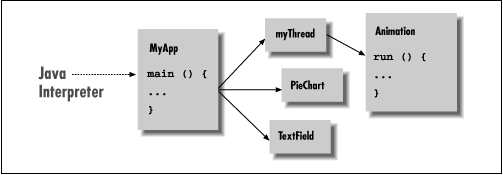
Once the class is loaded, java follows a
very C-like convention and looks to see if the class contains a method
called main(). If it finds an appropriate
main() method, the interpreter starts the
application by executing that method. From there, the application can
start additional threads, reference other classes, and create its user
interface or other structures, as shown in Figure 3.1.
In order to run, main() must have the
right method signature. A method signature is a
collection of information about the method, as in a C prototype or a
forward function declaration in other languages. It includes the
method's name, type, and visibility, as well as its arguments
and return type. In this case, main() must be a
public, static method that takes
an array of String objects as its argument and does
not return any value (void):
public static void main ( String [] myArgs )
Because main() is a
public and static
method, it can be accessed directly from another class using the name
of the class that contains it. We'll discuss the implications of
visibility modifiers such as public and the
meaning of static in Chapters 4 through 6.
The main() method's single argument,
the array of String objects, holds the command-line
arguments passed to java. As in C, the name that
we give the parameter doesn't matter; only the type is
important. Unlike C, the content of myArgs is a
true array. There's no need for an argument count parameter, because
myArgs knows how many arguments it contains and can
happily provide that information:
int argc = myArgs.length;
Java also differs from C in another respect here:
myArgs[0]is the first command-line argument, not
the name of the application. If you're accustomed to parsing C
command-line arguments, you'll need to be careful not to trip
over this difference.
The Java virtual machine continues to run until the
main()method of its initial class file has returned,
and until any threads that it started are complete. Special threads
designated as "daemon" threads are silently killed when
the rest of the application has completed.
|  | |
| 2.4 Hello Web! IV: Netscape's Revenge |  | 3.2 The Class Path |
