 | Chapter 13 The Abstract Window Toolkit |  |

| Chapter 13 The Abstract Window Toolkit | |
We've spent a lot of time discussing the different kinds of objects in AWT--components, containers, and a few special containers like applets. But we've neglected communications between different objects. A few times, we've mentioned events, and we have even used them in the occasional program, but we have deferred a discussion of events until later. Now is the time to pay that debt.
AWT objects communicate by sending events. The way we talk about "firing" events and "handling" them makes it sound as if they are part of some special Java language feature. But they aren't. An event is simply an ordinary Java object that is delivered to its receiver by invoking an ordinary Java method. Everything else, however interesting, is purely convention. The entire Java event mechanism is really just a set of conventions for the kinds of descriptive objects that should be delivered; these conventions prescribe when, how, and to whom events should be delivered.
Events are sent from a single source object to one or more listeners (or receivers). A listener implements specific event-handling methods that enable it to receive a type of event. It then registers itself with a source of that kind of event. Sometimes an adapter object may be interposed between the event source and the listener, but a connection is always established before any events are delivered.
An event object is a subclass of
java.util.EventObject that holds
information about something that's happened to its source. The
EventObject class serves mainly to
identify event objects;
the only information it contains is a reference to the event source
(the object that sent the event).
Components do not normally send or receive
EventObjects as such; they
work with subclasses that provide more specific information.
AWTEvent is a subclass of
EventObject that is used within AWT;
further subclasses of AWTEvent provide
information about specific event types.
For example, events of type ActionEvent
are fired by buttons
when they are pushed. ActionEvents are
also sent when a menu item is selected
or when a user presses Enter in a TextField.
Similarly, MouseEvents are generated when
you operate your mouse within a component's area.
You can gather the general meaning of these two events from their names;
they are relatively self-descriptive.
ActionEvents correspond to a decisive
"action" that a user has taken with the component--like pressing a
button or pressing Enter. An ActionEvent thus carries the
name of an action to be performed (the action command) by the program. MouseEvents describe the state of the
mouse, and therefore carry information like the x and y coordinates
and the state of your mouse
buttons at the time the MouseEvent was created.
You might hear someone say that
ActionEvent is at a "higher semantic level"
than MouseEvent, which means that
ActionEvent is an interpretation of
something that happened and is, therefore,
conceptually more powerful
than the MouseEvent, which carries raw
data. An ActionEvent lets us know that a component
has done its job, while a MouseEvent
simply confers a lot of information about the mouse at a given time.
You could figure out that somebody clicked on a
Button by examining mouse events, but it
is simpler to work with action events.
The precise meaning of an event, however, can depend on the context in
which it is received.
An event is delivered by passing it as an argument to an event-handler
method in the receiving object.
ActionEvents, for example,
are always delivered to a method called
actionPerformed() in the receiver:
// Receiver
public void actionPerformed( ActionEvent e ) {
	...
}
For each type of event, there is a corresponding
listener interface that describes the methods it must provide to receive
those events.
In this case, any object that receives
ActionEvents
must implement the ActionListener interface:
public interface ActionListener extends java.util.EventListener {
	public void actionPerformed( ActionEvent e );
}
// Receiver implements ActionListener
All listener interfaces are subinterfaces of
java.util.EventListener,
but EventListener is simply an empty
interface. It exists only to help the compiler
identify listener interfaces.
Listener interfaces are required for a number of reasons. First, they
help to identify objects that are capable of receiving a given
type of event. This way we can
give the event-handler methods friendly,
descriptive names and still make it easy for documentation, tools, and
humans to recognize them in a class. Next, listener interfaces are
useful because several methods can be specified for an event receiver.
For example, the FocusListener interface
contains two methods:
abstract void focusGained( FocusEvent e );
abstract void focusLost( FocusEvent e );
Athough these methods both take a
FocusEvent as an argument, they correspond
to different meanings as to why the
event was fired; in this case, whether the
FocusEvent means that focus was
received or lost. You could figure out what happened by inspecting the
event; all AWTEvents contain a constant
specifying the event's subtype. By requiring two methods, the
FocusListener
interface saves you the effort: if
focusGained() is called, you know the
event type was FOCUS_GAINED. Similarly,
the MouseListener interface defines five
methods for receiving mouse events (and
MouseMotionListener defines two more),
each of which gives you some additional information about why the
event occurred. In general, the listener interfaces group sets of
related event-handler methods; the method called in any given
situation provides a context for the information in the event object.
There can be more than one listener interface for dealing with a
particular kind of event. For example, the
MouseListener interface describes methods
for receiving MouseEvents when the mouse
enters or exits an area, or a mouse button is
pressed or released.
MouseMotionListener is an entirely separate
interface that describes methods to get mouse events when the mouse is
moved (no buttons pressed) or dragged (buttons pressed). By separating
mouse events into these two categories, Java lets you
be a little more selective about the circumstances under which you want to
receive MouseEvents. You can register as a
listener for mouse events without receiving mouse motion events; since
mouse motion events are extremely common, you don't want to handle
them if you don't need to.
Finally, two simple patterns govern the naming of AWT event listener interfaces and handler methods:
Event-handler methods are public methods that return type
void and take a single event object (a
subclass of java.util.EventObject as an argument).[1]
[1] This rule is not complete. JavaBeans allows event-handler methods to take additional arguments when absolutely necessary and also to throw checked exceptions.
Listener interfaces are subclasses of
java.util.EventListener
that are named with the suffix "Listener"--for example, FooListener.
These may seem pretty obvious, but they are important because they are our first hint of a design pattern governing how to build components that work with events.
The previous section described the machinery that an event receiver uses to accept events. In this section we'll describe how the receiver tells an event source to start sending it events as they occur.
To receive events, an eligible listener must register itself with an
event source. It does this by
calling an "add listener" method in the event source and passing a
reference (a callback) to itself.
For example, the AWT Button class is a
source of ActionEvents. In order to
receive these events, our code
might do something like the following:
// source of ActionEvents
Button theButton = new Button("Belly");

// receiver of ActionEvents
class TheReceiver implements ActionListener {
   setupReceiver() {
      ...
      theButton.addActionListener( this );
   }
   public void actionPerformed( ActionEvent e ) {
      // Belly Button pushed...
   }
The receiver makes a call to
addActionListener() to complete its
setup and become eligible to receive
ActionEvents from the button when they
occur.
It passes the reference this, to add
itself as the ActionListener.
To manage its listeners, an ActionEvent
source (like the Button) always implements
two methods:
// ActionEvent source
public void addActionListener(ActionListener listener) {
   ...
}
public void removeActionListener(ActionListener listener) {
   ...
}
The removeActionListener() method
complements addActionListener() and
does what you'd expect: it removes the listener from the list so that it will
not receive future events from that source.
Now, you may be expecting an
EventSource interface listing these two methods, but there isn't
one. There are no event source
interfaces in the current conventions.
If you are analyzing a class and trying to determine what events it
generates, you have to look for the add and remove methods.
For example, the presence of the
addActionListener() and
removeActionListener() methods define the
object as a source of ActionEvents.
If you happen to be a human being, you can simply look at the
documentation; but if the documentation isn't available, or if you're
writing a program that needs to analyze a class (a process called
"reflection"), you can look for this design pattern:
A source of events for the FooListener interface must implement
a pair of add/remove methods:
addFooListener(FooListener listener)
removeFooListener(FooListener listener)
If an event source can support only one event listener
(unicast delivery), the add listener method can throw the checked exception
java.util.TooManyListenersException.
So what do all the naming patterns up to this point accomplish? Well, for one thing they make it possible for automated tools and integrated development environments to divine what are sources and what are sinks of particular events. Tools that work with Java Beans will use the Java reflection and introspection APIs to search for these kinds of design patterns and identify the events that can be fired and received by a component.
It also means that event hookups are strongly typed, just like the
rest of Java. So it's not easy to accidentally hook up the wrong kind of
components; for example, you can't register to receive
ItemEvents from a
Button, because a button doesn't have an
addItemListener() method. Java knows at
compile-time what types of events can be delivered to whom.
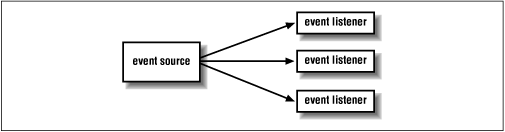
AWT events are multicast; every event is associated with a single source but can be delivered to any number of receivers. Events are registered and distributed using an observer/observable model. When an event listener registers itself with an event source, the event source adds the listener to a list. When an event is fired, it is delivered individually to each listener on the list (Figure 13.9).
There are no guarantees about the order in which events will be delivered. Neither are there any guarantees about what happens if you register yourself more than once with an event source; you may or may not get the event more than once. Similarly, you should assume that every listener receives the same event data. Events are immutable; they can't be changed by their listeners. There's one important exception to this rule, which we'll discuss later.
To be complete we could say that event delivery is synchronous with respect to the event source, but that follows from the fact that the event delivery is really just the invocation of a normal Java method. The source of the event calls the handler method of each listener. However, listeners shouldn't assume that all of the events will be sent in the same thread. An event source could decide to send out events to all of the listeners in parallel.
How exactly an event source maintains its set of listeners, constructs,
and fires the events is up to it. Often it is sufficient to use a
Vector
to hold the list. We'll show the code for a component that uses a
custom event in Chapter 14.
For efficiency, AWT components all use the
java.awt.AWTEventMulticaster object, which
maintains a linked tree of the
listeners for the component. You can use that too, if you are firing
standard AWT events. We'll describe the event multicaster in Chapter 14
as well.
All of the events used by AWT GUI components are subclasses of
java.awt.AWTEvent.
AWTEvent holds some
common information that is used by AWT
to identify and process events. You can use or subclass any of the
AWTEvent
types for use in your own components. Figure 13.11 shows the event hierarchy.

ComponentEvent is the base class for
events that can be fired by any AWT
component. This includes events that provide notification when a component
changes its dimensions or visibility, as well as the other event types for
mouse operation and key presses.
ContainerEvents are fired by AWT
containers when components are added or removed.
MouseEvents, which track the state of the
mouse, and KeyEvents,
which are fired when the user uses the keyboard, are types of
java.awt.event.InputEvent. Input events from
the mouse and keyboard are
a little bit special. They are normally produced by the native Java machinery
associated with the peers. When the user touches a key or moves the mouse
within a component's area, the events are generated with that component as
the source.
Input events and some other AWT events are placed on a special event queue that is managed by the AWT toolkit. This gives the toolkit control over how the events are delivered. First, under some circumstances, the toolkit can decide to compress a sequence of the same type of event into a single event. This is done to make some event types more efficient--in particular, mouse events and some special internal events used to control repainting. Perhaps more important to us, input events are delivered with a special arrangement that lets listeners decide if the component itself should act on the event.
Normally, the native peer of a standard AWT component operates by
receiving InputEvents telling it about the
mouse and keyboard.
When you push a Button, the native
ButtonPeer object receives a
MouseEvent
and does its job in native land to accomplish the button-pressing behavior.
But for InputEvents, the Toolkit first
delivers the event to any listeners
registered with the component and gives those listeners a chance to
mark the event as "consumed," effectively telling the peer to ignore it.
An InputEvent is marked "consumed" by
calling the consume() method. (Yes,
this is a case where an event is not immutable.)
So we could stop our Button from working
by registering a listener with it
that catches "mouse button depressed" events. When it got one, we could
call its consume() method to tell the
ButtonPeer to ignore that event.
This is particularly useful if you happen to be building a development
environment in Java, and you want to "turn off" components while the user
arranges them.
In a trusted application you can, if necessary, get access to the AWT
event queue. The toolkit uses an instance of
java.awt.EventQueue.
With it you can peek at pending AWT events or even push in new ones.
InputEvents come with a set of flags for
special modifiers. These let you
detect if the Shift or Alt key was held down during a mouse
button or key press, or if the second or third mouse buttons were
pressed. The following are the flag values contained in
java.awt.event.InputEvent:
SHIFT_MASK
CTRL_MASK
META_MASK
ALT_MASK
BUTTON1_MASK
BUTTON2_MASK
BUTTON3_MASK
To check for these masks, you can simply do a boolean AND of the modifiers,
returned by the InputEvent's
getModifiers() method and the flag or
flags you're interested in:
public void mousePressed (MouseEvent e) {
    int mods = e.getModifiers();
    if ((mods & InputEvent.SHIFT_MASK) != 0)

      { // Shifted Mouse Button press }
}
The three BUTTON flags can be
used to detect which mouse button was pressed on a
two- or three-button mouse. If you use these, you run the
risk that your program won't work on platforms without multibutton
mice. Currently, BUTTON2_MASK is equivalent to ALT_MASK, and
BUTTON3_MASK is equivalent to META_MASK. This means that pushing the
second mouse button is equivalent to pressing the first (or only)
button with the Alt key depressed, and the third button is equivalent
to the first with the Meta key depressed. However, if you really want
to guarantee portability, you should limit yourself to a single
button, possibly in combination with keyboard modifiers, rather than
relying on the button masks.
Key events provide one other situation in which events aren't
immutable. You can change the character that the user typed by calling
setKeyChar(),
setKeyCode(), or
setKeyModifiers(). A user's keystroke
isn't displayed until the KeyEvent is
delivered to the peer. Therefore, by changing the character in the
KeyEvent, you can change the character
displayed on the screen. This is a good way to implement a field that
displays only uppercase characters, regardless of what the user types.
|  | |
| 13.4 Applets |  | 13.6 AWT Event Summary |
