 | Chapter 13 The Abstract Window Toolkit |  |

| Chapter 13 The Abstract Window Toolkit | |
Java's developers initially decided to implement the standard AWT components with a "mostly native" toolkit. As we described earlier, that means that most of the important functionality of these classes is delegated to peer objects, which live in the native operating system. Using native peers allows Java to take on the look and feel of the local operating environment. Macintosh users see Mac applications, PC users see Windows' windows, and UNIX users can have their Motif motif; warm fuzzy feelings abound. Java's chameleon-like ability to blend into the native environment is considered by many to be an integral part of platform independence. However, there are a few important downsides to this arrangement.
First, as we mentioned earlier, using native peer implementations
makes it much more difficult (if not impossible) to subclass these
components to specialize or modify
their behavior. Most of their behavior comes from the native peer, and
therefore can't be overridden or extended easily. As it turns out,
this is not a terrible problem because of
the ease with which we can make our own components in Java. It is also
true that a sophisticated new component, like an HTML viewer,
would benefit little in deriving from a more primitive text-viewing
component like TextArea.
Next, porting the native code makes it much more difficult to bring Java to a new platform. For the user, this can only mean one thing--bugs. Quite simply, while the Java language itself has been stable, the cross platform behavior of the AWT has been an Achilles' heel. Although the situation is steadily improving, the lack of large, commercial quality Java applications until relatively recently testifies to the difficulties involved. At this time, new development has been saturated with Java for well over a year (a decade in Net time), and very few real applications are with us.
Finally, we come to a somewhat counterintuitive problem with the use of native peers. In most current implementations of Java, the native peers are quite "heavy" and consume a lot of resources. You might expect that relying on native code would be much more efficient than creating the components in Java. However, it can take a long time to instantiate a large number of GUI elements when each requires the creation of a native peer from the toolkit. And in some cases you may find that once the native peers are created, they don't perform as well as the pure Java equivalents that you can create yourself.
An extreme example would be a spreadsheet that uses an AWT
TextField for
each cell. Creating hundreds of
TextFieldPeer objects would be
something between slow and impossible. While simply saying "don't do
that" might be a
valid answer, this begs the question: how do you create large
applications with complex GUIs? Java would not be a very interesting
environment if it was limited only to simple tasks. One solution,
taken by development
environments like Sun's JavaWorkshop, is to use wrapper classes for
the standard
AWT components; the wrapper controls when peer objects are created.
Another attack on the problem has been to create lightweight
components that are written entirely in Java, and therefore don't
require native code.
A lightweight component is simply a component that is implemented
entirely in Java. You implement all of its appearance by drawing in
the paint() and
update() methods; you implement its
behavior by catching user events (usually at a low level) and possibly
generating new events. Lightweight components can be used to create
new kinds of gadgets, in the same way you might use a
Canvas or a
Panel. But they avoid some of the
performance penalties inherent in the use of peers, and, perhaps more
importantly, they provide more flexibility in their appearance.
A lightweight component can have a transparent background, allowing its
container to "show through" its own area. It is also more reasonable
to have another component or container overlap or draw into a lightweight
component's area.
You create a lightweight component by subclassing the
Component and
Container classes directly.
That is, instead of writing:
class myCanvas extends Canvas { ... }you write:
class myCanvas extends Container { ... } // lightweightThat's often all you need do to create a lightweight component.
When the lightweight component is put into a container, it doesn't get a
native peer. Instead, it gets a
LightweightPeer that serves as
a placeholder and identifies the component as lightweight
and in need of special help.
The container then takes over the responsibilities that
would otherwise be handled by a native peer:
namely, low-level delivery of events and paint requests.
The container receives mouse movement events, key strokes, paint
requests, etc., for the lightweight component. It then sorts out
the events that fall within the component's bounds and
dispatches them to it. Similarly, it translates paint requests that overlap
the lightweight component's area and forwards them to it.
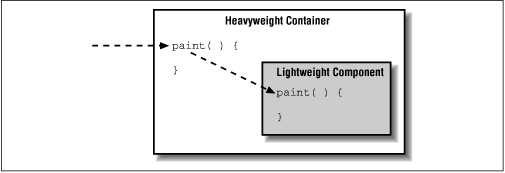
Figure 13.7 shows a component receiving a
paint() request via its container.
This makes it easy to see how a lightweight component can have a transparent
background. The component is actually drawing directly onto its
container's graphics context. Conversely, anything that the container
drew on its background is visible in the lightweight component. For an
ordinary
container, this will simply be the container's background color. But you
can do much cooler things too. (See the PictureButton example at the end
of Chapter 14.) All of the normal rules still apply; your
lightweight component's
paint() method should render the
component's entire image (assume that the container
has obliterated it), but your update()
method can assume that whatever drawing it has done previously is
still intact.
Just as you can create a lightweight component by subclassing
Component, you can create a lightweight
container by subclassing Container. A
lightweight container can hold any components, including other
lightweight components and containers. When lightweight containers contain other lightweight components, event handling
and paint requests are managed by the first "regular" container in the
container hierarchy. (There has to be one somewhere, if you think
about it.) This brings us to the cardinal rule of subclassing containers,
which is: "Always call super.paint() if you override
a container's paint() method." If you don't, the container won't
be able to manage lightweight components properly.
To summarize, lightweight components are very flexible, pure Java components that are managed by their container and have a transparent background by default. Lightweight components do not rely on native peers from the AWT toolkit to provide their implementations, and so they cannot readily take on the look and feel of the local platform. In a sense, a lightweight component is just a convenient way to package an extension to a container's painting and event handling methods. But, again, all of this happens automatically, behind the scenes; you can create and use lightweight components as you would any other kind of component.
|  | |
| 13.2 Containers |  | 13.4 Applets |
