 | Chapter 2 |  |

| Chapter 2 | |
Contents:
Hello Web!
Hello Web! II: The Sequel
Hello Web! III: The Button Strikes!
Hello Web! IV: Netscape's Revenge
Before we turn our attention to the details of the language, let's take a crash course and jump right into some Java code. In this chapter, we'll build a contrived but friendly little applet that illustrates a number of techniques we use throughout the book. We'll take this opportunity to introduce general features of the Java language and of Java applets. However, many details won't be fleshed out here, but in subsequent chapters.
This chapter also serves as a brief introduction to the object-oriented and multithreaded features of Java. If these concepts are new to you, you can take comfort in the knowledge that encountering them for the first time in Java should be a straightforward and pleasant experience. If you have worked with another object-oriented or multithreaded programming environment, clear your mind; you will especially appreciate Java's simplicity and elegance.
We can't stress enough the importance of experimentation as you learn new concepts. If you follow along with the online examples, be sure to take some time and compile them locally. Play with them; change their behavior, break them, fix them, and, as Java architect Arthur van Hoff would say: "Have fun!"
In the tradition of all good introductory programming texts, we begin with Java's equivalent of the archetypal "Hello World" application. In the spirit of our new world, we'll call it "Hello Web!"
We'll take four passes at this example, adding features and introducing new concepts along the way. Here's a minimalist version:
public class HelloWeb extends java.applet.Applet {
    public void paint( java.awt.Graphics gc ) {
        gc.drawString("Hello Web!", 125, 95 );
    }
}
Place this text in a file called HelloWeb.java. Now compile this source:
% javac HelloWeb.java
This produces the Java byte-code binary class file HelloWeb.class.
We need an HTML document that contains the
appropriate <APPLET> tag to display our example.
Place the following text in a file called
HelloWeb.html in the same directory as the binary
class file:
<html>
<head>
</head>
<body>
    <applet code=HelloWeb width=300 height=200></applet>
</body>
</html>
Finally, you can point your Java-enabled Web browser at this document with a URL such as:
http://yourServer/wherever/HelloWeb.html
or
file:/wherever/HelloWeb.html
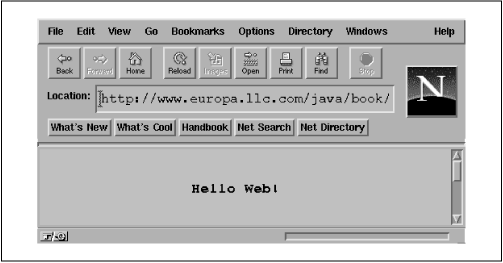
You should see the proclamation shown in Figure 2.1. Now congratulate yourself: you have written your first applet! Take a moment to bask in the glow of your monitor.
HelloWeb may be a small program, but there is
actually quite a bit going on behind the scenes. Those five lines
represent the tip of an iceberg. What lies under the surface are
layers of functionality provided by the Java language and its
foundation class libraries. In this chapter, we'll cover a lot
of ground quickly in an effort to show you the big picture.
We'll try to offer enough detail for a complete understanding of
what is happening in each example without exhaustive
explanations until the appropriate chapters. This holds for both
elements of the Java language and the object-oriented concepts that
apply to them. Later chapters will provide more detailed cataloging
of Java's syntax, components, and object-oriented features.
The previous example defines a class named
HelloWeb. Classes are the fundamental building
blocks of most object-oriented languages. A class in Java is akin to
the C++ concept of a class. Specifically, it's a group of data items
(à la a C struct), with associated functions that perform
operations on this data. The data items in a class are called
fields or variables;
the functions are called methods. A class might
represent something concrete, like a button on a screen or the
information in a spreadsheet, or it could be something more abstract,
such as a sorting algorithm or possibly the sense of ennui in your
MUD character. A hypothetical spreadsheet class
might, for example, have variables that represent the values of its
individual cells and methods that perform operations on those cells,
such as "clear a row" or "compute values."
Our HelloWeb class is the container for our Java
applet. It holds two general types of variables and methods: those we
need for our specific applet's tasks and some special
predesignated ones we provide to interact with the outside world. The
Java run-time environment, in this case a Java-enabled Web browser,
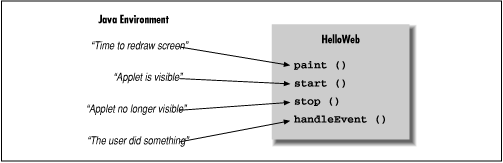
periodically calls methods in HelloWeb to pass us
information and prod us to perform actions, as depicted in Figure 2.2. Our simple HelloWeb
class defines a single method called paint(). The
paint() method is called by Java when it's time
for our application to draw itself on the screen.
You will see that the HelloWeb class derives some
of its structure from another class called Applet.
This is why we refer to HelloWeb as an applet.
A class is a blueprint for a part of an application; it lists methods and variables that go into making up that part. Many individual working copies of a given class can exist while an application is active. These individual incarnations are called instances of the class. Two instances of a given class may contain different data, but they always have the same methods.
As an example, consider a Button class. There is
only one Button class, but many actual working
instances of buttons can be in an application. Furthermore, two
Button instances might contain different data,
perhaps giving each a different appearance or specifying a different
message for each to send when pushed. In this sense, a class can
be considered a mold for making the object it represents:
something like a cookie cutter stamping out working instances of
itself in the memory of the computer. As you'll see later,
there's a bit more to it than that--a class can in fact
share information among its instances--but this
explanation suffices for now.
The term object is very general and in some other
contexts is used almost interchangeably with class. Objects are the
abstract entities all object-oriented languages refer to in one
form or another. We will use object as a generic term for an instance
of a class. We might, therefore, refer to an instance of the
Button class as a Button, a
Button object, or, indiscriminately, as an object.
A Java-enabled Web browser creates an instance of our
HelloWeb class when we first use our applet. If we
had included the HelloWeb applet tag in our
HTML document twice (causing it to appear twice on
the screen), the browser would create and manage two separate
HelloWeb objects (two separate instances of the
HelloWeb class).
In Java, every class defines a new type. A
variable can be of this type and then hold
instances of that class. A variable could, for example, be of type
Button and hold an instance of the
Button class, or of type
SpreadSheetCell and hold a
SpreadSheetCell object, just as it could be any of the more familiar types such as int or
float. In this way, by having variables containing
complex objects, a class may use other classes as tools within itself.
Using classes in this way is called composition.
Our examples in
this chapter are somewhat unrealistic in that we are building only a
single class of our own. However, we will be using many classes as
tools within our applet.
You have seen only one variable so far in our simple
HelloWeb example. It's found in the declaration
of our lonely paint() method:
public void paint( java.awt.Graphics gc ) {...}
Just like functions in C (and many other languages), a method in Java
declares a list of variables that hold its arguments, and it
specifies the types of those arguments. Our
paint() method takes one argument named (somewhat
tersely) gc, which is of type
Graphics. When the
paint() method is invoked, a
Graphics object is assigned to
gc, which we use in the body of the method. We'll
say more about paint() and the
Graphics class in a moment.
But first, a few words about variables. We have loosely referred to variables as holding objects. In reality, variables that have complex types (class types) don't so much contain objects as point to them. Class-type variables are references to objects. A reference is a pointer to, or another name for, an object.
Simply declaring a variable doesn't imply that any storage is
allocated for that variable or that an instance of its type even
exists anywhere. When a reference-type variable is first declared, if
it's not assigned to an instance of a class, it doesn't point to
anything. It's assigned the default value of
null, meaning
"no value." If you try to use a variable with a
null value as if it were pointing to a real object,
a run-time error (NullPointerException) occurs.
This discussion begs the question as to where to get an instance of a
class to assign to a variable in the first place. The answer, as you
will see later, is through the use of the new
operator.
In our first two passes at this example, we are dealing
only with objects handed to us prefabricated from somewhere
outside of our class. We examine object creation later in the
chapter.
Java classes are arranged in a parent-child hierarchy, in which the parent and child are known as the superclass and subclass, respectively. In Java, every class has exactly one superclass (a single parent), but possibly many subclasses. Of course, a class's superclass probably has its own superclass.
The declaration of our class in the previous example uses the keyword
extends to specify that HelloWeb
is a subclass of the Applet class:
public class HelloWeb extends java.applet.Applet {...}A subclass may be allowed to inherit some or all of the variables and methods of its superclass. Through inheritance, the subclass can use those members as if it has declared them itself. A subclass can add variables and methods of its own, and it can also override the meaning of inherited variables and methods. When we use a subclass, overridden variables and methods are hidden (replaced) by the subclass's own versions of them. In this way, inheritance provides a powerful mechanism whereby a subclass can refine or extend its superclass.
For example, the hypothetical spreadsheet class might be subclassed to produce a new scientific spreadsheet class with extra mathematical functions and special built-in constants. In this case, the source code for the scientific spreadsheet might declare methods for the added mathematical functions and variables for the special constants, but the new class automatically has all the variables and methods that constitute the normal functionality of a spreadsheet; they are inherited from the parent spreadsheet class. This means the scientific spreadsheet maintains its identity as a spreadsheet, and we can use it anywhere the simpler spreadsheet is used.
Our HelloWeb class is a subclass of the
Applet class and inherits many variables and
methods not explicitly declared in our source code.
These members function in the same way as the ones we add
or override.
The Applet class provides the framework for
building applets. It contains methods that support the basic
functionality for a Java application that is displayed and
controlled by a Java-enabled Web browser or other Java-enabled
software.
We override methods in the Applet class in a
subclass to implement the behavior of our particular applet. This may
sound restrictive, as if we are limited to some predefined set of
routines, but that is not the case at all. Keep in mind that the
methods we are talking about are means of getting information from the
outside world. A realistic application might involve hundreds or even
thousands of classes, with legions of methods and variables and
multiple threads of execution. The vast majority of these are related
to the particulars of our job. The inherited methods of the
Applet class, and of other special components,
serve as a framework on which to hang code that handles
certain types of events and performs special tasks.
The paint() method is an important method of the
Applet class; we override it to implement the way
our particular applet displays itself on the screen. We
don't override any of the other inherited members of
Applet because they provide basic functionality and
reasonable defaults for this (trivial) example. As
HelloWeb grows, we'll delve deeper into the
inherited members and override additional methods. Inherited members
will allow us to get information from the user and give us more
control over what our applet does. We will also add some
arbitrary, application-specific methods and variables for the needs
of HelloWeb.
If you want to verify for yourself what functionality the
Applet class is providing our example, you can try
out the world's least interesting applet: the
Applet base class itself. Just use the class name
java.applet.Applet in your HTML
code, instead of HelloWeb:
<applet code=java.applet.Applet width=300 height=200></applet>
You should get a blank area of screen. We told you it's not very interesting.
We can correctly refer to HelloWeb as an
Applet because subclassing can be thought of as
creating an "is a" relationship, in which the subclass is
a kind of its superclass. HelloWeb is therefore a
kind of Applet. When we refer to a kind of object,
we mean any instance of that object's class or any of its
subclasses.
Later, we will look more closely at the Java class hierarchy and see
that Applet is itself a subclass of the
Panel class, which is further derived from a class
called Container, and so on, as shown in Figure 2.3.
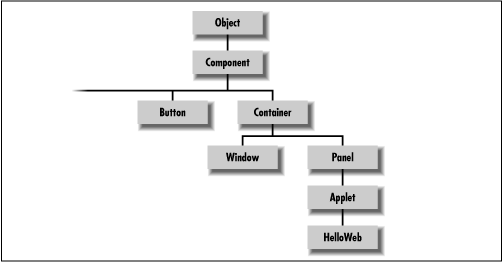
In this sense, an Applet is a kind of
Panel, which is, itself, a kind of
Container and each of these can ultimately be
considered to be a kind of Component. You'll
see later that it's from these classes that Applet
inherits its basic graphical user interface functionality and the
ability to have other graphical components embedded within it.
Component is a subclass of
Object, so all of these classes are a kind of
Object. As you'll see later, the
Object class is at the top of the Java class
hierarchy; Object doesn't have a superclass.
Every other class in the Java API inherits behavior from
Object, which defines a few basic methods, as
you'll see in Chapter 7. The terminology here
can become a bit muddled. We'll continue to use the word object
(lowercase o) in a generic way to refer to an instance of any class;
We'll use Object to refer specifically to that
class.
In our previous example, the Applet class
is referenced by its fully qualified name
java.applet.Applet:
public class HelloWeb extends java.applet.Applet {...} The prefix on the class name identifies it as belonging to the
java.applet package. Packages provide a means for
organizing Java classes. A package is a group of
Java classes that are related by purpose or by application. Classes
in the same package have special access privileges with respect to
one another and may be designed to work together. Package names are
hierarchical and are used somewhat like Internet domain
and host names, to distinguish groups of classes by organization and
application. Classes may be dynamically loaded over networks from
arbitrary locations; within this context, packages provide a crude
namespace of Java classes.[1]
[1] There are many efforts under way to find a general solution to the problem of locating resources in a globally distributed computing environment. The Uniform Resource Identifier Working Group of the IETF has proposed Uniform Resource Names (URNs). A URN would be a more abstract and persistent identifier that would be resolved to a URL through the use of a name service. We can imagine a day when there will exist a global namespace of trillions of persistent objects forming the infrastructure for all computing resources. Java provides an important evolutionary step in this direction.
java.applet identifies a particular package that
contains classes related to
applets. java.applet.Applet identifies a specific
class, the Applet class, within that package. The
java. hierarchy is special. Any package that
begins with java. is part of the core Java API and
is available on any platform that supports Java.
Figure 2.4
illustrates some of the core Java packages, showing a representative class or
two from each.
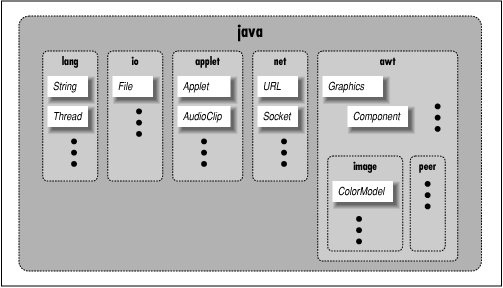
Some notable core packages include: java.lang,
which contains fundamental classes needed by the Java language itself;
java.awt, which contains classes of the Java
Abstract Window Toolkit; and java.net, which
contains the networking classes.
A few classes contain methods that are not written in Java, but are
instead part of the native Java implementation on
a particular platform. Approximately 22 such classes are in the
java package hierarchy; these are the only
classes that have to be ported to a new platform. They form the
basis for all interaction with the operating system. All other
classes are built on or around these and are completely platform
independent.
The source for our HelloWeb class defines just one
method, paint(), which overrides the
paint() method from the Applet
class:
public void paint( java.awt.Graphics gc ) {
    gc.drawString("Hello Web!", 125, 95 );
}
The paint() method is called by Java when it's
time for our applet to draw itself on the screen. It takes a single
argument, a Graphics object, and doesn't return
any type of value (void) to its caller.
Modifiers are keywords placed before classes,
variables, and methods to alter their accessibility, behavior, or
semantics. paint() is declared as
public, which means it can be invoked (called)
by methods in classes other than HelloWeb. In this
case, it's the Java windowing environment that is calling our
paint() method. A method or variable declared as
private is inaccessible from outside of its class.
The Graphics object, an instance of the
Graphics class, represents a particular graphical
drawing area and is also called a graphics context. It contains
methods the applet calls to draw in this area, and variables that
represent characteristics such as clipping or drawing modes. The
particular Graphics object we are passed in the
paint() method corresponds to our applet's
area of the screen.
The Graphics class provides methods for rendering
primitive shapes, images, and text. In HelloWeb, we
invoke the drawString() method of our
Graphics object to scrawl our message at the
specified coordinates. (For a description of the methods available in
the Graphics class, see Chapter 16.)
As in C++, a method or variable of an object is accessed in a
hierarchical way by appending its name with a "." (dot) to
the object that holds it. We invoked the
drawString() method of the
Graphics object (referenced by our
gc variable) in this way:
gc.drawString( "Hello Web!", 125, 95 );
You may need to get used to the idea that our application is drawn by a method that is called by an outside agent at arbitrary times. How can we do anything useful with this? How do we control what gets done and when? These answers will be forthcoming. For now, just think about how you would structure applications that draw themselves on command.
|  | |
| 1.10 Availability |  | 2.2 Hello Web! II: The Sequel |
