 | Chapter 7 |  |

| Chapter 7 | |
Contents:
The Object Class
The Class Class
Reflection
In the previous two chapters, we came to know Java objects and then their
interrelationships. We have now climbed the scaffolding of the Java class
hierarchy and reached the top. In this chapter we'll talk about the
Object class itself, which is the "grandmother"
of all classes in Java. We'll also describe the even more fundamental
Class class (the class named "Class")
that represents Java classes in the Java virtual machine.
We'll discuss what you can do with these objects in their own right.
Finally, this will lead us to a more general topic: the reflection interface,
which lets a Java program inspect and interact with objects on the fly.
java.lang.Object is the ancestor of all objects;
it's the primordial class from which all other classes are ultimately
derived. Methods defined in Object are therefore
very important because they appear in every instance of any class,
throughout all of Java. At last count, there were nine
public methods in
Object. Five
of these are versions of wait() and
notify() that are used to synchronize threads on
object instances, as we'll discuss in Chapter 8. The remaining four methods
are used for basic comparison, conversion, and administration.
Every object has a toString() method that is
called when it's to be represented as a text
value. PrintStream objects use
toString() to print data, as discussed in
Chapter 10. toString() is also used
when an object is referenced in a string concatenation. Here are some
examples:
MyObj myObject = new MyObj();
Answer theAnswer = new Answer();

System.out.println( myObject );
String s = "The answer is: " + theAnswer ;
To be friendly, a new kind of object should override
toString() and implement its own version that
provides appropriate printing functionality. Two other methods,
equals() and hashCode(), may
also require specialization when you create a new class.
equals() determines whether two objects are
equivalent. Precisely what that means for a particular class is
something that you'll have to decide for yourself. Two
String objects, for example, are considered
equivalent if they hold precisely the same characters in the same
sequence:
String userName = "Joe";
...
if ( userName.equals( suspectName ) )
    arrest( userName );
Using equals() is not the
same as:
// if ( userName == suspectName ) // Wrong!
The above code tests to see if the two String
objects are the same object, which is sufficient but not necessary for
them to be equivalent objects.
A class should override the equals() method
if it needs to implement its own notion of equality. If you have no
need to compare objects of a particular class, you don't need to
override equals().
Watch out for accidentally overloading
equals() when you mean to override
it. equals() takes an Object as
an argument and returns a boolean value. While
you'll probably want to check only if an object is equivalent to
an object of its own type, in order to properly override
equals(), the method should accept a generic
Object as its argument. Here's an example of
implementing equals():
class Sneakers extends Shoes {
    public boolean equals( Object arg ) {
        if ( (arg != null) && (arg instanceof Sneakers) ) {
            // compare arg with this object to check equivalence
            // If comparison is okay...
            return true;
        }
        return false;
    }
    ...
}
A Sneakers object can now be properly compared by
any current or future Java classes. If we had instead used a
Sneakers type object as the argument to
equals(), all would be well for classes that
reference our objects as Sneakers, but methods that
simply use Shoes would not see the overloaded
method and would compare Sneakers against other
Sneakers improperly.
The hashCode() method returns an integer that is a
hashcode for the object. A hashcode is like a signature or checksum
for an object; it's a random-looking identifying number that is usually
generated from the contents of the object. The hashcode should
always be different for instances of the class that contain
different data, but should normally be the same for instances that
compare "equal" with the equals() method.
Hashcodes are used in the process of storing
objects in a Hashtable, or a similar kind of
collection. The hashcode helps the Hashtable optimize its storage of
objects by serving as an identifier for distributing them into storage
evenly, and locating them quickly later.
The default implementation of hashCode() in
Object assigns each object instance a unique
number. If you don't override this
method when you create a subclass, each instance of your class will
have a unique hashcode. This is sufficient for some objects. However,
if your classes have a notion of equivalent objects (if you have
overriden equals()) and you want equal objects to serve as equivalent
keys in a Hashtable, then you should override
hashCode() so that your equivalent objects generate
the same hashcode value.
Objects can use the clone() method of the Object class to make
copies of themselves. A copied object will be a new object instance,
separate from the original. It may or may not contain the same state as the
original--that is, under the control of the object type being copied.
Just as important, the decision as to whether the object allows itself to
be cloned at all is up to the object.
The Java Object class provides the mechanism to make a simple copy of an
object including all of its state--a bitwise copy. But by default this
capability is turned off. (We'll hit upon why in a moment.)
To make itself cloneable an object must implement the
java.lang.Cloneable interface. This is a flag indicating to Java that the
object wants to cooperate in being cloned. If the object isn't cloneable, the
clone() method throws a CloneNotSupportedException.
clone() is a protected method, so by default it can only be
called by an object on itself, an object in the same package, or another object
of the same type or a supertype. If we want to make an object cloneable by
everyone, we have to override its clone() method and make it public.
Here is a simple, cloneable class--Sheep:
import java.util.Hashtable;

public class Sheep implements Cloneable {
    Hashtable flock = new Hashtable();

    public Object clone() {
        try {
            return super.clone();
        } catch (CloneNotSupportedException e ) {
            throw new Error("This should never happen!");
        }
    }
}
Sheep has one instance variable, a Hashtable called flock (which the
sheep uses to keep track of its fellow sheep).
Our class implements the Cloneable interface, indicating that it
is okay to copy Sheep and it has overridden the clone() method to make it
public. Our clone() simply returns the object created by the superclass's
clone--a copy of our Sheep. Unfortunately, the compiler is not smart enough
to figure out that the object we're cloning will never throw the
CloneNotSupportedException, so we have to guard against it anyway. Our
sheep is now cloneable. We can make copies like so:
Sheep one = new Sheep();
Sheep anotherOne = (Sheep)one.clone();
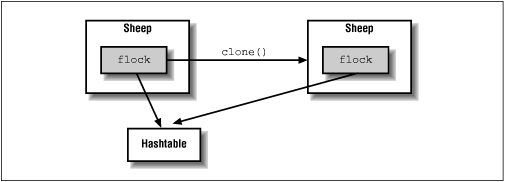
We now have two sheep instead of one. The equals() method would tell us that the sheep are equivalent, but == tells us that they aren't equal--that is, they are two distinct objects. Java has made a "shallow" copy of our Sheep. What's so shallow about it?
Java has simply copied the bits of our variables. That means that the
flock instance variable in each of our Sheep still holds the same information--that is, both sheep have a reference to the same Hashtable.
The situation looks like that shown in Figure 7.1.
This may or may not be what you intended. If we instead want our Sheep
to have separate copies of all of its variables (or something in between),
we can take control ourselves. In the following example, DeepSheep, we
implement a "deep" copy, duplicating our own flock variable:
public class DeepSheep implements Cloneable {
    Hashtable flock = new Hashtable();

    public Object clone() {
        try {
            DeepSheep copy = (DeepSheep)super.clone();
            copy.flock = (Hashtable)flock.clone();
            return copy;
        } catch (CloneNotSupportedException e ) {
            throw new Error("This should never happen!");
        }
    }
}
Our clone() method now clones the Hashtable as well.
Now, when a DeepSheep is cloned, the situation looks more like that shown in Figure 7.2.
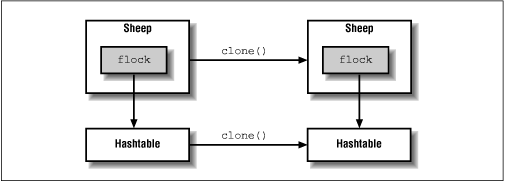
Each DeepSheep now has its own hashtable.
You can see now why objects are not cloneable by default. It would make
no sense to assume that all objects can be sensibly duplicated with
a shallow copy. Likewise, it makes no sense to assume that a deep copy is necessary, or even correct. In this case, we probably don't need a deep copy; the flock contains the same members no matter which sheep you're looking at, so there's no need to copy the Hashtable. But the decision depends on the object itself and its requirements.
|  | |
| 6.6 Inner Classes |  | 7.2 The Class Class |
