 | Chapter 2 A First Applet |  |

| Chapter 2 A First Applet | |
Let's make our applet a little more interactive, shall we? The
following improvement, HelloWeb2, allows us to drag
the message around with the mouse. HelloWeb2
is
also customizable. It takes the text of its message from a parameter
of the <APPLET> tag of the HTML document.
HelloWeb2 is a new applet--another subclass
of the Applet class. In that sense, it's a
sibling of HelloWeb. Having just seen inheritance
at work, you might wonder why we aren't creating a subclass of
HelloWeb and exploiting inheritance to build upon
our previous example and extend its functionality. Well, in this
case, that would not necessarily be an advantage, and for clarity we
simply start over.[2]
Here is HelloWeb2:
[2] You are left to consider whether such a subclassing would even make sense. Should
HelloWeb2really be a kind ofHelloWeb? Are we looking for refinement or just code reuse?
import java.applet.Applet;
import java.awt.*;
import java.awt.event.*;
public class HelloWeb2 extends Applet implements MouseMotionListener {
    int messageX = 125, messageY = 95;
    String theMessage;

    public void init() {
        theMessage = getParameter("message");
        addMouseMotionListener(this);
    }

    public void paint( Graphics graphics ) {
        graphics.drawString( theMessage, messageX, messageY );
    }
    public void mouseDragged( MouseEvent e ) {
        messageX = e.getX();
        messageY = e.getY();
        repaint();
    }
    public void mouseMoved( MouseEvent e ) { }
}
Place the text of this example in a file called
HelloWeb2.java and compile it as before. You
should get a new class file, HelloWeb2.class, as
a result. We need to create a new <APPLET> tag for
HelloWeb2. You can either create another
HTML document (copy
HelloWeb.html and modify it) or simply add a
second <APPLET> tag to the existing
HelloWeb.html file. The <APPLET>
tag for HelloWeb2 has to use a parameter; it should
look like this:
<applet code=HelloWeb2 width=300 height=200>
<param name="message" value="Hello Web!" >
</applet>
Feel free to substitute your own salacious comment for the value of
message.
Run this applet in your Java-enabled Web browser, and enjoy many hours of fun, dragging the text around with your mouse.
So, what have we added? First you may notice that a few lines are now hovering above our class:
import java.applet.Applet;
import java.awt.*;
import java.awt.event.*;
public class HelloWeb2 extends Applet implements MouseMotionListener {
...
The import statement lists external classes to use
in this file and tells the compiler where to look for them. In our
first HelloWeb example, we designated the Applet
class as the superclass of
HelloWeb. Applet was not defined
by us, and the compiler therefore had to look elsewhere for it. In
that case, we referred to Applet by its fully
qualified name, java.applet.Applet, which told the
compiler that Applet belongs to the
java.applet package so the compiler knew where to find it.
The import statement is really just a convenience; by
importing java.applet.Applet in our newer example,
we tell the compiler up front we are using this class and,
thereafter in this file, we can simply refer to it as
Applet. The second import statement makes use of
the wildcard "*" to tell the compiler to import all of
the classes in the java.awt package. But
don't worry, the compiled code doesn't contain any excess
baggage. Java doesn't do things like that. In fact, compiled
Java classes don't contain other classes at all; they simply
note their relationships. Our current example uses only the
java.awt.Graphics class. However, we are
anticipating using several more classes from this package in the
upcoming examples. We also import all the classes from the package
java.awt.event; these classes provide the
Event objects that we use to communicate
with the user. By listening for events, we find out when the user
moved the mouse, clicked a button, and so on. Notice that importing
java.awt.* doesn't automatically import
the event package. The star only imports the classes in a particular
package, not other packages.
The import statement may seem a bit like the C or C++
preprocessor #include statement, which injects
header files into programs at the appropriate places. This is not
true; there are no header files in Java. Unlike compiled C or C++
libraries, Java binary class files contain all necessary type
information about the classes, methods, and variables they
contain, obviating the need for prototyping.
We have added some variables to our example:
public class HelloWeb2 extends Applet {
    int messageX = 125, messageY = 95;
    String theMessage;
...
messageX and messageY are
integers that hold the current coordinates of our movable message.
They are initialized to default values, which should place a message
of our length somewhere near the center of the applet. Java integers
are always 32-bit signed numbers. There is no fretting about what
architecture your code is running on; numeric types in Java are
precisely defined. The variable theMessage is of
type String and can hold instances of the
String class.
You should note that these three variables are declared inside the braces of the class definition, but not inside any particular method in that class. These variables are called instance variables because they belong to the entire class, and copies of them appear in each separate instance of the class. Instance variables are always visible (usable) in any of the methods inside their class. Depending on their modifiers, they may also be accessible from outside the class.
Unless otherwise initialized, instance variables are set to a default
value of 0 (zero), false, or
null. Numeric types are set to zero,
boolean variables are set to
false, and class type variables always have their
value set to null, which means "no
value." Attempting to use an object with a
null value results in a run-time error.
Instance variables differ from method arguments and other variables that are declared inside of a single method. The latter are called local variables. They are effectively private variables that can be seen only by code inside the method. Java doesn't initialize local variables, so you must assign values yourself. If you try to use a local variable that has not yet been assigned a value, your code will generate a compile-time error. Local variables live only as long as the method is executing and then disappear (which is fine since nothing outside of the method can see them anyway). Each time the method is invoked, its local variables are recreated and must be assigned values.
We have made some changes to our previously stodgy
paint() method. All of the arguments in the call
to drawString() are now variables.
Several new methods have appeared in our class. Like
paint(), these are methods of the base
Applet class we override to add our own
functionality.
init() is an important method of the
Applet class. It's called once, when our applet is
created, to give us an opportunity to do any work needed to set up
shop. init() is a good place to allocate resources
and perform other activities that need happen only once in the
lifetime of the applet. A Java-enabled Web browser calls
init() when it prepares to place the
Applet on a page.
Our overridden init() method does two things:
it sets the text of the theMessage instance
variable, and it tells the system "Hey, I'm interested in anything
that happens involving the mouse":
public void init() {
    theMessage = getParameter("message");
    addMouseMotionListener(this);
}
When an applet is instantiated, the parameters given in the
<APPLET> tag of the HTML document
are stored in a table and made available through the
getParameter() method. Given the name of a
parameter, this method returns the value as a
String object. If the name is not found, it
returns a null value.
So what, you may ask, is the type of the argument to the
getParameter() method? It, too, is a
String. With a little magic from the Java
compiler, quoted strings in Java source code are turned into
String objects. A bit of funny-business is going
on here, but it's simply for convenience. (See Chapter 9 for a complete discussion of the
String class.)
getParameter() is a public method we inherited
from the Applet class. We can use it from any of
our methods. Note that the getParameter() method
is invoked directly by name; there is no object name prepended to it
with a dot. If a method exists in our class or is inherited from a
superclass, we can call it directly by name.
In addition, we can use a special read-only variable, called
this, to explicitly refer to our object. A method
can use this to refer to the instance of the object
that holds it. The following two statements are therefore equivalent:
theMessage = getParameter("message"); or
theMessage = this.getParameter("message");
We'll always use the shorter form. We will need the
this variable later when we have to pass a
reference to our object to a method in another class. We often do
this so that methods in another class can give us a call back later or can watch our public variables.
The other method that we call in init() is
addMouseMotionListener(). This method is
part of the event mechanism, which we discuss next.
The last two methods of HelloWeb2 let us
get information from the mouse. Each time the user performs an action,
such as pressing a
key on the keyboard, moving the mouse, or perhaps banging his or her
head against a touch-sensitive screen, Java generates an
event. An event represents an action that has
occurred; it contains information about the action, such as its time
and location. Most events are associated with a particular
graphical user interface
(GUI) component in an application. A keystroke, for
instance, could correspond to a character being typed into a
particular text entry field. Pressing a mouse button could cause a
certain graphical button on the screen to activate. Even just moving
the mouse within a certain area of the screen could be intended to
trigger effects such as highlighting or changing the cursor to a
special mouse cursor.
The way events work is one of the major changes between Java 1.0 and
Java 1.1. We're going to talk about the Java 1.1 events only; they're
a big improvement, and there's no sense in learning yesterday's news.
In Java 1.1, there are many different event classes:
MouseEvent,
KeyEvent,
ActionEvent, and many others. For the most
part, the meaning of these events is fairly intuitive. A
MouseEvent occurs when the user does
something with the mouse, a KeyEvent
occurs when the user types a key, and so on.
ActionEvent is a little special; we'll see
it at work later in this chapter in our third applet. For now, we'll focus on dealing with a
MouseEvent.
The various GUI components in Java generate events. For example, if
you click the mouse inside an applet, the applet generates a mouse
event. (In the future, we will probably see events as a general-purpose way to communicate between Java objects; for the moment, let's
limit ourselves to the simplest case.)
In Java 1.1, any object can ask to receive the events generated by
another component. We will call the object that wants to receive events a
"listener."
For example, to declare that a listener wants to receive a component's
mouse motion events, you invoke that component's
addMouseMotionListener() method.
That's what our
applet is doing in init(). In this case,
the applet is calling its own
addMouseMotionListener() method, with the
argument this, meaning "I want to receive
my own mouse motion events."
That's how we register to receive events. But how do we actually get
them? That's what the two remaining methods in our applet are for.
The mouseDragged() method is called
automatically to receive the event generated whenever the user drags the
mouse--that is, moves the mouse with any button pressed. The
mouseMoved() method is called whenever the
user moves the mouse over the area without pressing a button. Our
mouseMoved() method is simple: it doesn't
do anything. We're ignoring simple mouse motions.
mouseDragged() has a bit more meat to it.
It is called repeatedly to give us updates on the position of the
mouse. Here it is:
    public void mouseDragged( MouseEvent e ) {
        messageX = e.getX();
        messageY = e.getY();
        repaint();
    }
The first argument to mouseDragged() is a
MouseEvent object,
e, that contains all the information we
need to know about this event. We ask the
MouseEvent to tell us the
x and y
coordinates of the mouse's current position by calling its
getX() and
getY() methods. These are saved in the
messageX and
messageY instance variables. Now, having
changed the coordinates for the message, we would like
HelloWeb2 to redraw itself. We do this by
calling repaint(), which asks the system
to redraw the screen at a later time. We can't call
paint() directly because we don't have a
graphics context to pass to it.
The real beauty of this event model is that you only have to handle the kinds of events you want. If you don't care about keyboard events, you just don't register a listener for them; the user can type all he or she wants, and you won't be bothered. Java 1.1 doesn't go around asking potential recipients whether they might be interested in some event, as it did in older versions. If there are no listeners for a particular kind of event, Java won't even generate it. The result is that event handling in Java 1.1 is quite efficient.
We've danced around one question that may be bothering you by now:
how does the system know to call
mouseDragged() and
mouseMoved()? And why
do we have to supply a mouseMoved() method
that doesn't do anything? The
answer to these questions has to do with "interfaces." We'll discuss
interfaces after clearing up some unfinished business with
repaint().
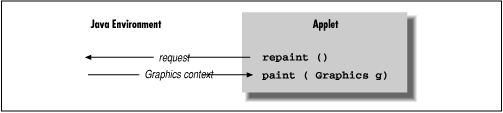
We can use the repaint() method of the
Applet class to request our applet be
redrawn. repaint() causes the Java windowing system
to schedule a call to our paint() method at the
next possible time; Java supplies the necessary
Graphics object, as shown in Figure 2.5.
This mode of operation isn't just an inconvenience brought about
by not having the right graphics context handy at the moment. The
foremost advantage to this mode of operation is that the repainting is
handled by someone else, while we are free to go about our business.
The Java system has a separate, dedicated thread of execution that
handles all repaint() requests. It can schedule
and consolidate repaint() requests as necessary,
which helps to prevent the windowing system from being overwhelmed
during painting-intensive situations like scrolling. Another
advantage is that all of the painting functionality can be kept in our
paint() method; we aren't tempted to spread
it throughout the application.
Now it's time to face up to the question we avoided earlier: how does
the system know to call mouseDragged()
when a mouse event occurs? Is it simply a matter of knowing that
mouseDragged() is some magic name that our
event handling method must have? Not quite; the answer to the question
touches on the discussion of interfaces, which are one of the most important
features of the Java language.
The first sign of an interface comes on the line of code that
introduces the HelloWeb2 applet: we say
that the applet implements
MouseMotionListener.
MouseMotionListener
is an interface that the applet implements. Essentially, it's a list
of methods that the applet must have; this particular interface
requires our applet to have methods called
mouseDragged() and
mouseMoved(). The interface doesn't say
what these methods have to do--and indeed,
mouseMoved() doesn't do anything. It does
say that the methods must take a
MouseEvent as an argument and return
void (i.e., no return value).
Another way of looking at an interface is as a contract between you,
the code developer, and the compiler. By saying that your applet
implements the MouseMotionListener
interface, you're saying that these methods will be available for
other parts of the system to call. If you don't provide them, the
compiler will notice and give you an error message.
But that's not the only way interfaces impact this program. An
interface also acts like a class. For example, a method could return a
MouseMotionListener or take a
MouseMotionListener as an argument. This
means that you don't care about the object's class; the only
requirement is that the object implement the given interface. In fact,
that's exactly what the method
addMouseMotionListener() does. If you look
up the documentation for this method, you'll find that it takes a
MouseMotionListener as an argument. The
argument we pass is this, the applet
itself. The fact that it's an applet is irrelevant--it could be a
Cookie, an
Aardvark, or any other class we dream
up. What is important is that it implements
MouseMotionListener, and thus declares
that it will have the two named methods. That's why we need a
mouseMoved() method, even though the one
we supplied doesn't do anything: the
MouseMotionListener interface says we have
to have one.
In other languages, you'd handle this problem by passing a function
pointer; for example, in C, the argument to
addMouseMotionListener() might be a
pointer to the function you want to have called when an event
occurs. This technique is called a "callback." For a variety of reasons,
the Java language has eliminated function pointers. Instead, we use
interfaces to make contracts between classes and the compiler. (Some
new features of the language make it easier to do something similar to
a callback, but that's beyond the scope of this discussion.)
The Java distribution comes with many interfaces that define what classes have to do in various situations. It turns out that this idea of a contract between the compiler and a class is very important. There are many situations like the one we just saw, where you don't care what class something is, you just care that it has some capability, like listening for mouse events. Interfaces give you a way of acting on objects based on their capabilities, without knowing or caring about their actual type.
Furthermore, interfaces provide an important escape clause to the rule that any new class can extend only a single class (formally called "single inheritance"). They provide most of the advantages of multiple inheritance (a feature of languages like C++) without the confusion. A class in Java can extend only one class but can implement as many interfaces as it wants; our next applet will implement two interfaces, and the final example in this chapter will implement three. In many ways, interfaces are almost like classes but not quite. They can be used as data types, they can even extend other interfaces (but not classes), and can be inherited by classes (if class A implements interface B, subclasses of A also implement B). The crucial difference is that applets don't actually inherit methods from interfaces; the interfaces specify only the methods the applet must have.
|  | |
| 2.1 Hello Web! |  | 2.3 Hello Web! III: The Button Strikes! |
