 | Chapter 9 |  |

| Chapter 9 | |
Contents:
Strings
Math Utilities
Dates
Vectors and Hashtables
Properties
The Security Manager
Internationalization
If you've been reading this book sequentially, you've read all about the core Java language constructs, including the object-oriented aspects of the language and the use of threads. Now it's time to shift gears and talk about the Java Application Programming Interface (API), the collection of classes that comes with every Java implementation. The Java API encompasses all the public methods and variables in the classes that make up the core Java packages. Table 9.1 lists the most important packages in the API and shows which chapters in this book discuss each of the packages.
| Package | Contents | Chapter |
|---|---|---|
java.lang | Basic language classes | 4, 5, 6, 7, 8 |
java.lang.reflect | Reflection | 7 |
java.io | Input and output | 10 |
java.util | Utilities and collections classes | 9 |
java.text | International text classes | 9 |
java.net | Sockets and URLs | 11, 12 |
java.applet | The applet API | 13 |
java.awt | The Abstract Window Toolkit | 13, 14, 15, 16, 17 |
java.awt.event | AWT event classes | 13, 14 |
java.awt.image | AWT image-processing classes | 17 |
java.beans | Java Beans API | 18 |
java.rmi | RMI classes | 11 |
As you can see in Table 9.1, we've
already examined some of the classes in java.lang
in earlier chapters on the core language constructs. Starting with
this chapter, we'll throw open the Java toolbox and begin
examining the rest of the classes in the API.
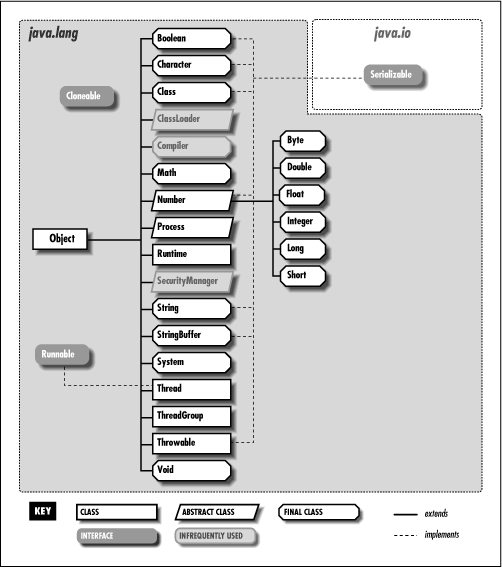
We'll begin our exploration with some of the fundamental
language classes in java.lang, including strings
and math utilities. Figure 9.1 shows the class
hierarchy of the java.lang package.
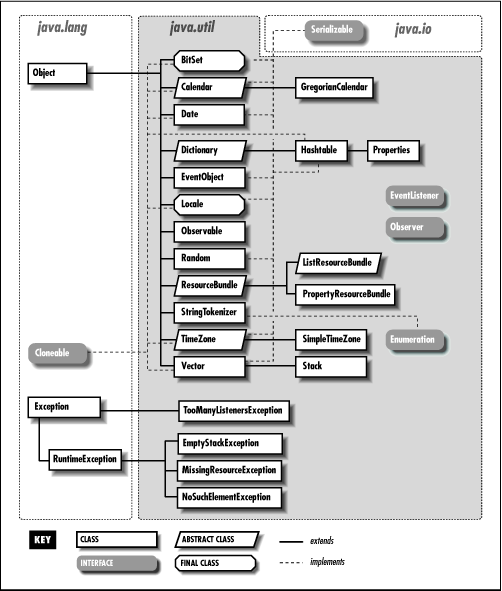
We'll cover some of the classes in java.util,
such as classes that support date and time values, random numbers, vectors,
and hashtables. Figure 9.2 shows the class hierarchy
of the java.util package.
In this section, we take a closer look at the Java
String class (or more specifically,
java.lang.String). Because strings are used so
extensively throughout Java (or any programming language, for that
matter), the Java String class has quite a bit of
functionality. We'll test drive most of the important features,
but before you go off and
write a complex parser or regular expression
library, you should refer to a Java class reference manual
for additional details.
Strings are immutable; once you create a
String object, you can't change its
value. Operations that would otherwise change the characters or the
length of a string instead return a new String
object that copies the needed parts of the original. Because of this
feature, strings can be safely shared. Java makes an effort to
consolidate identical strings and string literals in the same class
into a shared string pool.
To create a string, assign a double-quoted constant
to a String variable:
String quote = "To be or not to be";
Java automatically converts the string literal into a
String object. If you're a C or C++
programmer, you may be wondering if quote is
null-terminated. This question doesn't make any sense with Java
strings. The String class actually uses a Java
character array internally. It's private to the
String class, so you can't get at the
characters and change them. As always, arrays in Java are real objects
that know their own length, so String objects in
Java don't require special terminators (not even internally).
If you
need to know the length of a String, use the
length() method:
int length = quote.length();
Strings can take advantage of the only overloaded operator in Java,
the + operator, for string concatenation. The
following code produces equivalent strings:
String name = "John " + "Smith";
String name = "John ".concat("Smith");
Literal strings can't span lines in Java source files, but we can concatenate lines to produce the same effect:
String poem =
    "'Twas brillig, and the slithy toves\n" +
    "   Did gyre and gimble in the wabe:\n" +
    "All mimsy were the borogoves,\n" +
    "   And the mome raths outgrabe.\n";
Of course, embedding lengthy text in source code should now be a thing
of the past, given that we can retrieve a String
from anywhere on the planet via a URL. In Chapter 12, we'll see how to do things like:
String poem =
    (String) new URL
       ("http://server/~dodgson/jabberwocky.txt").getContent();
In addition to making strings from literal expressions, we can construct
a String from an array of characters:
char [] data = { 'L', 'e', 'm', 'm', 'i', 'n', 'g' };
String lemming = new String( data );
Or from an array of bytes:
byte [] data = { 97, 98, 99 };
String abc = new String(data, "8859_5");
The second argument to the String constructor
for byte arrays is the name of an encoding scheme. It's used to convert the
given bytes to the
string's Unicode characters. Unless you know something
about Unicode, you can use the form of the constructor that
accepts a byte array only; the default encoding scheme will be used.
We can get the string representation of most things with the static String.valueOf()
method. Various overloaded versions of this method give us string values
for all of the primitive types:
String one = String.valueOf( 1 );
String two = String.valueOf( 2.0f );
String notTrue = String.valueOf( false );
All objects in Java have a toString() method,
inherited from the Object class. For class-type references,
String.valueOf() invokes the object's
toString() method to get its string
representation. If the reference is null, the
result is the literal string "null":
String date = String.valueOf( new Date() );
System.out.println( date );
// Sun Dec 19 05:45:34 CST 1999

date = null;
System.out.println( date );
// null
Producing primitives like numbers from String
objects is not a function of the String class. For
that we need the primitive wrapper classes; they are described in the
next section on the Math utilities. The wrapper classes
provide valueOf() methods that produce an object
from a String, as well as corresponding methods to
retrieve the value in various primitive forms. Two examples are:
int i = Integer.valueOf("123").intValue();
double d = Double.valueOf("123.0").doubleValue();
In the above code, the Integer.valueOf() call
yields an Integer object that represents the value
123. An Integer object can provide its primitive
value in the form of an int with the
intValue() method.
Although the techniques above may work for simple cases, they will not work internationally. Let's pretend for a moment that we are programming Java in the rolling hills of Tuscany. We would follow the local customs for representing numbers and write code like the following:
double d = Double.valueOf("1.234,56").doubleValue(); // oops!Unfortunately, this code throws a
NumberFormatException. The
java.text package, which we'll
discuss later, contains
the tools we need to generate and parse strings in different
countries and languages.
The charAt() method of the
String class lets us get at the characters of a
String in an array-like fashion:
String s = "Newton";

for ( int i = 0; i < s.length(); i++ )     System.out.println( s.charAt( i ) );
This code prints the characters of the string one at a time.
Alternately, we can get the characters all at once with
toCharArray(). Here's a way to save typing a
bunch of single quotes:
char [] abcs = "abcdefghijklmnopqrstuvwxyz".toCharArray();
Just as in C, you can't compare strings for equality with
"==" because as in C, strings are actually
references. If your Java compiler doesn't happen to coalesce
multiple instances of the same string literal to a single string pool
item, even the expression "foo"
== "foo" will return
false. Comparisons with <,
>, <=, and >=
don't work at all, because Java can't convert references to
integers.
Use the equals() method to compare strings:
String one = "Foo";

char [] c = { 'F', 'o', 'o' };
String two = new String ( c );

if ( one.equals( two ) )                // yes
An alternate version, equalsIgnoreCase(), can
be used to check the equivalence of strings in a case-insensitive way:
String one = "FOO";
String two = "foo";

if ( one.equalsIgnoreCase( two ) )      // yes
The compareTo() method compares the lexical value
of the String against another
String. It returns an integer that is less than,
equal to, or greater than zero, just like the C routine
string():
String abc = "abc";
String def = "def";
String num = "123";

if ( abc.compareTo( def ) < 0 )         // yes
if ( abc.compareTo( abc ) == 0 )        // yes
if ( abc.compareTo( num ) > 0 )         // yes
On some systems, the behavior of lexical comparison is complex, and obscure alternative character sets exist. Java avoids this problem by comparing characters strictly by their position in the Unicode specification.
In Java 1.1, the java.text package
provides a sophisticated set of classes for comparing strings,
even in different languages. German, for example, has vowels
with umlauts (those funny dots) over them and a weird looking
beta character that represents a double s. How should we
sort these? Although the rules for sorting these characters are
precisely defined, you can't assume that the lexical comparison we
used above works correctly for languages other than English.
Fortunately, the
Collator class takes care of these complex
sorting problems.
In the
following example, we use a Collator
designed to compare German strings. (We'll talk about
Locales in a later section.) You can
obtain a default Collator by calling
the Collator.getInstance() method that has no
arguments. Once you
have an appropriate Collator
instance, you can use its compare() method,
which returns values just like String's
compareTo() method. The following code
creates two strings for the German translations of "fun" and "later,"
using Unicode constants for these two special characters.
It then compares them, using a Collator
for the German locale; the result is that "later" (später) sorts
before "fun" (spaß).
String fun = "Spa\u00df";
String later = "sp\u00e4ter";
Collator german = Collator.getInstance(Locale.GERMAN);
if (german.compare(later, fun) < 0)	// yes
Using collators is essential if you're working with languages other than English. In Spanish, for example, ll and ch are treated as separate characters and alphabetized separately. A collator handles cases like these automatically.
The String class provides several methods for
finding substrings within a string. The
startsWith() and endsWith()
methods compare an argument String with the
beginning and end of the String, respectively:
String url = "http://foo.bar.com/";
if ( url.startsWith("http:") )
    // do HTTP
Overloaded versions of indexOf() search for the
first occurrence of a character or substring:
int i = abcs.indexOf( 'p' );            // i = 15
int i = abcs.indexOf( "def" );          // i = 3
Correspondingly, overloaded versions of
lastIndexOf() search for the last occurrence of a
character or substring.
A number of methods operate on the String and
return a new String as a result. While this is
useful, you should be aware that creating lots of strings in this manner
can affect performance. If you need to modify a string often, you should
use the StringBuffer class, as I'll discuss
shortly.
trim() is a useful method that removes
leading and trailing white space (i.e., carriage return, newline, and
tab) from the String:
String abc = "   abc   ";
abc = abc.trim();                       // "abc"
In the above example, we have thrown away the original
String (with excess white space), so it will be
garbage collected.
The toUpperCase() and
toLowerCase() methods return a new
String of the appropriate case:
String foo = "FOO".toLowerCase();
String FOO = foo.toUpperCase();
substring() returns a specified range of
characters. The starting index is inclusive; the ending is exclusive:
String abcs = "abcdefghijklmnopqrstuvwxyz";
String cde = abcs.substring(2, 5);      // "cde"
Many people complain when they discover the Java
String class is final (i.e., it
can't be subclassed). There is a lot of functionality in
String, and it would be nice to be able to modify
its behavior directly. Unfortunately, there is also a serious need to
optimize and rely on the performance of String
objects. The Java
compiler can optimize final classes by inlining
methods when appropriate. The implementation of
final classes can also be trusted by classes that
work closely together, allowing for special cooperative
optimizations. If you want to make a new string class that uses basic
String functionality, use a
String object in your class and provide methods
that delegate method calls to the appropriate
String methods.
Table 9.2 summarizes the methods provided
by the String class.
| Method | Functionality |
|---|---|
charAt() | Gets at a particular character in the string |
compareTo() | Compares the string with another string |
concat() | Concatenates the string with another string |
copyValueOf() | Returns a string equivalent to the specified character array |
endsWith() | Checks if the string ends with a suffix |
equals() | Compares the string with another string |
equalsIgnoreCase() | Compares the string with another string and ignores case |
getBytes() | Copies characters from the string into a byte array |
getChars() | Copies characters from the string into a character array |
hashCode() | Returns a hashcode for the string |
indexOf() | Searches for the first occurrence of a character or substring in the string |
intern() | Fetches a unique instance of the string from a global shared string pool |
lastIndexOf() | Searches for the last occurrence of a character or substring in a string |
length() | Returns the length of the string |
regionMatches() | Checks whether a region of the string matches the specified region of another string |
replace() | Replaces all occurrences of a character in the string with another character |
startsWith() | Checks if the string starts with a prefix |
substring() | Returns a substring from the string |
toCharArray() | Returns the array of characters from the string |
toLowerCase() | Converts the string to uppercase |
toString() | Converts the string to a string |
toUpperCase() | Converts the string to lowercase |
trim() | Removes the leading and trailing white space from the string |
valueOf() | Returns a string representation of a value |
The java.lang.StringBuffer class is a growable
buffer for characters. It's an efficient alternative to
code like the following:
String ball = "Hello";
ball = ball + " there.";
ball = ball + " How are you?";
The above example repeatedly produces new String
objects. This means that the character array must be copied over and
over, which can adversely affect performance. A more economical
alternative is to use a StringBuffer object and its
append() method:
StringBuffer ball = new StringBuffer("Hello");
ball.append(" there.");
ball.append(" How are you?");
The StringBuffer class actually provides a number
of overloaded append() methods, for appending
various types of data to the buffer.
We can get a String from the
StringBuffer with its
toString() method:
String message = ball.toString();
StringBuffer also provides a number of overloaded
insert() methods for inserting various types
of data at a particular location in the string buffer.
The String and StringBuffer
classes cooperate, so that even in this last operation, no copy has to
be made. The string data is shared between the objects, unless and until
we try to change it in the StringBuffer.
So, when should you use a StringBuffer
instead of a String? If you need to keep adding
characters to a string, use a StringBuffer; it's
designed to efficiently handle such modifications. You'll still
have to convert the StringBuffer to a
String when you need to use any of the methods in
the String class. You can print a
StringBuffer directly using
System.out.println() because
println() calls the toString()
for you.
Another thing you should know about
StringBuffer methods is that they are thread-safe,
just like all public methods in the Java API. This means that any time
you modify a StringBuffer, you don't have to
worry about another thread coming along and messing up the string
while you are modifying it. If you recall our discussion of
synchronization in Chapter 8, you know that being
thread-safe means that only one thread at a time can change the state
of a StringBuffer instance.
On a final note, I mentioned earlier that strings take
advantage of the single overloaded operator in Java,
+, for concatenation. You might be interested to
know that the compiler uses a StringBuffer to
implement concatenation. Consider the following expression:
String foo = "To " + "be " + "or";
This is equivalent to:
String foo = new
  StringBuffer().append("To ").append("be ").append("or").toString();
This kind of chaining of expressions is one of the things operator overloading hides in other languages.
A common programming task involves parsing a string of text into words
or "tokens" that are separated by some set of delimiter
characters. The java.util.StringTokenizer class is
a utility that does just this. The following example reads words from
the string text:
String text = "Now is the time for all good men (and women)...";
StringTokenizer st = new StringTokenizer( text );

while ( st.hasMoreTokens() )  {
    String word = st.nextToken();
    ...
}
First, we create a new StringTokenizer from the
String. We invoke the
hasMoreTokens() and nextToken()
methods to loop over the words of the text. By default, we use white
space (i.e., carriage return, newline, and tab) as delimiters.
The StringTokenizer implements the
java.util.Enumeration interface, which means that
StringTokenizer also implements two more general
methods for accessing elements: hasMoreElements()
and nextElement(). These methods are defined by the
Enumeration interface; they provide a standard way
of returning a sequence of values, as we'll discuss a bit
later. The advantage of nextToken() is that it
returns a String, while
nextElement() returns an
Object. The Enumeration
interface is implemented by many items that return sequences or
collections of objects, as you'll see when we talk about
hashtables and vectors later in the chapter. Those of you who have
used the C strtok()function should appreciate how
useful this object-oriented equivalent is.
You can also specify your own set of delimiter characters in
the StringTokenizer constructor, using another
String argument to the constructor. Any combination
of the specified characters is treated as the equivalent of white
space for tokenizing:
text = "http://foo.bar.com/";
tok = new StringTokenizer( text, "/:" );

if ( tok.countTokens() < 2 )         // bad URL

String protocol = tok.nextToken();   // protocol = "http"
String host = tok.nextToken();       // host = "foo.bar.com"
The example above parses a URL specification to get
at the protocol and host components. The characters "/"
and ":" are used as separators. The countTokens()
method provides a fast way to see how many tokens will be returned by
nextToken(), without actually creating the
String objects.
An overloaded form of nextToken() accepts a
string that defines a new delimiter set for that and subsequent
reads. And finally, the StringTokenizer constructor
accepts a flag that specifies that separator characters are to be
returned individually as tokens themselves. By default, the token
separators are not returned.
|  | |
| 8.5 Thread Groups |  | 9.2 Math Utilities |
