 | Chapter 17 |  |

| Chapter 17 | |
Contents:
Image Processing
Implementing an ImageObserver
Using a MediaTracker
Producing Image Data
Image Producers and Consumers
Filtering Image Data
Working with Audio
Up to this point, we've confined ourselves to working with the
high-level drawing commands of the Graphics class
and using images in a hands-off mode. In this section, we'll
clear up some of the mystery surrounding images and see how they are
produced and used. The classes in the
java.awt.image package handle image processing;
Figure 17.1 shows the classes in this package.
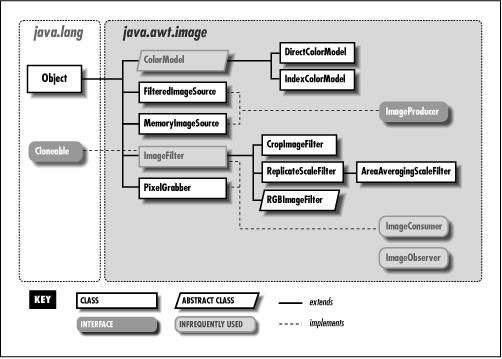
First, we'll return to our discussion about image observers and see how we can get more control over image data as it's processed asynchronously by AWT components. Then we'll open the hood and have a look at image production. If you're interested in creating sophisticated graphics, such as rendered images or video streams, this will teach you about the foundations of image construction in Java.[1]
[1] You will also want to pay attention to the forthcoming Java Media API. Java Media will support plug-and-play streaming media.
Objects that work with image data fall into one of three
categories: image-data producers, image-data consumers, and
image-status observers. Image producers implement the
ImageProducer interface. They create pixel data and
distribute it to one or more consumers. Image consumers implement a
corresponding ImageConsumer interface. They eat the
pixel data and do something useful with it, such as display it on
screen or analyze its contents. Image observers, as I mentioned
earlier, implement the ImageObserver
interface. They are effectively nosy neighbors of image consumers that
watch as the image data arrives.
Image producers generate the information that defines each pixel of an image. A pixel has both a color and a transparency; the transparency specifies how pixels underneath the image show through. Image producers maintain a list of registered consumers for the image and send them this pixel data in one or more passes, as the pixels are generated. Image producers give the consumers other kinds of information as well, such as the image's dimensions. The producer also notifies the consumer when it has reached a boundary of the image. For a static image, such as GIF or JPEG data, the producer signals when the entire image is complete, and production is finished. For a video source or animation, the image producer could generate a continuous stream of pixel data and mark the end of each frame.
An image producer delivers pixel data and other image-attribute
information by invoking methods in its consumers, as shown in
Figure 17.2. This diagram illustrates an image producer
sending pixel data to three consumers by invoking their
setPixels() methods.
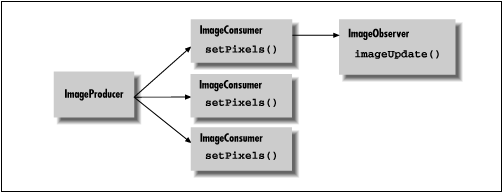
Each consumer represents a view of the image. A given consumer might prepare the image for display on a particular medium, or it might simply serve as a filter and pass the image data to another consumer down the line.
Figure 17.2 also shows an image observer,
watching the status of one of the consumers. The observer is
notified as new portions of the image and new attributes are
ready. Its job is to track this information and let another part of
the application know its status. As I discussed earlier, the image
observer is essentially a callback that is notified asynchronously as
the image is built. The default Component class
image observer that we used in our previous examples called
repaint() for us each time a new section of the
image was available, so that the screen was updated more or less
continuously as the data arrived. A different kind of image observer
might wait for the entire image before telling the application to
display it; yet another observer might update a loading meter showing
how far the image loading had progressed.
|  | |
| 16.5 Drawing Techniques |  | 17.2 Implementing an ImageObserver |
