 | Chapter 14 Creating GUI Components |  |

| Chapter 14 Creating GUI Components | |
In the previous sections, we've worked with many different user interface objects and made a lot of new classes that are sort of like components. Our new classes do one particular thing well; a number of them can be added to applets or other containers just like the standard AWT components; and several of them are lightweight components that use system resources efficiently because they don't rely on a peer.
But these new classes still aren't really components.
If you think about it, all our classes have
been fairly self-contained; they know everything about what to
do and don't rely on other parts of the program to do much
processing. Therefore, they are overly specialized. Our menu example
created a DinnerFrame class that had a
menu of dinner options, but it included all the processing needed to
handle the user's selections. If we wanted to process the selections
differently, we'd have to modify the class. That's not what we want;
we'd like to separate registering the user's choices from processing
those choices. In contrast, true components don't do any processing.
They let the user take some action and then inform some other part of
the program, which processes the action.
So we need a way for our new classes to communicate with other parts of the program. Since we want our new classes to be components, they should communicate the way components communicate: that is, by generating events and sending those events to listeners. So far, we've written a lot of code that listened for events but haven't seen any examples that generated events.
Generating events sounds like it ought to be difficult, but it
isn't. You can either create new kinds of events by subclassing
AWTEvent, or use one of the standard event
types. In either case, you need to register listeners for your events and provide a means to deliver events to your listeners. If you are
using the standard events, AWT provides an
AWTEventMulticaster class that handles
most of the machinery. We'll focus on that option in this section; at
the end, we'll make some comments on how you might manage events on
your own.
The AWTEventMulticaster is one of those
things that looks a lot more complicated than it is. It is confusing,
but most of the confusion occurs because it's hard to believe it's so
simple. Its job is to maintain a linked list of event listeners and
to propagate events to all the listeners on that linked list. So we can use
a multicaster to register (and unregister) event listeners and to
send any events we generate to all registered listeners.
The best way to show you how to use the multicaster is through an
example. The following example creates a new component called
PictureButton.
PictureButton
looks at least somewhat button-like and responds to mouse clicks
(MOUSE_RELEASED events) by generating
action events. (Figure 14.11 shows a
PictureButton in both depressed and raised
modes.) The PictureButtonApplet is passed
the events in
its actionPerformed() method, just as with
any other button, and prints a message each time it's pressed:

import java.awt.*;
import java.awt.event.*;
public class PictureButtonApplet extends java.applet.Applet
                                 implements ActionListener {
    Image image;
    public void init() {
        image = getImage( getClass().getResource(getParameter("image")) );
        PictureButton pictureButton = new PictureButton( image );
        add ( pictureButton );
        pictureButton.setActionCommand("Aaargh!");
        pictureButton.addActionListener( this );
    }

    public void actionPerformed( ActionEvent e ) {
        System.out.println( e );
    }
}
class PictureButton extends Component {
    private Image image;
    boolean pressed = false;
    ActionListener actionListener;
    String actionCommand;
    PictureButton(Image image) {
        this.image = image;
        MediaTracker mt = new MediaTracker(this);
        mt.addImage( image, 0 );
        try { mt.waitForAll(); } catch (InterruptedException e) { /* error */ };
        setSize( image.getWidth(null), image.getHeight(null) );
        enableEvents( AWTEvent.MOUSE_EVENT_MASK );
    }
    public void paint( Graphics g ) {
        g.setColor(Color.white);
        int width = getSize().width, height = getSize().height;
        int offset = pressed ? -2 : 0;  // fake depth
        g.drawImage( image, offset, offset, width, height, this );
        g.draw3DRect(0, 0, width-1, height-1, !pressed);
        g.draw3DRect(1, 1, width-3, height-3, !pressed);
    }
    public Dimension getPreferredSize() {
        return getSize();
    }
    public void processEvent( AWTEvent e ) {
        if ( e.getID() == MouseEvent.MOUSE_PRESSED ) {
            pressed = true;
            repaint();
        } else
        if ( e.getID() == MouseEvent.MOUSE_RELEASED ) {
            pressed = false;
            repaint();
            fireEvent();
        }
        super.processEvent(e);
    }
    public void setActionCommand( String actionCommand ) {
        this.actionCommand = actionCommand;
    }
    public void addActionListener(ActionListener l) {
        actionListener = AWTEventMulticaster.add(actionListener, l);
    }
    public void removeActionListener(ActionListener l) {
        actionListener = AWTEventMulticaster.remove(actionListener, l);
    }
    private void fireEvent() {
        if (actionListener != null) {
            ActionEvent event = new ActionEvent( this,
                                ActionEvent.ACTION_PERFORMED, actionCommand );
            actionListener.actionPerformed( event );
        }
    }
}
Before diving into the event multicaster, here are a few notes about
the applet and the PictureButton. The
applet is an ActionListener because it is
looking for events coming from the button. Therefore, it registers
itself as a listener and contains an
actionPerformed() method. The
PictureButton doesn't have a label, so the
applet explicitly sets the button's action command by calling
setActionCommand().
The button itself is concerned mostly with being pretty. It uses a
media tracker to make sure that the image has loaded before displaying
itself. The paint() method, which we won't
discuss in detail, is devoted to making the button appear "pressed"
(i.e., recessed) when the mouse is pressed. The
getPreferredSize() method lets layout
managers size the button appropriately.
Now we'll start with the button's machinery. The button needs to
receive mouse events. It could register as a mouse listener, but in
this case, it seems more appropriate to override
processEvent().
processEvent() receives all incoming
events. It first checks whether we have a
MOUSE_PRESSED event; if so, it tells the
button to repaint itself in its "pressed" mode. If the event is a
MOUSE_RELEASED event, it tells the button
to paint itself in its "unpressed" mode and calls the private
fireEvent() method, which sends an action
event to all listeners. Finally,
processEvent() calls
super.processEvent() to make sure normal
event processing occurs; this is a good practice whenever you override
a method that performs a significant task.
However, processEvent() doesn't receive
events if they aren't generated; and normally, events aren't generated
if there are no listeners. Therefore, the button's constructor calls
enableEvents() with the argument
MOUSE_EVENT_MASK to turn on mouse event
processing.
Now we're ready to talk about how to generate events. The picture
button has addActionListener() and
removeActionListener() methods for
registering listeners. These just call the static methods
add() and
remove() of the
AWTEventMulticaster class. Here's the
addActionListener() method:
public void addActionListener(ActionListener l) {
    actionListener = AWTEventMulticaster.add(actionListener, l);
}
If you look back to see how the instance variable
actionListener is declared, you'll see
that it is an ActionListener. No big
surprise--except that this code doesn't appear to make sense. It's
saying "add an action listener to an action listener and store the
result back in the original action listener."
There are a couple of tricks here. First, an
AWTEventMulticaster implements all of the
listener interfaces. Therefore, a multicaster can appear wherever an
ActionListener (or any other listener) is
required. In this case, the actionListener
object will be a multicaster--perhaps not what you expected, and
certainly not what's being passed in the argument
l. Now the code is starting to make sense:
earlier, I said that multicasters maintained linked lists of
listeners. So this method really adds l to
the linked list of action listeners that a multicaster is managing,
and saves the new list.
But that begs the question: where does the multicaster come from?
The linked list
has to start somewhere. This is where the second trick comes in.
add() is a static method, so we don't need
a multicaster to call it. But we still need some way to start the
linked list. The class's constructor is never
called--in fact, it's protected, so you can't call it. The answer lies
in the
add() method, which creates an
AWTEventMulticaster when you need it--that
is, as soon as you add the second listener to the list. The arguments
to add() may be
null; one of them probably is
null when you register your first action
listener.
Removing action listeners works the same way. We use the
AWTEventMulticaster's
remove() method. After the last listener
is taken off the linked list, remove()
returns null.
With this machinery in place, sending an event to all registered listeners is
very simple. You just create an event by calling its constructor, and
then call the appropriate method in the listener interface to deliver
it. The AWTEventMulticaster makes sure
that the event gets to all the listeners. In this example, we create
an ActionEvent and deliver the event to
the listeners' actionPerformed() methods by
calling
actionListener.actionPerformed(event).
The code to generate other kinds of events is almost exactly the same.
Remember the multicaster implements all the listener interfaces
and has overloaded add() and
remove() methods for every standard
listener type. Therefore, it can be used for any kind of
AWTEvent. It shouldn't be hard to adapt
this example to other situations.
What if you want to generate your own event type by subclassing
AWTEvent? To make things concrete, let's
say you want to create an ExplosionEvent
that you generate whenever your monitor catches fire. In this case,
you should define
your own ExplosionListener interface and
(possibly) your own ExplosionAdapter class.
You can't use the
AWTEventMulticaster unless your new event
is a subclass of a standard event; extending the multicaster to
support new event types probably isn't worth the effort. It's easier
to write an addExplosionListener() method
that maintains a Vector of listeners and
to deliver events by calling the appropriate method of each listener
in the Vector. We'll demonstrate this
approach in the next section, where we implement another new
component: a Dial.
The standard AWT classes don't have a component that's similar to an
old fashioned dial--for example, the volume control on your radio.
Such a component is something of a rarity; I don't remember seeing one
used recently. But that's all the more reason to build one.
In this section, we implement a Dial
class. We also define a new event type,
DialEvent, and a new listener interface,
DialListener. The dial can be used just
like any other Java component. It is built entirely in Java and,
therefore, is a lightweight component; it extends
Component directly and doesn't
have a native peer.
We will create the new event type used in this example mainly as an exercise.
It might make more sense for our dial to use the standard
AdjustmentEvent (and probably to implement the
Adjustable interface as well). However, this gives us a
chance to show how to handle event listeners without using the AWT event
multicaster. There are many situations in which defining a new event type
is the appropriate solution.
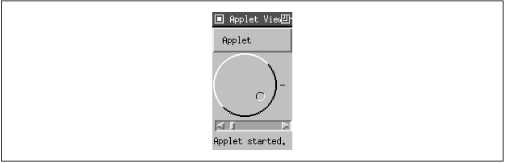
Figure 14.12 shows what the dial looks like; it is followed by the code.
import java.awt.*;
import java.awt.event.*;
import java.util.*;

public interface DialListener extends EventListener {
    void dialAdjusted( DialEvent e );
}

public class DialEvent extends EventObject {
	int value;

	DialEvent( Dial source, int value ) {
		super( source );
		this.value = value;
	}
	public int getValue() {
		return value;
	}
}

public class Dial extends Component {
	int minValue = 0, value, maxValue = 100, radius;
	Vector dialListeners;

	public Dial() {
		enableEvents( AWTEvent.MOUSE_MOTION_EVENT_MASK );
	}
	public Dial( int maxValue ) {
		this();
		this.maxValue = maxValue;
	}

	public void paint( Graphics g ) {
		int tick = 10;
		radius = getSize().width/2 - tick;
		g.drawLine(radius*2+tick/2, radius, radius*2+tick, radius);
		draw3DCircle( g, 0, 0, radius, true );
		draw3DCircle( g, 1, 1, radius-1, true );
		int knobRadius = radius/7;
		double th = value*(2*Math.PI)/(maxValue-minValue);
		int x = (int)(Math.cos(th)*(radius-knobRadius*3)),
			y = (int)(Math.sin(th)*(radius-knobRadius*3));
		draw3DCircle( g, x+radius-knobRadius, y+radius-knobRadius,
                              knobRadius, false );
	}

        private void draw3DCircle( Graphics g, int x, int y,
                                   int radius, boolean raised ) {
		g.setColor( raised ? Color.white : Color.black );
		g.drawArc( x, y, radius*2, radius*2, 45, 180);
		g.setColor( raised ? Color.black : Color.white);
		g.drawArc( x, y, radius*2, radius*2, 225, 180);
	}

	public void processEvent( AWTEvent e ) {
		if ( e.getID() == MouseEvent.MOUSE_DRAGGED ) {
			int y=((MouseEvent)e).getY();
			int x=((MouseEvent)e).getX();
			double th = Math.atan( (1.0*y-radius)/(x-radius) );
			int value=((int)(th/(2*Math.PI)*(maxValue-minValue)));
			if ( x < radius )
				setValue( value + maxValue/2 );
			else if ( y < radius )
				setValue( value + maxValue );
			else
				setValue( value );
			fireEvent();
		}
		super.processEvent( e );
	}

	public Dimension getPreferredSize() {
		return new Dimension( 100, 100 );
	}

    public void setValue(int value) {
		this.value = value;
		repaint();
	}
    public int getValue()  { return value; }
    public void setMinimum(int minValue )  { this.minValue = this.minValue; }
    public int getMinimum()  { return minValue; }
    public void setMaximum(int maxValue )  { this.maxValue = maxValue; }
    public int getMaximum()  { return maxValue; }

	public void addDialListener(DialListener listener) {
		if ( dialListeners == null )
			dialListeners = new Vector();
		dialListeners.addElement( listener );
	}
	public void removeDialListener(DialListener listener) {
		if ( dialListeners != null )
			dialListeners.removeElement( listener );
	}
	private void fireEvent() {
		if ( dialListeners == null )
			return;

		DialEvent event = new DialEvent(this, value);
		for (Enumeration e = dialListeners.elements();
                                      e.hasMoreElements(); )
			((DialListener)e.nextElement()).dialAdjusted( event );
	}
}

public class DialApplet extends java.applet.Applet
                        implements DialListener, AdjustmentListener {
    final int max = 100;
    Scrollbar scrollbar = new Scrollbar( Scrollbar.HORIZONTAL, 0, 1, 0, max );
    Dial dial = new Dial( max );
    public void init() {
        setLayout( new BorderLayout() );
        dial.addDialListener( this );
        add( "Center", dial );
        scrollbar.addAdjustmentListener( this );
        add( "South", scrollbar );
    }
    public void dialAdjusted( DialEvent e ) {
        scrollbar.setValue( e.getValue() );
    }
    public void adjustmentValueChanged( AdjustmentEvent e ) {
        dial.setValue( e.getValue() );
    }
}
Let's start from the top. We'll focus on the event handling and leave
you to figure out the trigonometry on your own. The
DialListener
interface contains a single method,
dialAdjusted(), which is called when a
DialEvent occurs. The DialListener interface
extends java.util.EventListener, which defines no methods, but
serves as a flag that implementers of the interface are a type of event
receiver.
The DialEvent itself is simple.
It carries one item of data: the dial's new value. It has a single "get" method
that returns this value. Note that our event is not a subtype of
java.awt.AWTEvent, but of the more general event base class
java.util.EventObject. If we had wanted to, we could have subclassed a
standard AWT event and specialized it.
The constructor for the Dial class stores
the dial's maximum value; its minimum defaults to 0. It then enables
mouse motion events, which the Dial needs
to tell how it is being manipulated.
paint(),
draw3DCircle(), and
processEvent() do a lot of trigonometry to
figure out how to display the dial.
draw3DCircle() is a private helper method
that draws a circle that appears either raised or depressed; we use
this to make the dial look three dimensional.
processEvent() is called whenever any
event occurs within the component's area. We only expect to receive
mouse motion events, because these are the only events we enabled.
processEvent() first checks the AWT event's
ID; if it is MOUSE_DRAGGED, the user has
changed the dial's setting. We respond by computing
a new value for the dial, repainting the dial in its new position, and
firing a
DialEvent. Any other events (in
particular, MOUSE_MOVED) are ignored.
However, we call the superclass's
processEvent() method to make sure that
any other processing needed for this event occurs.
The next group of methods provide ways to retrieve or change the
dial's current setting and the minimum and maximum values. They are similar
to the methods in the Adjustable
interface; again, you could argue that Dial
really ought to implement Adjustable.
But the important thing to notice here is the pattern of "getter" and
"setter" methods for all of the important values used by the Dial. We will
talk more about this in Chapter 18 when we discuss JavaBeans.
Finally, we reach the methods that work with listeners.
addDialListener() adds a new listener to a
Vector of listeners by calling
addElement(). If the vector doesn't
already exist, addDialListener() creates
it. removeDialListener() simply takes a
listener off the list so that it won't receive any further events.
fireEvent() is a private method that
creates a DialEvent and sends it to every
listener. It does so by converting the
Vector into an
Enumeration and running through every
element in the list by calling
nextElement() until
hasMoreElements() returns false. To send
the event to a listener, it calls the listener's
dialAdjusted() method. Note that
nextElement() returns an
Object; we must cast this object to
DialListener before we can deliver the
event.
To show how the applet is used, I included a simple applet called
DialApplet. This applet places a
Dial and a
Scrollbar in a border layout. Any change
to either the dial or the scrollbar is reflected by the other. The
applet implements both DialListener and
AdjustmentListener and therefore has both
dialAdjusted() and
adjustmentValueChanged() methods. Although
this isn't a good argument for creating new event types, it's worth noticing
that the logic of the listener methods is much simpler than it would have
been if the dial generated its own adjustment events. You could achieve the
same benefit without creating new events by simply defining additional event
listener interfaces. Remember that event receivers are strongly typed, and
their types are determined by the listener interfaces that they implement.
|  | |
| 14.8 Dialogs |  | 15. Layout Managers |
