 | Chapter 14 Creating GUI Components |  |

| Chapter 14 Creating GUI Components | |
A Checkbox is a labeled toggle button. A group of
such toggle buttons can be made mutually exclusive by tethering them
together with a CheckboxGroup object. By now
you're probably well into the swing of things and could easily
master the Checkbox on your own. We'll throw
out an example to illustrate a different way of dealing with the state
of components and to show off a few more things about containers.
A Checkbox sends item events when it's
pushed, just like a List, a
Menu, or a
Choice. In our last example, we caught the
action events from our choice and menu selections and worked with them
when they happened. For something like a checkbox, we might want to
be lazy and check on the state of the buttons only at some later time,
such as when the user commits an action. It's like filling out a
form; you can change your choices until you submit the form.
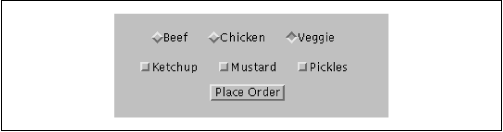
The following applet, DriveThrough, lets us
check off selections on a fast food menu, as shown in
Figure 14.7.
DriveThrough prints
the results when we press the Place
Order button. Therefore, we can ignore all the item
events generated by our checkboxes and listen only for the action
events generated by the button.
import java.awt.*;
import java.awt.event.*;
public class OrderForm extends java.applet.Applet implements ActionListener {
    Panel condimentsPanel = new Panel();
    CheckboxGroup entreeGroup = new CheckboxGroup();
    public void init() {
        condimentsPanel.add( new Checkbox("Ketchup"));
        condimentsPanel.add( new Checkbox("Mustard"));
        condimentsPanel.add( new Checkbox("Pickles"));
        Checkbox c;
        Panel entreePanel = new Panel();
        entreePanel.add( c = new Checkbox("Beef") );
        c.setCheckboxGroup( entreeGroup );
        entreePanel.add( c = new Checkbox("Chicken") );
        c.setCheckboxGroup( entreeGroup );
        entreePanel.add( c = new Checkbox("Veggie") );
        c.setCheckboxGroup( entreeGroup );
        entreeGroup.setCurrent( c );
        Panel orderPanel = new Panel();
        Button orderButton = new Button("Place Order");
        orderButton.addActionListener( this );
        orderPanel.add( orderButton );
        setLayout( new GridLayout(3, 1) );
        add( entreePanel );
        add( condimentsPanel );
        add( orderPanel );
    }
    public void actionPerformed(ActionEvent e) {
        takeOrder();
    }
    void takeOrder() {
        Checkbox c = entreeGroup.getCurrent();
            System.out.println( c.getLabel() + " sandwich" );
        Component [] components = condimentsPanel.getComponents();
        for (int i=0; i< components.length; i++)
            if ( (c = (Checkbox)components[i]).getState() )
                System.out.println( "With " + c.getLabel() );
        System.out.println("Thank you, drive through...");
    }
}
DriveThrough lays out two panels, each
containing three checkboxes. The checkboxes in the
entreePanel are tied together through a single
CheckboxGroup object.
We call their setCheckboxGroup() methods to
put them in a single CheckboxGroup that
makes the checkboxes mutually exclusive. The
CheckboxGroup object is an odd animal. One
expects it to be a container or a component, but it isn't; it's simply
a helper object that coordinates the functionality of the
Checkbox objects. Because a
CheckboxGroup isn't a container, it
doesn't have an add() method. To put a
checkbox into a group, you call the
setCheckboxGroup() method of the
Checkbox class.
Once a set of checkboxes has been placed in a checkbox group, only one of the boxes may be checked at a time. In this applet, the checkbox group forces you to choose a beef, chicken, or veggie entree, but not more than one. The condiment choices, however, aren't in a checkbox group, so you can request ketchup, mustard, and pickles on your chicken sandwich.
When the Place Order button is
pushed, we receive an ActionEvent via
our actionPerformed() method. At this
point, we gather the information in the checkboxes and
print it. actionPerformed() simply calls
our takeOrder() method, which reads the
checkboxes. We could have saved references to the checkboxes in a number
of ways;
this example demonstrates two. First, we find out which entree was
selected.
To do so, we call the CheckboxGroup's
getCurrent() method.
getCurrent()
returns the selected Checkbox; we use
getLabel() to extract the name of the entree.
To find out which condiments were selected, we use a more
complicated procedure. The problem is that condiments aren't
mutually exclusive, so we don't have the convenience of a
CheckboxGroup. Instead, we ask the condiments
Panel for a list of its components. The
getComponent() method returns an array of
references to the container's child components. We'll use
this to loop over the components and print the results. We cast each
element of the array back to Checkbox and
call its
getState() method to see if the checkbox
is on or
off. Remember that if we were dealing with different types of
components, we could determine what kind of component we had with the
instanceof operator.
|  | |
| 14.5 PopupMenu |  | 14.7 ScrollPane and Scrollbars |
