 | Chapter 14 Creating GUI Components |  |

| Chapter 14 Creating GUI Components | |
One of the new components in Java 1.1 is PopupMenu: a menu that automatically
appears when you press the appropriate mouse button inside of a
component. Which button you press depends on the platform you're
using; fortunately, you don't have to care.
The care and feeding of PopupMenu is
basically the same as any other menu. You use a different constructor
(PopupMenu()) to create it, but otherwise,
you build a menu and add elements to it the same way. The big
difference is that you don't need to attach it to MenuBar, and consequently don't need to
worry about putting MenuBar in a
Frame. Instead, you call
add() to add the
PopupMenu to any component.
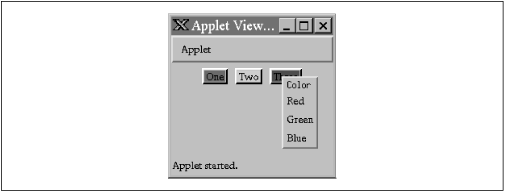
The PopupColorMenu applet contains three
buttons. You can use a PopupMenu to set the color
of each button or the applet itself, depending on where you press the
mouse. (Setting the color of the applet also sets the buttons'
colors.) Figure 14.6 shows the applet in action;
the user is preparing to change the color of the right-most button.
import java.awt.*;
import java.awt.event.*;
public class PopUpColorMenu extends java.applet.Applet
implements ActionListener {
    PopupMenu colorMenu;
    Component selectedComponent;
    public void init() {
        add( new Button("One") );
        add( new Button("Two") );
        add( new Button("Three") );

        colorMenu = new PopupMenu("Color");
        colorMenu.add( makeMenuItem("Red") );
        colorMenu.add( makeMenuItem("Green") );
        colorMenu.add( makeMenuItem("Blue") );
        addMouseListener( new MouseAdapter() {
            public void mousePressed(MouseEvent e) {
                if ( e.isPopupTrigger() ) {
                    selectedComponent = getComponentAt( e.getX(), e.getY() );
                    colorMenu.show(e.getComponent(), e.getX(), e.getY());
                }
            }
        } );
        add(colorMenu);
    }
    public void actionPerformed(ActionEvent e) {
        String color = e.getActionCommand();
        if ( color.equals("Red") )
            selectedComponent.setBackground( Color.red );
        else if ( color.equals("Green") )
            selectedComponent.setBackground( Color.green );
        else if ( color.equals("Blue") )
            selectedComponent.setBackground( Color.blue );
    }
    private MenuItem makeMenuItem(String label) {
        MenuItem item = new MenuItem(label);
        item.addActionListener( this );
        return item;
    }
}
Because the popup menu is triggered by mouse events, we need to
register a MouseListener. In our call to
addMouseListener(), we create an
anonymous inner class based on the
MouseAdapter. In this class, we override
the mousePressed() method to display the
popup menu when we get an appropriate event. How do we know what an
"appropriate event" is? Fortunately, we don't need to worry about the
specifics of our user's platform; we just need to call the event's
isPopupTrigger() method. If this method
returns true, we know the user has done
whatever normally displays a popup menu on his system.
Once we know that the user wants to raise a popup menu, we figure out
which component the mouse is over by calling
getComponentAt(), with the coordinates of
the mouse click (given by e.getX() and
e.getY()). Then we display the popup menu
by calling its show() method, again with
the mouse coordinates as arguments.
If we wanted to provide different menus for different types of components or the background, we could add a test within the check for the popup trigger:
if ( e.isPopupTrigger() ) {
    selectedComponent = getComponentAt( e.getX(), e.getY() );

    if ( selectedComponent instanceof Button )
         colorMenu.show(e.getComponent(),
                        e.getX(), e.getY());
    else if ( selectedComponent instanceof Applet )
            // show a menu for the background
    else if ( selectedComponent instanceof someOtherComponent )
            // show another menu
}
The only thing left is to handle the action events from the popup menu
items. As in our earlier example, we use a helper method called
makeMenuItem() to register the applet as
an action listener for every item we add. The applet implements
ActionListener and has the required
actionPerformed() method. This method
reads the action command from the event, which is equal to the
selected menu item's label by default. It then sets the background
color of the selected component appropriately.
|  | |
| 14.4 Menus and Choices |  | 14.6 Checkbox and CheckboxGroup |
