 | Chapter 14 Creating GUI Components |  |

| Chapter 14 Creating GUI Components | |
A Menu is a standard, pull-down menu with a fixed
name. Menus can hold other menus as submenu items, letting you
implement complex menu structures. Menus come with several
restrictions; they must be attached to a menu bar, and the menu bar
can be attached only to a Frame (or another
menu). You can't stick Menu at an arbitrary
position within a container. A top-level Menu has a
name that is always visible in the menu bar. (An important exception to
these rules is PopupMenu, which we'll
describe in the next section.)
A Choice is an item that lets you choose
from a selection of alternatives. If this sounds like a menu,
you're right. Choices are free-spirited relatives of menus. A
Choice item can be positioned anywhere, in any kind
of container. It looks something like a button, with the current
selection as its label. When you press the mouse button on a choice,
it unfurls to show possible selections.
Both menus and choices send action events when an item is
selected. We'll create a little example that illustrates choices
and menus and demonstrates how to work with the events they
generate. Since Menu has to be placed in the menu
bar of Frame, we'll take this opportunity
to show off a Frame object as
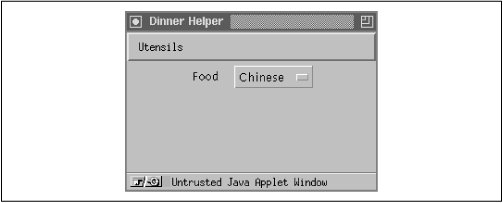
well. DinnerMenu pops up a window containing a
Food choice and a menu of Utensils, as shown in Figure 14.5. DinnerMenu prints a
message for each selection; choosing Quit from the menu removes the window. Give it a
try.
import java.awt.*;
import java.awt.event.*;
import java.util.EventListener;
public class DinnerMenu extends java.applet.Applet {
    public void init() {
        new DinnerFrame().show();
    }
}
class DinnerFrame extends Frame implements ActionListener, ItemListener {
    DinnerFrame() {
        setTitle("Dinner Helper");
        setLayout( new FlowLayout() );
        add( new Label("Food") );
        Choice c = new Choice ();
        c.addItem("Chinese");
        c.addItem("Italian");
        c.addItem("American");
        c.addItemListener( this );
        add( c );
        Menu menu = new Menu("Utensils");
        menu.add( makeMenuItem("Fork") );
        menu.add( makeMenuItem("Knife") );
        menu.add( makeMenuItem("Spoon") );
        Menu subMenu = new Menu("Hybrid");
        subMenu.add( makeMenuItem("Spork") );
        subMenu.add( makeMenuItem("Spife") );
        subMenu.add( makeMenuItem("Knork") );
        menu.add( subMenu);
        menu.add( makeMenuItem("Quit") );
        MenuBar menuBar = new MenuBar();
        menuBar.add(menu);
        setMenuBar(menuBar);
        pack();
    }
    public void itemStateChanged(ItemEvent e) {
        System.out.println( "Choice set to: " + e.getItem() );
    }
    public void actionPerformed(ActionEvent e) {
        String command = e.getActionCommand();
        if ( command.equals( "Quit" ) )
            dispose();
        else
            System.out.println( "Menu selected: " + e.getActionCommand() );
    }
    private MenuItem makeMenuItem( String name ) {
        MenuItem m = new MenuItem( name );
        m.addActionListener( this );
        return m;
    }
}
Yes, I know. Quit doesn't belong in the Utensils menu. If it's driving you crazy, you can go back and add a File menu as an exercise when we're through.
So what do we have? Well, we've created a new kind of
component called DinnerFrame that implements our
palette of dinner options. We do our setup work in the
DinnerFrame constructor.
DinnerFrame sets the name on its titlebar with
setTitle().
The constructor also handles a few
other miscellaneous details, such as setting the layout manager that
places things side by side in the display area and later, resizing
itself by calling pack().
We make an instance of Choice and add three
options to it with its addItem()
method. Choice options are simple
String objects. When one is picked, we get an
action event with an argument that specifies the selected option
name. We can also examine the currently selected item at any time with
the Choice's
getSelectedItem() method. A
Choice generates an
ItemEvent when a user makes a selection,
so we register the DinnerFrame as an
ItemEvent listener by calling
addItemListener(). (This means we must
also implement the ItemListener interface
and provide an itemStateChanged() method.)
As with any component, we
display the Choice by adding it to our
applet's layout with add().
The Menu has a few more moving parts. A
Menu holds
MenuItem objects. A
simple MenuItem just has a
String as a label. It sends this as an argument in
an action event when it's selected. We can set its font with
setFont(). We can also turn it on or off with
setEnabled(); this
method controls whether the MenuItem is
available. A Menu object is itself a kind of
MenuItem, and this allows us to use a menu as a
submenu in another menu.
We construct Menu with its name and call
its add() method to give it three new
MenuItem objects. To create the menu
items, we call our own makeMenuItem()
helper method. Next, we repeat this process to
make a new Menu object, subMenu,
and add it as the fourth option. Its name appears as the menu item
along with a little arrow, indicating it's a submenu. When it's
selected, the subMenu menu pops up to the side, and
we can select from it. Finally, we add one last simple menu item to
serve as a Quit option.
We use a private method, makeMenuItem(),
to create our menu items for us. This method is convenient because,
with menus, every item generates its own events. Therefore, we must
register an ActionListener for every
selection on the menu. Rather than write lots of code, we use a helper
method to register our
DinnerFrame
(this) as the listener for every item. It
should be no
surprise then, that DinnerFrame must
implement ActionListener and provide an
actionPerformed() method.
Now we have the menu; to use it, we have to insert it in a menu bar. A MenuBar holds
Menu objects. We create MenuBar and set it as the menu bar for
DinnerFrame with the
Frame.setMenuBar() method. We can then add our menu
to it with menuBar.add():
MenuBar menuBar = new MenuBar();
menuBar.add(menu);
setMenuBar(menuBar);
Suppose our applet didn't have its own frame? Where could we put our menu? Ideally, you'd like the applet to be able to add a menu to the top-level menu bar of the Web browser or applet viewer. Unfortunately, as of Java 1.1, there is no standard for doing so. (There are obvious security considerations in allowing an applet to modify its viewer.) There has been talk of adding this ability as part of Java Beans, but so far, it's not possible.
One final note about the DinnerMenu
example. As we said in the previous chapter, any
time you use Frame, and thus create a new
top-level window, you should add code to destroy your frame whenever
the user closes the window with her native window manager. To do so,
you register your frame as a
WindowListener, implement the
WindowListener interface, and provide a
windowClosing() method that calls
dispose().
By calling dispose(), we indicate the window
is no longer needed, so that it can release its window system resources.
|  | |
| 14.3 Lists |  | 14.5 PopupMenu |
