 | Chapter 13 The Abstract Window Toolkit |  |

| Chapter 13 The Abstract Window Toolkit | |
Tables 13-1 and 13-2 summarize the AWT events, which components fire them, and the methods of the listener interfaces that receive them.
| Event | Fired by | Listener Interface | Handler Method |
|---|---|---|---|
ComponentEvent | All components | ComponentListener | componentResized() |
componentMoved() | |||
componentShown() | |||
componentHidden() | |||
FocusEvent | All components | FocusListener | focusGained() |
focusLost | |||
KeyEvent | All components | KeyListener | keyTyped() |
keyPressed() | |||
keyReleased() | |||
MouseEvent | All components | MouseListener | mouseClicked() |
mousePressed() | |||
mouseReleased() | |||
mouseEntered() | |||
mouseExited() | |||
MouseMotionListener | mouseDragged() | ||
mouseMoved() | |||
ContainerEvent | All containers | ContainerListener | componentAdded() |
componentRemoved() |
| Event | Fired by | Listener Interface | Handler Method |
|---|---|---|---|
ActionEvent | TextField | ActionListener | actionPerformed() |
MenuItem | |||
List | |||
Button | |||
ItemEvent | List | ItemListener | itemStateChanged() |
Checkbox | |||
Choice | |||
CheckboxMenuItem | |||
AdjustmentEvent | ScrollPane | AdjustmentListener | adjustmentValue- |
Scrollbar | Changed() | ||
TextEvent | TextArea | TextListener | textValueChanged() |
TextField | |||
WindowEvent | Frame | WindowListener | windowOpened() |
Dialog | windowClosing() | ||
windowClosed() | |||
windowIconified() | |||
windowDeiconified() | |||
windowActivated() | |||
windowDeactivated() |
It's not usually ideal to have your application components implement a listener interface and receive events directly. Sometimes it's not even possible. Being an event receiver forces you to modify or subclass your objects to implement the appropriate event listener interfaces and add the code necessary to handle the events. Since we are talking about AWT events here, a more subtle issue is that you are, of necessity, building GUI logic into parts of your application that shouldn't have to know anything about the GUI. Let's look at an example.
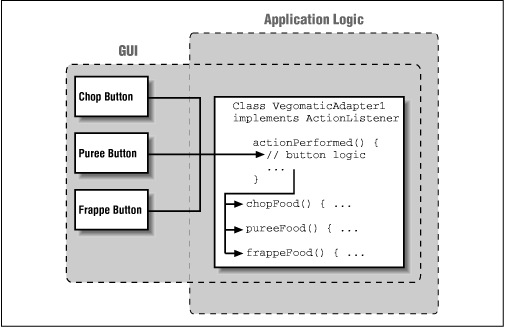
In Figure 13.11 we have drawn the plans for our Vegomatic food processor.
Here we have made our Vegomatic object implement the
ActionListener interface
so that it can receive events directly from the three
Button components:
Chop, Puree, and Frappe. The problem is that our Vegomatic object
now has to know more than how to mangle food. It also has to be
aware that it will be driven by three controls--specifically, buttons that
send action commands--and be aware of which methods in itself it should invoke for those
commands. Our boxes labeling the GUI and application code overlap in an
unwholesome way. If the marketing people should later want to add or
remove buttons or perhaps just change the names, we have to be
careful. We may have to modify the logic in our Vegomatic object. All
is not well.
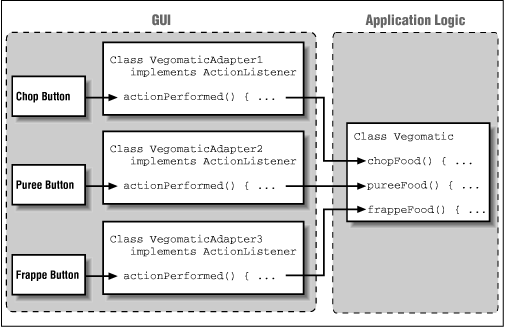
An alternative is to place an adapter class between our event source and receiver. An adapter is a simple object whose sole purpose is to map an incoming event to an outgoing method.
Figure 13.12 shows a better design that uses three adapter classes, one for each button. The implementation of the first adapter might look like:
class VegomaticAdapter1 implements actionListener {
    Vegotmatic vegomatic;
    VegomaticAdapter1 ( Vegotmatic vegomatic ) {
        this.vegomatic = vegomatic;
    }
    public void actionPerformed( ActionEvent e ) {
        vegomatic.chopFood();
    }
}
So somewhere in the code where we build our GUI, we could register our listener like so:
// building GUI for our Vegomatic
Vegomatic theVegomatic = ...;
Button chopButton = ...;
// make the hookup
chopButton.addActionListener( new VegomaticAdapter1(theVegomatic) );
We have completely separated the messiness of our GUI from the application code. However, we have added three new classes to our application, none of which does very much. Is that good? That depends on your vantage point.
Under different circumstances, our buttons may have been able to share
a common adapter class that was simply instantiated with different
parameters. Various trade-offs can be made between
size, efficiency, and elegance of code. Adapter classes will
often be generated automatically by development tools. The way we have
named our adapter classes VegomaticAdapter1, VegomaticAdapter2,
and VegomaticAdapter3 hints at this. More often, when hand coding,
you'll use an inner
class. At the other extreme, we can forsake Java's strong typing and
use the reflection API to create a completely dynamic hookup between an
event source and listener.
Many listener interfaces contain more than one event-handler method. Unfortunately, this means that to register yourself as interested in any one of those events, you must implement the whole listener interface. And to accomplish this you might find yourself typing in dummy "stubbed out" methods, simply to complete the interface. There is really nothing wrong with this, but it is a bit tedious. To save you some trouble, AWT provides some helper classes that implement these dummy methods for you. For each listener interface containing more than one method, there is an adapter class containing the stubbed methods. The adapter class serves as a base class for your own adapters. So when you need a class to patch together your event source and listener, you can simply subclass the adapter and override only the methods you want.
For example, the MouseAdapter class
implements the MouseListener interface
and provides the following implementation:
public void mouseClicked(MouseEvent e) {};
public void mousePressed(MouseEvent e) {};
public void mouseReleased(MouseEvent e) {};
public void mouseEntered(MouseEvent e) {};
public void mouseExited(MouseEvent e) {};
This isn't a tremendous time saver; it's
simply a bit of sugar. The primary advantage comes into play when we use
the MouseAdapter as the base for our own
adapter in an anonymous inner class.
For example, suppose we want to catch a
mousePressed() event in some component
and blow up a building. We can use the following to make the hookup:
someComponent.addMouseListener( new MouseAdapter() {
    public void MousePressed(MouseEvent e) {
        building.blowUp();
    }
} );
We've taken artistic liberties with the formatting, but I think it's very readable. Writing adapters is common enough that it's nice to avoid typing those extra few lines and perhaps stave off the onset of carpal tunnel syndrome for a few more hours. Remember that any time you use an inner class, the compiler is generating a class for you, so the messiness you've saved in your source still exists in the output classes.
Although Java is still a youngster, it has a bit of a legacy. Versions of
Java before 1.1 used a different style of event delivery. Back in the
old days (a few months ago), event types were
limited, and an event was delivered only to the
Component that generated it or
one of its parent containers. The old style component event-handler
methods (now deprecated) returned a boolean
value declaring whether or not they had handled the event:
boolean handleEvent( Event e ) {
    ...
}
If the method returns false, the
event is automatically redelivered to the component's container to give it a
chance. If the container does not handle it, it is passed on to its parent
container, and so on. In this way, events were propagated up the containment hierarchy
until they were either consumed or
passed over to the component peer, just as current
InputEvents are ultimately
interpreted using the peer if no registered event listeners have
consumed them.
Although this style of event delivery was convenient for some simple
applications, it is not very flexible. Events could be handled only by
components, which meant that you always had to subclass a
Component or
Container type to handle events. This was
a degenerate use of inheritance
(i.e., bad design) that led to the creation of lots of unnecessary classes.
We could, alternatively, receive the events for many embedded components in a single parent container, but that would often lead to very convoluted logic in the container's event-handling methods. It is also very costly to run every single AWT event through a gauntlet of (often empty) tests as it traverses its way up the tree of containers. This is why Java now provides the more dynamic and general event source/listener model that we have described in this chapter. The old style events and event-handler methods are, however, still with us.
Java is not allowed to simply change and break an established API. Instead, older ways of doing things are simply deprecated in favor of the new ones. This means that code using the old style event handler methods will still work; you may see old style code around for a long time. The problem with relying on old style event delivery, however, is that the old and new ways of doing things cannot be mixed.
By default, Java is obligated to perform the old behavior--offering events
to the component and each of its parent containers. However, Java turns off
the old style delivery whenever it thinks that we have elected to use the new
style.
Java determines whether a Component should
receive old style
or new style events based on whether any event listeners are registered, or
whether new style events have been explicitly enabled.
When an AWT event listener is registered with a
Component, new style events
are implicitly turned on (a flag is set).
Additionally, a mask is set telling the component the types of AWT events
it should process.
The mask allows components to be more selective about which events
they process.
When new style events are enabled, all events are first routed to the
dispatchEvent() method of the
Component class. The
dispatchEvent() method examines the
component's event
mask and decides whether the event
should be processed or ignored. Events that have been enabled are
sent to the processEvent() method, which
simply looks at the event's type
and delegates it to a helper processing method named for its type.
The helper processing method finally dispatches the event to the set of
registered listeners for its type.
This process closely parallels the way in which old style events are
processed and the way in which events are first directed to a single
handleEvent()
method that dispatches them to more specific handler methods in the
Component class. The differences are that
new style events are not delivered
unless someone is listening for them, and the listener registration mechanism
means that we don't have to subclass the component in order to override its
event-handler methods and insert our own code.
Still, if you are subclassing a Component or you
really want to process all events in a single method, you should
be aware that it is possible to emulate the old style event handling
and override your component's event processing methods. You simply have to
call the Component's
enableEvents() method with the appropriate
mask value to turn on processing for the given type of event. You can then
override the corresponding method and insert your code.
The mask values, listed in Table 13.3, are found in the
java.awt.AWTEvent class.
| java.awt.AWTEvent mask | Method |
|---|---|
COMPONENT_EVENT_MASK | processComponentEvent() |
FOCUS_EVENT_MASK | processFocusEvent() |
KEY_EVENT_MASK | processKeyEvent() |
MOUSE_EVENT_MASK | processMouseEvent() |
MOUSE_MOTION_EVENT_MASK | processMouseMotionEvent() |
For example:
    public void init() {
        ...
        enableEvent( AWTEvent.KEY_EVENT_MASK ):
    }
    public void processKeyEvent(KeyEvent e) {
        if ( e.getID() == KeyEvent.KEY_TYPED )
            // do work
        super.processKeyEvent(e);
    }
If you do this, it is very important that you remember to make a call to
super.process...Event() in order to allow
normal event delegation to continue. Of course, by emulating old style
event handling, we're giving up the virtues of the new style; this code is a lot less flexible than the code we could
write with the new event model. As we've seen, the user interface is
hopelessly tangled with the actual work your program does.
A compromise solution would be to have your subclass declare that it
implements the appropriate listener interface and register itself, as we have
done in the simpler examples in this book:
class MyApplet implements KeyListener ...
    public void init() {
        addKeyListener( this ):
        ...
    }
    public void keyTyped(KeyEvent e) {
        // do work
} |  | |
| 13.5 Events |  | 14. Creating GUI Components |
