 | Chapter 8 |  |

| Chapter 8 | |
Contents:
Introducing Threads
Threading Applets
Synchronization
Scheduling and Priority
Thread Groups
Threads have been around for some time, but few programmers have actually worked with them. There is even some debate over whether or not the average programmer can use threads effectively. In Java, working with threads can be easy and productive. In fact, threads provide the only way to effectively handle a number of tasks. So it's important that you become familiar with threads early in your exploration of Java.
Threads are integral to the way Java works. We've already seen
that an applet's paint() method isn't
called by the applet itself, but by another thread within the
interpreter. At any given time, there may be many such background
threads, performing activities in parallel with your application. In
fact, it's easy to get a half dozen or more threads running in
an applet without even trying, simply by requesting images, updating
the screen, playing audio, and so on. But these things happen behind
the scenes; you don't normally have to worry about them. In this
chapter, we'll talk about writing applications that create and
use their own threads explicitly.
Conceptually, a thread is a flow of control within a program. A thread is similar to the more familiar notion of a process, except that multiple threads within the same application share much of the same state--in particular, they run in the same address space. It's not unlike a golf course, which can be used by many players at the same time. Sharing the same address space means that threads share instance variables, but not local variables, just like players share the golf course, but not personal things like clubs and balls.
Multiple threads in an application have the same problems as the players sharing a golf course: in a word, synchronization. Just as you can't have two sets of players blindly playing the same green at the same time, you can't have several threads trying to access the same variables without some kind of coordination. Someone is bound to get hurt. A thread can reserve the right to use an object until it's finished with its task, just as a golf party gets exclusive rights to the green until it's done. And a thread that is more important can raise its priority, asserting its right to play through.
The devil is in the details, of course, and those details have historically made threads difficult to use. Java makes creating, controlling, and coordinating threads simple. When creating a new thread is the best way to accomplish some task, it should be as easy as adding a new component to your application.
It is common to stumble over threads when you first look at them, because creating a thread exercises many of your new Java skills all at once. You can avoid confusion by remembering there are always two players involved in running a thread: a Java language object that represents the thread itself and an arbitrary target object that contains the method the thread is to execute. Later, you will see that it is possible to play some sleight of hand and combine these two roles, but that special case just changes the packaging, not the relationship.
A new thread is born when we create an instance of the
java.lang.Thread class. The
Thread object represents a real thread in the Java
interpreter and serves as a handle for controlling and synchronizing
its execution. With it, we can start the thread, stop the thread, or
suspend it temporarily. The constructor for the
Thread class accepts information about where the
thread should begin its execution. Conceptually, we would like to
simply tell it what method to run, but since there are no pointers to
methods in Java, we can't specify one directly. Instead, we have
to take a short detour and use the Runnable
interface to create an object that contains a "runnable"
method.
An object that wants to serve as the target of a
Thread can declare that it has an appropriate
executable method by implementing the
java.lang.Runnable
interface. Runnable defines a single,
general-purpose method:
public interface Runnable {
  abstract public void run();
}
Every thread begins its life by executing a run()
method in a particular object. run() is a rather
mundane method that can hold an arbitrary body of code. It is
public, takes no arguments, has no return value,
and is not allowed to throw any exceptions.
Any class that contains an appropriate
run() method can declare that it implements
the Runnable
interface. An instance of this class is then a runnable object that
can serve as the target of a new Thread.
If you don't want to put the run() method
directly in your object, you
can always make an adapter class that serves as the
Runnable for you.
The adapter's run() method can call any
method it wants to start the thread.
A newly born Thread remains idle until we give it a
figurative slap on the bottom by calling its
start() method. The thread then wakes up and
proceeds to execute the run() method of its target
object. start() can be called only once in the
lifetime of a Thread. Once a thread starts, it
continues running until the target object's
run() method completes, or we call the
thread's stop() method to kill the thread
permanently. A little later, we will look at some other methods
you can use to control the thread's progress while it is running.
Now let's look at an example. The following class,
Animation, implements a run()
method to drive its drawing loop:
class Animation implements Runnable {
   ...
   public void run() {

       while ( true ) {
           // Draw Frames
           ...
       }
   }
}
To use it, we create a Thread object with an
instance of Animation as its target object, and
invoke its start() method. We can perform these
steps explicitly, as in the following:
Animation happy = new Animation("Mr. Happy");
Thread myThread = new Thread( happy );
myThread.start();
...
Here we have created an instance of our Animation
class and passed it as the argument to the constructor for
myThread. When we call the
start() method, myThread begins
to execute Animation's
run() method. Let the show begin!
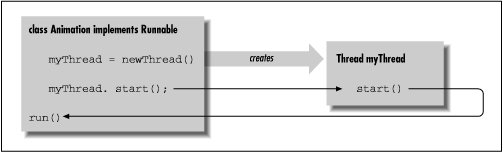
The above situation is not terribly object oriented. More often, we
want an object to handle its own threads,
as shown in Figure 8.1, which depicts a Runnable
object that creates and starts its own Thread.
We'll show our Animation class performing these
actions in its constructor:
class Animation implements Runnable {

    Thread myThread;

    Animation (String name) {
        myThread = new Thread( this );
        myThread.start();
    }
    ...
In this case, the argument we pass to the Thread
constructor is this, the current object
instance. We keep the Thread reference in the
instance variable myThread, in case we want to stop
the show, or exercise some other kind of control.
The Runnable interface lets us make an arbitrary
object the target of a thread, as we did above. This is the most
important, general usage of the Thread class. In
most situations where you need to use threads, you'll create a
class that implements the Runnable
interface. I'd be remiss, however, if I didn't show you
the other technique for creating a thread. Another design option is to
make our target class a subclass of a type that is already
runnable. The Thread class itself implements the
Runnable interface; it has its own
run() method we can override to make it do
something useful:
class Animation extends Thread {
    ...

    public void run() {
        while (true ) {
            // Draw Frames
            ...
        }
    }
}
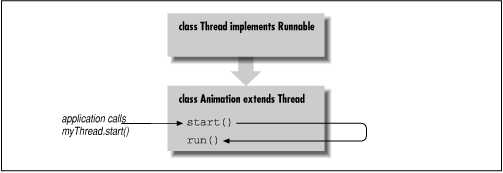
The skeleton of our Animation class above looks
much the same as before, except that our class is now a kind of
Thread. To go along with this scheme, the default
constructor of the Thread class makes
itself the default target. That is, by default, the
Thread executes its own
run()
method when we call the start() method, as shown in
Figure 8.2.
Now our subclass can just override the run()
method in the Thread class
(Thread simply defines an empty
run() method).
Now we create an instance of Animation
and call its start() method:
Animation bouncy = new Animation("Bouncy");
bouncy.start();
Alternatively, we can have the Animation
object start itself when it is created, as before:
class Animation extends Thread {

    Animation (String name) {
        start();
    }
    ...
Here our Animation object just calls its own
start() method when an instance is created.
(It's better form to start
and stop our objects explicitly after they're created.)
Subclassing Thread seems like a
convenient way to bundle a Thread and its
target run() method. However, this
approach often isn't the best design. If you subclass
Thread to implement a thread, you are
saying you need a new type of object that is a kind of
Thread. While there is something
unnaturally satisfying about taking an object that's primarily concerned with
performing a task and making it a type of Thread, the
actual situations where you'll want to create a subclass of
Thread should be rather rare. In most
cases, it will be more natural to let the requirements of your program
dictate the class structure. If you find
you're subclassing Thread left and right,
you may want to examine whether you are falling into the design trap
of making objects that are simply glorified functions.
Finally, we can build an adapter class to give us more control over
how to structure the code. It is convenient to create an anonymous
inner class that implements
Runnable and invokes an arbitrary method
in our object. This almost gives the feel of starting a thread and
telling it what method to run, as if we had method pointers. For
example, suppose that our Animation class
provides a method called startAnimating()
that does setup, loads the images, etc., and then starts a thread to
perform the actual animation loop. The animation loop is in a private
method called drawFrames(). We could use
an an adapter to run drawFrames() for us:
class Animation {

    public void startAnimating() {
        // Do setup, load images, etc.
        ...

        // Start a drawing thread
        myThread = new Thread ( new Runnable() {
            public void run() { drawFrames(); }
        } );
        myThread.start();
    }

    private void drawFrames() {
        // do animation ...
    }
}
In this code, the anonymous inner class implementing
Runnable is generated for us by the
compiler. We create a Thread with this
anonymous class as its target and have its
run() method call our
drawFrames() method. We have avoided
implementing a generic run() method in our
application code, but at the expense of generating an extra class.
We have seen the start() method used to
bring a newly created Thread to life.
Five other methods, listed below, let us control a
Thread's execution:
stop(),
suspend(),
resume(),
sleep() and
interrupt(). None of these methods take
any arguments; they all operate on the thread object on which they are
called.
The stop() method complements
start(); it destroys the
thread. start() and
stop() can be called only once in the life
of a Thread.
By contrast, the
suspend() and
resume() methods can be used to
arbitrarily pause and then restart the execution of a
Thread.
The
sleep() method causes a thread to wait for
a designated period of time.
The
interrupt() method can be used to wake up
a thread that is sleeping or is otherwise blocked on a long I/O
operation.[1]
[1]
interrupt()does not work in versions of Java prior to 1.1.
For simple tasks, it is often easy enough to throw away a thread when
we want to stop it and simply create a new one when want to proceed
again. suspend() and
resume()
can be used in situations where the Thread's
setup is very expensive. For example, if creating the thread involves
opening a socket and setting up some elaborate communication, it
probably makes more sense to use suspend() and
resume() with this thread.
We often need to tell a thread to wait, or "sleep," for a fixed period
of time. While a thread is asleep, or otherwise blocked on input of
some kind, it doesn't consume CPU time or compete
with other threads for processing. For this we can either call the
thread's sleep() method or use a
convenience method of the Thread class.
Thread.sleep() is a static method that
causes the currently executing thread to delay for a specified number
of milliseconds:
try {
    Thread.sleep( 1000 );
    // Thread.currentThread().sleep( 1000 );
}
catch ( InterruptedException e ) {
    // Someone woke us up prematurely
}
The call to Thread.sleep() is equivalent
to the "commented out" call
below it that calls sleep() explicitly on the
currently executing thread.
In any form,
sleep() throws an
InterruptedException if it is interrupted by
another Thread. To interrupt a thread,
call its interrupt() method.
As you see in the code above, the thread can catch this
exception and take the opportunity to perform some action, or perhaps just
go back to sleep.
Finally, if you need to coordinate your activities with
another thread by waiting for the other thread to complete its task,
you can use the join() method. Calling a
thread's join() method causes the caller to block
until the thread dies. Alternatively, you can
poll the thread by calling join() with a
number of milliseconds to wait. Later we'll look at a much more
general and powerful mechanism for coordinating the activities of
threads: wait() and
notify().
A Thread continues to execute until one of the
following things happens:
It returns from its target run() method
It's interrupted by an uncaught exception
Its stop() method is called
So what happens if the run() method for a thread
never terminates, and the application that started the thread never
calls its stop() method? The answer is that the
thread lives on, even after the application that created it has
finished. This means we have to be aware of how our threads eventually
terminate, or an application can end up leaving orphaned threads that
unnecessarily consume resources.
In many cases, we really want to create background threads
that do simple, periodic tasks in an application. The
setDaemon() method can be used to mark a
Thread as a daemon thread that should be killed and
discarded when no other application threads remain. Normally, the Java
interpreter continues to run until all threads have completed. But
when daemon threads are the only threads still alive, the interpreter
will exit.
Here's a devilish example using daemon threads:
class Devil extends Thread {

    Devil() {
        setDaemon( true );
        start();
    }

    public void run() {
        // Perform evil tasks
        ...
    }
}
In the above example, the Devil
thread sets its daemon status when it is created. If any Devil
threads remain when our application is otherwise complete, Java kills them
for us. We don't have to worry about cleaning them up.
Daemon threads are primarily useful in standalone Java applications
and in the implementation of the Java system itself, but not in
applets. Since an applet runs inside of another Java application, any
daemon threads it creates could continue to live until the controlling
application exits--probably not the desired effect. A browser or an application can use
ThreadGroups
to control all of the threads created by an application and clean them up
if necessary.
|  | |
| 7.3 Reflection |  | 8.2 Threading Applets |
