 | Chapter 8 Threads |  |

| Chapter 8 Threads | |
Applets are embeddable Java applications that are expected to be able to start and stop themselves on command. Unlike threads, applets can be started and stopped any number of times. A Java-enabled Web browser normally starts an applet when the applet is displayed and stops it when the user moves to another page or scrolls the applet out of view. We would like an applet to cease its nonessential activity when it is stopped and resume it when started again.
In this section, we will build UpdateApplet, a
simple base class for an Applet that maintains a
Thread to automatically update its display at
regular intervals. UpdateApplet handles the basic
starting and stopping behavior for us, as shown below:
public class UpdateApplet extends java.applet.Applet
    implements Runnable {

    private Thread updateThread;
    int updateInterval = 1000;

    public void run() {
        while ( true ) {
            try {
                Thread.sleep( updateInterval );
            }  catch (InterruptedException e ) { }

            repaint();
        }
    }

    public void start() {
        if ( updateThread == null ) {
            updateThread = new Thread(this);
            updateThread.start();
        }
    }
    public void stop() {
        if ( updateThread != null ) {
            updateThread.stop();
            updateThread = null;
        }
    }
}
UpdateApplet is a Runnable
object that alternately sleeps and calls its
repaint() method. It has two other public methods:
start() and stop(). These are
methods of the Applet class we are overriding;
do not confuse them with the similarly named methods of the
Thread class. These start() and
stop() methods are called by the Java environment
to tell the applet when it should and should not be running.
UpdateApplet illustrates an environmentally
friendly way to deal with threads in a simple
applet. UpdateApplet kills its thread each time the
applet is stopped and recreates it if the applet is restarted. When
UpdateApplet's start()
method is called, we first check to make sure there is no
currently executing updateThread. We then create
one to begin our execution. When our applet is subsequently stopped,
we kill the thread by invoking its stop() method
and throw away the reference by setting it to null.
Setting updateThread
to null serves both to allow the garbage collector to
clean up the dead Thread object, and to indicate to
UpdateApplet's start() method
that the thread is gone.
In truth, an Applet's
start() and stop() methods are
guaranteed to be called in sequence. As a result, we
shouldn't have to check for the existence of
updateThread in start() (it
should always be null). However, it's good
programming practice to perform the test. If we didn't, and for
some reason stop() were to fail at its job, we
might inadvertently start a lot of threads.
With UpdateApplet
doing all of the work for us, we can now create the world's simplest
clock applet with just a few lines of code, given below. Figure 8.3 shows our Clock.
(This might be a good one to run on your Java wristwatch.)
public class Clock extends UpdateApplet {
    public void paint( java.awt.Graphics g ) {
        g.drawString( new java.util.Date().toString(), 10, 25 );
    }
} 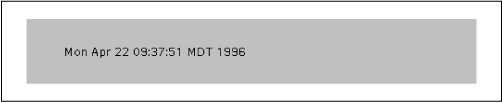
The java.util.Date().toString() sequence
simply creates a string that contains the current time.
Our Clock applet provides a good example of a
simple thread; we don't mind throwing it away and subsequently
rebuilding it if the user should happen to wander on and off of our
Web page a few times. But what if the task that our thread handles
isn't so simple? What if, for instance, we have to open a socket
and establish a connection with another system? One solution is to use
Thread's suspend() and
resume() methods, as I'll show you
in a moment.
Now if you've been wondering why we've been using
stop() to kill the thread, rather than using the
suspend() and resume() methods
all along, here's the explanation you've been waiting
for. The problem with applets is that we have no control over how a
user navigates Web pages. For example, say a user scrolls our applet
out of view, and we use suspend() to suspend the
applet. Now we have no way of ensuring that the user will bring the
applet back into view before moving on to another page. And actually,
the same situation would occur if the user simply moves on to another
page and never comes back.
If we call suspend(), we'd really like to
make sure we call resume() at a later date, or
we'll end up leaving the thread hanging in permanent
suspense. But we have no way of knowing if the applet will ever be
restarted, so just putting a call to resume() in
the applet's start() method won't
work. Leaving the suspended thread around forever might not hurt us,
but it's not good programming practice to be wasteful. What we
need is a way to guarantee we can clean up our mess if the applet
is never used again. What to do?
There is a solution for this dilemma, but in many cases, like with our
simple Clock, it's just easier to use
stop(), with a subsequent call to
start() if necessary. In cases where it is
expensive to set up and tear down a thread, we could make the
following modifications to UpdateApplet:
public void start() {
    if ( updateThread == null ) {
        updateThread = new Thread(this);
        updateThread.start();
    }
    else
        updateThread.resume();
}

public void stop() {
    updateThread.suspend();
}

public void destroy() {
    if ( updateThread != null ) {
        updateThread.stop();
        updateThread = null;
    }
}
These modifications change UpdateApplet so that it
suspends and restarts its updateThread, rather than
killing and recreating it. The new start() method
creates the thread and calls start() if
updateThread is null; otherwise
it assumes that the thread has been suspended, so it calls
resume(). The applet's
stop() method simply suspends the thread by calling
suspend().
What's new here is the destroy() method. This
is another method that UpdateApplet inherits from
the Applet class. The method is called by the Java
environment when the applet is going to be removed (often from a
cache). It provides a place where we can free up any resources
the applet is holding. This is the perfect place to cut the suspense
and clean up after our thread. In our destroy()
method, we check to see that the thread exists, and if it does, we
call stop() to kill it and set its reference to
null.
|  | |
| 8.1 Introducing Threads |  | 8.3 Synchronization |
