 | Chapter 8 Threads |  |

| Chapter 8 Threads | |
Java makes few guarantees about how it schedules threads. Almost all of Java's thread scheduling is left up to the Java implementation and, to some extent, the application. Although it might have made sense (and would certainly have made many developers happier) if Java's developers had specified a scheduling algorithm, a single scheduling algorithm isn't necessarily suitable for all of the roles that Java can play. Instead, JavaSoft decided that it is better for you to write robust code that works whatever the scheduling algorithm, and let the implemenation tune the algorithm for whatever is best.
Therefore, the priority rules that we'll describe next are carefully worded in the Java language specification to be a general guideline for thread scheduling. You should be able to rely on this behavior overall (statistically), but it is not a good idea to write code that relies on very specific features of the scheduler to work properly. You should instead use the control and synchronization tools that we have described in this chapter to coordinate your threads.[3]
[3] Java Threads, by Scott Oaks and Henry Wong (O'Reilly), includes a detailed discussion of synchronization, scheduling, and other thread-related issues.
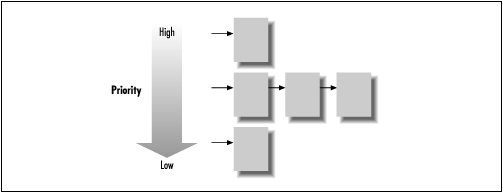
Every thread has a priority value. If, at any time, a thread of a higher priority than the current thread becomes runnable, it preempts the lower priority thread and begins executing. By default, threads at the same priority are scheduled round robin, which means once a thread starts to run, it continues until it does one of the following:
Calls Thread.sleep() or wait()
Waits for a lock in order to run a synchronized method
Blocks, for example, in a read() or an
accept() call
Calls yield()
Completes its target method or is terminated by a
stop() call
This situation looks something like what's shown in Figure 8.4.
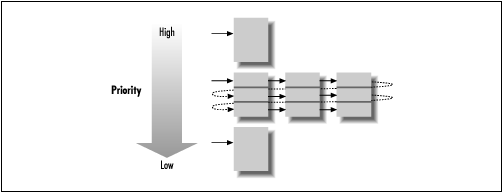
In addition to prioritization, many systems implement time slicing of threads.[4]
[4] As of Java Release 1.0, Sun's Java Interpreter for the Windows 95 and Windows NT platforms uses time slicing, as does the Netscape Navigator Java environment. Sun's Java 1.0 for the Solaris UNIX platforms doesn't.
In a time-sliced system, thread processing is chopped up, so that each thread runs for a short period of time before the context is switched to the next thread, as shown in Figure 8.5.
Higher priority threads still preempt lower priority threads in this scheme. The addition of time slicing mixes up the processing among threads of the same priority; on a multiprocessor machine, threads may even be run simultaneously. This can introduce a difference in behavior for applications that don't use threads and synchronization properly.
Since Java doesn't guarantee time slicing, you shouldn't write code that relies on this type of scheduling; any software you write needs to function under the default round-robin scheduling. If you're wondering what your particular flavor of Java does, try the following experiment:
class Thready {
    public static void main( String args [] ) {
        new MyThread("Foo").start();
        new MyThread("Bar").start();
    }
}

class MyThread extends Thread {
    String message;

    MyThread ( String message ) {
        this.message = message;
    }

    public void run() {
        while ( true )
            System.out.println( message );
    }
}
The Thready class starts up two
MyThread objects. Thready is a
thread that goes into a hard loop (very bad form) and prints its
message. Since we don't specify a priority for either thread,
they both inherit the priority of their creator, so they have the same
priority. When you run this example, you will see how your Java
implementation does its scheduling. Under a round-robin scheme, only
"Foo" should be printed; "Bar" never
appears. In a time-slicing implementation, you should occasionally see the
"Foo" and "Bar" messages alternate.
Now let's change the priority of the second thread:
class Thready {
    public static void main( String args [] ) {
        new MyThread("Foo").start();
        Thread bar = new MyThread("Bar");
        bar.setPriority( Thread.NORM_PRIORITY + 1 );
        bar.start();
    }
}
As you might expect, this changes how our example behaves. Now you may see a few "Foo" messages, but "Bar" should quickly take over and not relinquish control, regardless of the scheduling policy.
Here we have used the setPriority() method of the
Thread class to adjust our thread's
priority. The Thread class defines three standard
priority values, as shown in Table 8.1.
| Value | Definition |
|---|---|
MIN_PRIORITY | Minimum priority |
NORM_PRIORITY | Normal priority |
MAX_PRIORITY | Maximum priority |
If you need to change the priority of a thread, you should use one of
these values or a close relative value. But let me warn you against
using MAX_PRIORITY or a close relative value; if
you elevate many threads to this priority level, priority will quickly
become meaningless. A slight increase in priority should be enough for
most needs. For example, specifying NORM_PRIORITY + 1 in
our example is enough to beat out our other thread.
Whenever a thread sleeps, waits, or blocks on I/O,
it gives up its time slot, and another thread is scheduled. So as
long as you don't write methods that use hard loops, all threads
should get their due. However, a Thread can also
give up its time voluntarily with the yield()
call. We can change our previous example to include a
yield() on each iteration:
class MyThread extends Thread {
    ...

    public void run() {
        while ( true ) {
            System.out.println( message );
            yield();
        }
    }
}
Now you should see "Foo" and "Bar" messages alternating one for one. If you have threads that perform very intensive calculations, or otherwise eat a lot of CPU time, you might want to find an appropriate place for them to yield control occasionally. Alternatively, you might want to drop the priority of your intensive thread, so that more important processing can proceed around it.
I mentioned the possibility that different threads could run on different processors. This would be an ideal Java implementation. Unfortunately, most implementations don't even allow multiple threads to run in parallel with other processes running on the same machine. The most common implementations of threads today effectively simulate threading for an individual process like the Java virtual machine. One feature that you might want to look for in the future is called native threads. This means that Java is able to use the real (native) threading mechanism of the host environment, which should perform better and, ideally, could allow multi-processor operation.
|  | |
| 8.3 Synchronization |  | 8.5 Thread Groups |
