 | Chapter 10 |  |

| Chapter 10 | |
Contents:
Streams
Files
Serialization
Data Compression
In this chapter, we'll continue our exploration of the Java
API by looking at many of the classes in the
java.io package.
Figure 10.1 shows the
class hierarchy of the java.io package.
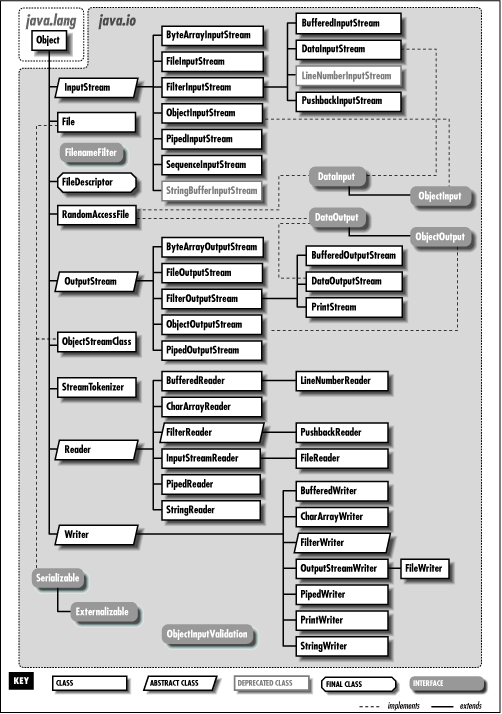
We'll start by looking at the stream classes in
java.io; these classes are all subclasses of the
basic InputStream, OutputStream, Reader, and
Writer classes. Then we'll examine the
File class and discuss how you can interact with
the filesystem using classes in java.io. Finally,
we'll take a quick look at the data compression classes provided in
java.util.zip.
All fundamental I/O in Java is based on streams. A stream represents a flow of data, or a channel of communication with (at least conceptually) a writer at one end and a reader at the other. When you are working with terminal input and output, reading or writing files, or communicating through sockets in Java, you are using a stream of one type or another. So that you can see the forest without being distracted by the trees, I'll start by summarizing the different types of streams:
InputStream/OutputStreamAbstract classes that define the basic functionality
for reading or writing an unstructured sequence of
bytes. All other byte streams in Java are built on top of
the basic InputStream and OutputStream.
Reader/Writer
Abstract classes that define the basic functionality
for reading or writing an unstructured sequence of
characters. All other character streams in Java are built on top of
Reader and Writer.
InputStreamReader/OutputStreamWriter"Bridge" classes that convert bytes to characters and vice versa.
DataInputStream/DataOutputStreamSpecialized stream filters that add the ability to
read and write simple data types like numeric primitives and
String objects.
ObjectInputStream/ObjectOutputStreamSpecialized stream filters that are capable of writing serialized Java objects and reconstructing them.
BufferedInputStream/BufferedOutputStream/BufferedReader/ BufferedWriterSpecialized streams that add buffering for additional efficiency.
PrintWriterA specialized character stream that makes it simple to print text.
PipedInputStream/PipedOutputStream
/PipedReader/PipedWriter"Double-ended" streams that always occur in pairs. Data written
into a PipedOutputStream or PipedWriter
is read from its corresponding PipedInputStream or
PipedReader.
FileInputStream/FileOutputStream
/FileReader/FileWriterImplementations of InputStream, OutputStream,
Reader, and
Writer that read from and write to files on
the local filesystem.
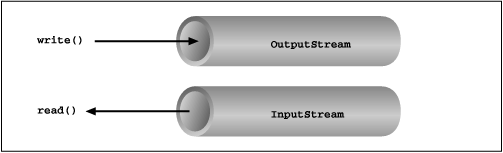
Streams in Java are one-way streets. The
java.io input and
output classes represent the ends of
a simple stream, as shown in Figure 10.2. For
bidirectional conversations, we use one of each type of stream.
InputStream and OutputStream are
abstract classes that define the lowest-level
interface for all byte streams. They contain methods for reading or writing
an unstructured flow of byte-level data. Because these classes are
abstract, you can never create a "pure" input or output stream. Java
implements subclasses of these for activities like reading and writing
files and communicating with sockets. Because all byte streams inherit the
structure of InputStream or
OutputStream, the various kinds of byte streams can be
used interchangeably. For example, a method often takes an
InputStream as an argument. This means the method
accepts any subclass of InputStream. Specialized
types of streams can also be layered to provide features, such as buffering or handling larger data types.
In Java 1.1, new classes based around Reader and
Writer were added
to the java.io package. Reader and
Writer are very much like InputStream and
OutputStream, except that they deal with characters instead
of bytes. As true character streams, these classes correctly handle Unicode characters,
which was not always the case with the byte streams. However, some sort of
bridge is needed between these character streams and the byte streams of
physical devices like
disks and networks. InputStreamReader and
OutputStreamWriter are special classes that use
an encoding scheme
to translate between character and byte streams.
We'll discuss all of the interesting stream types in this
section, with the exception of FileInputStream,
FileOutputStream, FileReader, and
FileWriter. We'll postpone the
discussion of file streams until the next section, where we'll
cover issues involved with accessing the filesystem in
Java.
The prototypical example of an InputStream object
is the standard input of a Java application. Like
stdin in C or cin in C++, this
object reads data from the program's environment, which is
usually a terminal window or a command pipe. The
java.lang.System class, a general repository for
system-related resources, provides a reference to standard input in
the static variable in.
System also provides objects for standard output
and standard error in the out and
err variables, respectively. The following example
shows the correspondence:
InputStream stdin = System.in;
OutputStream stdout = System.out;
OutputStream stderr = System.err;
This example hides the fact that System.out
and System.err aren't really
OutputStream objects, but more specialized
and useful PrintStream objects. I'll explain
these later, but for now we can reference
out and err as
OutputStream objects, since they are a kind of
OutputStream by inheritance.
We can read a single byte at a time from standard input with
the InputStream's read()
method. If you look closely at the API,
you'll see that the read() method of the base
InputStream class is actually an
abstract method. What lies behind
System.in is an implementation of
InputStream, so it's valid to call
read() for this stream:
try {
    int val = System.in.read();
    ...
}
catch ( IOException e ) {
}
As is the convention in C, read() provides a byte
of information, but its return type is int. A
return value of -1 indicates a normal end of
stream has been reached; you'll need to test for this condition
when using the simple read() method. If an
error occurs during the read, an IOException is
thrown.
All basic input and output stream commands can throw an
IOException, so you should arrange to catch
and handle them as appropriate.
To retrieve the value as a byte, perform the cast:
byte b = (byte) val;
Of course, you'll need to check for the end-of-stream condition
before you perform the cast. An overloaded form of
read() fills a byte array with as much data as
possible up to the limit of the array size and returns the number of
bytes read:
byte [] bity = new byte [1024];
int got = System.in.read( bity );
We can also check the number of bytes available for reading on an
InputStream with the available()
method. Once we have that information, we can create an array of
exactly the right size:
int waiting = System.in.available();
if ( waiting > 0 ) {
    byte [] data = new byte [ waiting ];
    System.in.read( data );
    ...
}
InputStream provides the skip()
method as a way of jumping over a number of bytes. Depending on the
implementation of the stream and if you aren't interested in the
intermediate data, skipping bytes may be more efficient than reading
them. The close() method shuts down the stream and
frees up any associated system resources. It's a good
idea to close a stream when you are done using it.
The InputStream and OutputStream subclasses
of Java 1.0.2 included methods for reading and writing strings, but most of them
operated by assuming that a 16-bit Unicode character was equivalent to an
8-bit byte in the stream. This only works for Latin-1 (ISO8859-1) characters, so
the character stream classes Reader and Writer
were introduced in Java 1.1. Two special classes, InputStreamReader
and OutputStreamWriter, bridge the gap between the world of
character streams and the world of byte streams. These are character streams that are
wrapped around an underlying byte stream. An encoding scheme is used to convert
between bytes and characters. An encoding scheme name can be specified in the constructor
of InputStreamReader or OutputStreamWriter. Another constructor
simply accepts the underlying stream and uses the system's default encoding scheme. For example, let's parse a human-readable
string from the standard input into an integer. We'll assume that the bytes coming from
System.in use the system's default encoding scheme:
try {
    InputStreamReader converter = new InputStreamReader(System.in);
    BufferedReader in = new BufferedReader(converter);

    String text = in.readLine();
    int i = NumberFormat.getInstance().parse(text).intValue();
}
catch ( IOException e ) { }
catch ( ParseException pe ) { }
First, we wrap an InputStreamReader around System.in.
This object converts the incoming bytes of System.in to characters
using the default encoding scheme. Then, we wrap a BufferedReader around
the InputStreamReader. BufferedReader gives us
the readLine() method, which we can use to convert a full
line of text into a String. The string is then parsed into an
integer using the techniques described in Chapter 9.
We could have programmed the previous example using only byte streams, and it would have worked for users in the United States, at least. So why go to the extra trouble of using character streams? Character streams were introduced in Java 1.1 to correctly support Unicode strings. Unicode was designed to support almost all of the written languages of the world. If you want to write a program that works in any part of the world, in any language, you definitely want to use streams that don't mangle Unicode.
So how do you decide when you need a byte stream and when you need a character
stream? If you want to read or write character strings, use some variety of Reader
or Writer. Otherwise, a byte stream should suffice. Let's say,
for example, that you want to read strings from a file that was written by
a Java 1.0.2 application. In this case, you could simply create a
FileReader, which will convert the bytes
in the file to characters using the system's default encoding scheme. If
you have a file in a specific encoding scheme, you can create an
InputStreamReader with that encoding
scheme and read characters from it. Another example comes from the
Internet. Web servers serve files as byte streams. If you want to read
Unicode strings from
a file with a particular encoding scheme, you'll need an appropriate
InputStreamReader wrapped around the
socket's InputStream.
What if we want to do more than read and write a mess of bytes or characters? Many of the
InputStream,
OutputStream, Reader, and
Writer classes wrap other streams and add new
features. A filtered stream takes another stream in its constructor; it delegates calls
to the underlying stream while doing some additional processing of its
own.
In Java 1.0.2, all wrapper streams were subclasses of FilterInputStream and
FilterOutputStream. The character stream classes
introduced in Java 1.1 break this pattern, but they operate in the same way. For
example, BufferedInputStream extends
FilterInputStream in the byte world, but
BufferedReader extends Reader
in the character world. It doesn't really matter--both classes accept a stream in
their constructor and perform buffering. Like the byte stream classes,
the character stream classes include the abstract
FilterReader and FilterWriter
classes, which simply pass all method calls to an underlying stream.
The FilterInputStream, FilterOutputStream,
FilterReader, and
FilterWriter classes themselves aren't
useful; they must be subclassed and specialized to create a new type
of filtering operation. For example, specialized wrapper streams like
DataInputStream and
DataOutputStream provide additional methods
for reading and writing primitive data types.
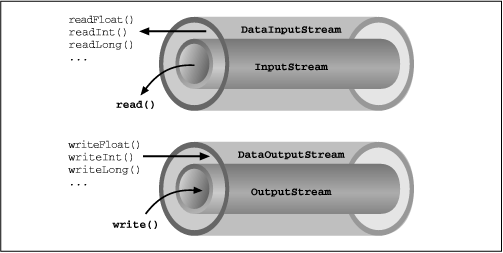
As we said, when you create an instance of a filtered stream,
you specify another stream in the constructor. The specialized
stream wraps an additional layer of functionality around the other
stream, as shown in Figure 10.3. Because filtered
streams themselves are subclasses of the fundamental
stream
types, filtered streams can be layered on top of each other to provide
different combinations of features. For example, you could wrap a
PushbackReader around a LineNumberReader
that was wrapped around a FileReader.
DataInputStream and
DataOutputStream are filtered streams that let you read or write strings and
primitive data types that comprise
more than a single byte. DataInputStream and
DataOutputStream implement the
DataInput and
DataOutput interfaces, respectively. These
interfaces define the methods required for streams that read and write
strings and Java primitive types in a machine-independent manner.
You can construct a DataInputStream from an
InputStream and then use a method like
readDouble() to read a primitive data type:
DataInputStream dis = new DataInputStream( System.in );
double d = dis.readDouble();
The above example wraps the standard input stream in a
DataInputStream and uses it to read a double
value. readDouble() reads bytes from the stream
and constructs a double from them.
All DataInputStream methods
that read primitive types also read binary information.
The DataOutputStream class provides write methods
that correspond to the read methods in DataInputStream.
For example, writeInt() writes an integer in
binary format to the underlying output stream.
The readUTF() and
writeUTF() methods of
DataInputStream and
DataOutputStream read and write a Java
String of Unicode characters using the
UTF-8 "transformation format."
UTF-8 is an ASCII-compatible
encoding of Unicode characters commonly used for the
transmission and storage of Unicode text.[1]
[1] Check out the URL http://www.stonehand.com/unicode/standard/utf8.html for more information on UTF-8.
We can use a DataInputStream with any kind
of input stream, whether it be from a file, a socket, or standard
input. The same applies to using a
DataOutputStream, or, for that matter, any other
specialized streams in java.io.
The BufferedInputStream,
BufferedOutputStream,
BufferedReader, and
BufferedWriter classes add a data
buffer of a specified size to the stream path. A buffer can increase
efficiency by reducing the number of physical read or write operations
that correspond to read() or
write() method calls. You create a buffered stream
with an appropriate input or output stream and a buffer
size. Furthermore, you can wrap another stream around a buffered
stream so that it benefits from the buffering. Here's a simple
buffered input stream:
BufferedInputStream bis = new BufferedInputStream(myInputStream, 4096);
...
bis.read();
In this example, we specify a buffer size of 4096 bytes. If we leave
off the size of the buffer in the constructor, a reasonably sized one
is chosen for us. On our first call to read(),
bis tries to fill the entire 4096-byte buffer with
data. Thereafter, calls to read() retrieve data
from the buffer until it's empty.
A BufferedOutputStream works in a similar
way. Calls to write() store the data in a buffer;
data is actually written only when the buffer fills up. You can also
use the flush() method to wring out the contents of
a BufferedOutputStream before the buffer is full.
Some input streams like BufferedInputStream
support the ability to mark a location in the data and later reset the
stream to that position. The mark() method sets the
return point in the stream. It takes an integer value that specifies
the number of bytes that can be read before the stream gives up and
forgets about the mark. The reset() method returns
the stream to the marked point; any data read after the call
to mark() is read again.
This functionality is especially useful when you are reading
the stream in a parser. You may occasionally fail to parse a structure
and so must try something else. In this situation, you can have your
parser generate an error (a homemade
ParseException) and then reset the stream to the
point before it began parsing the structure:
BufferedInputStream input;
...
try {
    input.mark( MAX_DATA_STRUCTURE_SIZE );
    return( parseDataStructure( input ) );
}
catch ( ParseException e ) {
    input.reset();
    ...
}
The BufferedReader and
BufferedWriter classes work just
like their byte-based counterparts, but operate on characters instead of
bytes.
Another useful wrapper stream is
java.io.PrintWriter. This class provides a suite of
overloaded print() methods that turn their
arguments into strings and push them out the stream. A complementary
set of println() methods adds a newline to the end
of the strings. PrintWriter is the more
capable big brother of the PrintStream
byte stream. PrintWriter is an
unusual character stream because it can wrap either an OutputStream
or another Writer. The System.out and
System.err streams are
PrintStream objects; you have already seen such
streams strewn throughout this book:
System.out.print("Hello world...\n");
System.out.println("Hello world...");
System.out.println( "The answer is: " + 17 );
System.out.println( 3.14 );
In Java 1.1, the
PrintStream class has been enhanced
to translate characters to bytes using the system's default
encoding scheme. Although PrintStream
is not deprecated in Java 1.1, its constructors are. For all new
development, use a PrintWriter instead of
a PrintStream. Because a
PrintWriter can wrap an
OutputStream, the two classes are
interchangeable.
When you create a PrintWriter object, you
can pass an additional boolean value to the
constructor. If this value is true, the
PrintWriter automatically performs a
flush() on the underlying
OutputStream or Writer
each time it sends a newline:
boolean autoFlush = true;
PrintWriter p = new PrintWriter( myOutputStream, autoFlush );
When this technique is used with a buffered output stream, it corresponds to the behavior of terminals that send data line by line.
Unlike methods in other stream classes,
the methods of PrintWriter
and PrintStream
do not throw
IOExceptions.
Instead, if we are
interested, we can check for errors with the
checkError() method:
System.out.println( reallyLongString );
if ( System.out.checkError() )                // Uh oh
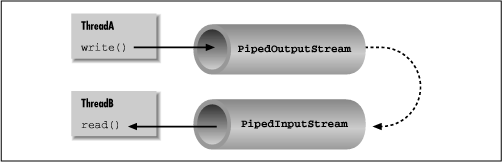
Normally, our applications are directly involved with one side of
a given stream at a time. PipedInputStream
and PipedOutputStream (or
PipedReader
and PipedWriter), however, let us
create two sides of a stream and connect them together, as shown in
Figure 10.4. This provides a stream
of communication between threads, for example.
To create a pipe, we use both a
PipedInputStream and a
PipedOutputStream. We can simply choose a side and
then construct the other side using the first as an argument:
PipedInputStream pin = new PipedInputStream();
PipedOutputStream pout = new PipedOutputStream( pin );
Alternatively:
PipedOutputStream pout = new PipedOutputStream( );
PipedInputStream pin = new PipedInputStream( pout );
In each of these examples, the effect is to produce an input
stream, pin, and an output stream,
pout, that are connected. Data written to
pout can then be read by pin. It
is also possible to create the PipedInputStream and
the PipedOutputStream separately, and then connect
them with the connect() method.
We can do exactly the same thing in the character-based world, using
PipedReader and
PipedWriter in place of
PipedInputStream and
PipedOutputStream.
Once the two ends of the pipe are connected, use the two
streams as you would other input and output
streams. You can use read() to read data from the
PipedInputStream (or PipedReader)
and write() to
write data to the PipedOutputStream