 | Chapter 18 Java Beans |  |

| Chapter 18 Java Beans | |
So far, we've seen how to create and use Beans within a Bean application builder environment. That is the primary role of a Java Bean in development. But Beans are not limited to being used by automated tools. There's no reason we can't use Beans in handwritten code. You might use a builder to assemble Beans for the user interface of your application and then load that serialized Bean collection in your own code. We'll give an example of that in a moment.
Beans are an abstraction over simple Java classes. They add, by convention, features that are not part of the Java language. Over the course of the next year, the JavaBeans specification will evolve to give Beans even greater capabilities. The goal is to allow groups of Beans to work together as an aggregate or a sort of "virtual Bean."
To enable us to treat a collection of Beans as a single type within
the Java language, we have to use some special tools. Specifically,
when working with Beans, we need replacements for three basic Java
operations: creating an object with new,
checking the type of an object with the
instanceof operator, and casting a type
with a cast expression. In place of these, use the corresponding
static methods of the java.beans.Beans
class, shown in Table 18.1.
| Operator | Equivalent |
|---|---|
new | Beans.instantiate(classloader, name) |
instanceof | Beans.isInstanceOf(object, class) |
explicit cast | Beans.getInstanceOf(object, class) |
Beans.instantiate() is the
new operation for Beans. It takes a
classloader and
the name of a Bean class or serialized Bean as arguments. Its
advantage over the new operator is that it
can also load Beans from a serialized class. If you use
intantiate(), you don't have to specify in
advance whether you will provide the Bean as a class or as a
serialized object.
Beans.isInstanceOf() and
Beans.getInstanceOf() do the jobs of
checking a Bean's type and casting it to a new type. In the future
these methods will be used to let Beans take control of this behavior,
providing different "views" of themselves.
Remember the tip calculator we developed a few sections back? I asked you
to serialize the BeanBox container and save it. As I
mentioned earlier, BeanBox is a Bean itself. We can therefore pull
the serialized BeanBox along with all of our
previous work into another application and use it just as we had left
it. We'll assume that you saved the serialized BeanBox in a file
called tipcalc.ser.
Compile the following small application:
import java.awt.*;
import java.beans.*;

public class MyApplication extends Frame {

    public MyApplication() {
        super("Tip Calculator");
        try {
            Object bean = Beans.instantiate(
                getClass().getClassLoader(), "tipcalc" );

            if ( Beans.isInstanceOf(bean, Component.class) ) {
                Component comp =
                    (Component)Beans.getInstanceOf(bean, Component.class);
                add("Center", comp);
            } else
                System.out.println("Bean is not a Component...");

        } catch ( java.io.IOException e1 ) {
			// Error loading the serialized object
        } catch ( ClassNotFoundException e2 ) {
			// Can't find the class that goes with the object
        }
        pack();
    }

    public static void main(String [] args) {
        new MyApplication().show();
    }
}
Run this program, making sure that the BeanBox classes and our magicbeans.jar file are in your class path. You should see the restored BeanBox, just as you left it, as shown in Figure 18.10.
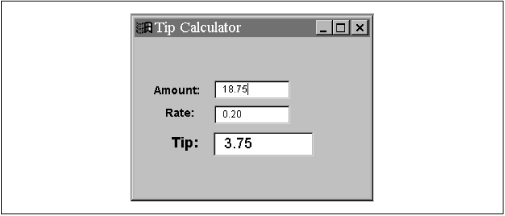
Here we use Beans.instantiate() to load
our serialized Bean by name. Then we check to see if it is a GUI
component using Beans.isInstanceOf(). (It
is because the BeanBox itself is a subclass of
java.awt.Panel.) Finally, we cast the
instantiated object to a Component with
Beans.getInstanceOf() and add it to our
application's Frame. Notice that we still
need a static Java cast to turn the Object returned by
getInstanceOf() into a
Component. This cast may seem gratuitous;
in the future, an aggregate Bean consisting of
several simple Beans could use this feature to present an
object with the desired behavior.
One important question remains: how does
instantiate() find a Bean using the name
"tipcalc"? First, it appends the extension .ser to form the
filename tipcalc.ser. If it can find this file anywhere
along the class path, it loads it as a serialized Bean. It also needs
the serialized Bean's original .class file; the name of that
file is included in the serialized object and usually doesn't have
any relation to the name of the serialized object. (In this case,
instantiate() would look for
BeanBox.class and the classes for the components in the
BeanBox.)
If the .ser file doesn't exist,
instantiate() appends .class to
the name (in this case, yielding tipcalc.class) and looks
for a class file. In this case,
instantiate() instantiates the Bean like
any other object--that is, with the new
operator.
|  | |
| 18.2 Building Beans |  | 18.4 Putting Reflection to Work |
