 | Chapter 15 Layout Managers |  |

| Chapter 15 Layout Managers | |
GridLayout arranges components into regularly
spaced rows and columns. The components are arbitrarily resized to fit in
the resulting areas; their minimum and preferred sizes are
consequently ignored. GridLayout is most useful
for arranging very regular, identically sized objects and for allocating
space for Panels to hold other layouts in each region of the container.
GridLayout takes the number of rows and
columns in its constructor. If you subsequently give it too many
objects to manage, it adds extra columns to make the objects fit. You
can also set the number of rows or columns to zero, which means that
you don't care how many elements the layout manager packs in
that dimension. For example, GridLayout(2,0)
requests a layout with two rows and an unlimited number of columns; if
you put ten components into this layout, you'll get two rows of
five columns each.
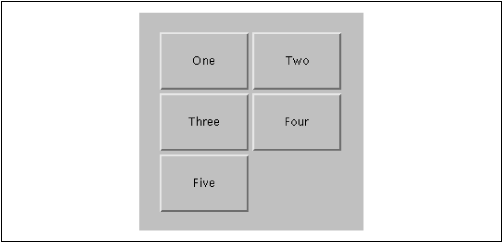
The following applet sets a GridLayout with
three rows and two columns as its layout manager; the results are
shown in Figure 15.3.
import java.awt.*;

public class Grid extends java.applet.Applet {
    public void init() {
        setLayout( new GridLayout( 3, 2 ));
        add( new Button("One") );
        add( new Button("Two") );
        add( new Button("Three") );
        add( new Button("Four") );
        add( new Button("Five") );
    }
}
The five buttons are laid out, in order, from left to right, top to bottom, with one empty spot.
|  | |
| 15.1 FlowLayout |  | 15.3 BorderLayout |
