 | Chapter 12 Working with URLs |  |

| Chapter 12 Working with URLs | |
A URL object uses a protocol handler to establish a
connection with a server and perform whatever protocol is necessary to
retrieve data. For example, an HTTP protocol
handler knows how to talk to an HTTP server and
retrieve a document; an FTP protocol handler knows
how to talk to an FTP server and retrieve a
file. All types of URLs use protocol handlers to
access their objects. Even the lowly "file" type
URLs use a special "file" protocol handler that
retrieves files from the local filesystem. The data a protocol
handler retrieves is then fed to an appropriate content handler for
interpretation.
While we refer to a protocol handler as a single entity, it
really has two parts: a java.net.URLStreamHandler
and a java.net.URLConnection. These are both
abstract classes we will subclass to create
our protocol handler. (Note that these are abstract
classes, not interfaces. Although they contain abstract methods we are
required to implement,
they also contain many utility methods we can use or override.)
The URL looks up an appropriate
URLStreamHandler, based on the protocol component
of the URL. The
URLStreamHandler
then finishes parsing the URL and creates a
URLConnection when it's time to communicate with
the server. The URLConnection represents a single
connection with a server, and implements the communication protocol
itself.
Protocol handlers are organized in a package hierarchy similar to
content handlers. But unlike content handlers, which are grouped into
packages by the MIME types of the objects that they
handle, protocol handlers are given individual packages. Both parts of
the protocol handler (the URLStreamHandler class
and the URLConnection class) are located in a
package named for the protocol they support.
For example, if we wrote an FTP protocol
handler, we might put it in an
exploringjava.protocolhandlers.ftp
package. The URLStreamHandler is placed in this
package and given the name Handler; all
URLStreamHandlers are named
Handler and distinguished by the package in which
they reside. The URLConnection portion of the
protocol handler is placed in the same package and can be given any
name. There is no need for a naming convention because the
corresponding URLStreamHandler is responsible for
creating the URLConnection objects it uses.
As with content handlers, Java locates packages containing protocol handlers
using the java.protocol.handler.pkgs system
property. The value of this property is a list of package names; if
more than one package is in the list, use a vertical bar (|) to
separate them. For our example, we will set this property to include
exploringjava.protocolhandlers.
The URL,
URLStreamHandler,
URLConnection, and
ContentHandler
classes work together closely. Before diving into an example,
let's take a step back, look at the parts a little more,
and see how these things communicate. Figure 12.4
shows how these components relate to each other.
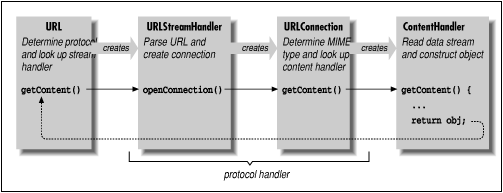
We begin with the URL object, which points
to the resource we'd like to retrieve. The
URLStreamHandler helps the URL
class parse the URL specification string for its
particular protocol. For example, consider the following call to the
URL constructor:
URL url = new URL("protocol://foo.bar.com/file.ext");
The URL class parses only the protocol component;
later, a call to the URL class's
getContent() or openStream()
method starts the machinery in motion. The URL
class locates the appropriate protocol handler by looking in the
protocol-package hierarchy. It then creates an instance of the
appropriate URLStreamHandler class.
The URLStreamHandler is responsible for
parsing the rest of the URL string, including
hostname and filename, and possibly an alternative port
designation. This allows different protocols to have their own
variations on the format of the URL specification
string. Note that this step is skipped when a URL
is constructed with the "protocol," "host," and "file"
components specified explicitly. If the protocol is straightforward,
its URLStreamHandler class can let Java do the
parsing and accept the default behavior. For this illustration,
we'll assume that the URL string requires no
special parsing. (If we use a nonstandard
URL with a strange format, we're responsible
for parsing it ourselves, as I'll show shortly.)
The URL object next invokes the
handler's openConnection() method, prompting
the handler to create a new URLConnection to the
resource. The URLConnection performs whatever
communications are necessary to talk to the resource and begins to
fetch data for the object. At that time, it also determines the
MIME type of the incoming object data and prepares
an InputStream to hand to the appropriate content
handler. This InputStream must send
"pure" data with all traces of the protocol removed.
The URLConnection also locates an
appropriate content handler in the content-handler package
hierarchy. The URLConnection creates an instance of
a content handler; to put the content handler to work, the
URLConnection's
getContent() method calls the content
handler's getContent() method. If this sounds
confusing, it is: we have three getContent() methods
calling each other in a chain. The newly created
ContentHandler object then acquires the stream of
incoming data for the object by calling the
URLConnection's
getInputStream() method. (Recall that we acquired
an InputStream in our x_tar
content handler.) The content handler reads the stream and constructs
an object from the data. This object is then returned up the
getContent() chain: from the content handler, the
URLConnection, and finally the
URL itself. Now our application has the desired
object in its greedy little hands.
To summarize, we create a protocol handler by implementing a
URLStreamHandler class that creates specialized
URLConnection objects to handle our protocol. The
URLConnection objects implement the
getInputStream() method, which provides data to a
content handler for construction of an object. The base
URLConnection class implements many of the methods
we need; therefore, our URLConnection needs only to
provide the methods that generate the data stream and return the
MIME type of the object data.
Okay. If you're not thoroughly confused by all that terminology (or even if you are), let's move on to the example. It should help to pin down what all these classes are doing.
In this section, we'll build a crypt protocol handler. It parses URLs of the form:
crypt:type://hostname[:port]/location/item
type is an identifier that specifies
what kind of
encryption to use. The protocol itself is a simplified version of
HTTP; we'll implement the
GET command and no more. I added the
type identifier to the
URL to
show how to parse a nonstandard URL
specification. Once the handler has figured out the encryption type,
it dynamically loads a class that implements the chosen encryption
algorithm and uses it to retrieve the data. Obviously, we don't
have room to implement a full-blown public-key encryption algorithm,
so we'll use the rot13InputStream class from
Chapter 10. It should be apparent
how the example can
be extended by plugging in a more powerful encryption class.
First, we'll lay out our plug-in encryption class. We'll
define an abstract class called
CryptInputStream that provides some essentials for
our plug-in encrypted protocol. From the
CryptInputStream we'll create a
subclass called rot13CryptInputStream, that implements
our particular kind of encryption:
package exploringjava.protocolhandlers.crypt;

import java.io.*;

abstract class CryptInputStream extends InputStream {
    InputStream in;
    OutputStream out;
    abstract public void set( InputStream in, OutputStream out );
}

class rot13CryptInputStream extends CryptInputStream {

    public void set( InputStream in, OutputStream out ) {
        this.in = new exploringjava.io.rot13InputStream( in );
    }
    public int read() throws IOException {
        return in.read();
    }
}
Our CryptInputStream class defines a method called
set() that passes in the
InputStream it's to translate. Our
URLConnection calls set() after
creating an instance of the encryption class. We need a
set() method because we want to load the encryption
class dynamically, and we aren't allowed to pass arguments to
the constructor of a class when it's dynamically loaded. (We noticed
this same issue in our content handler previously.) In the encryption class,
we also provide for the possibility of an
OutputStream. A more complex
kind of encryption might use the OutputStream to
transfer public-key information. Needless to say,
rot13 doesn't, so we'll ignore the
OutputStream here.
The implementation of rot13CryptInputStream
is very simple. set() just takes the
InputStream it receives and wraps it with the
rot13InputStream filter. read() reads filtered data
from the InputStream, throwing an exception if
set() hasn't been called.
Next we'll build our URLStreamHandler class.
The class name is Handler; it extends the
abstract URLStreamHandler
class. This is the class the Java URL looks up
by converting the protocol name (crypt) into a
package name. Remember that Java expects this class to be named
Handler, and to live in a package named
for the protocol type.
package exploringjava.protocolhandlers.crypt;

import java.io.*;
import java.net.*;

public class Handler extends URLStreamHandler {

    protected void parseURL(URL url, String spec, int start, int end) {
        int slash = spec.indexOf('/');
        String crypType = spec.substring(start, slash-1);
        super.parseURL(url, spec, slash, end);
        setURL( url, "crypt:"+crypType, url.getHost(),
            url.getPort(), url.getFile(), url.getRef() );
    }

    protected URLConnection openConnection(URL url) throws IOException {
        String crypType = url.getProtocol().substring(6);
        return new CryptURLConnection( url, crypType );
    }
}
Java creates an instance of our URLStreamHandler
when we create a URL specifying the
crypt protocol. Handler has
two jobs: to assist in parsing the URL
specification strings and to create
CryptURLConnection objects when it's time to open a
connection to the host.
Our parseURL() method overrides the
parseURL() method in the
URLStreamHandler class. It's called whenever the
URL constructor sees a URL
requesting the crypt protocol. For example:
URL url = new URL("crypt:rot13://foo.bar.com/file.txt"); parseURL() is passed a reference to the
URL object, the URL
specification string, and starting and ending indexes that show what
portion of the URL string we're expected to
parse. The URL class has already identified the
simple protocol name; otherwise, it wouldn't have found our protocol
handler.
Our version of parseURL() retrieves our
type identifier from the specification
and stores it temporarily in the variable cryptype.
To find the encryption type, we take everything between the starting index we
were given and the character preceding the first slash in the
URL string (i.e., everything up to the colon in ://).
We then defer to the superclass parseURL()
method to complete the job of parsing the URL after that point.
We call super.parseURL() with the new start
index, so that it points to the character just after the type specifier. This
tells the superclass parseURL() that we've
already parsed everything prior to the first slash, and it's
responsible for the rest. Finally we use the utility method
setURL() to
put together the final URL. Most everything has already been set correctly
for us, but we need to call setURL() to
add our special type to the protocol identifier.
We'll need this information later when someone wants to open the URL
connection.
Before going on, we'll note two other possibilities. If we
hadn't hacked the URL string for our own
purposes by adding a type specifier, we'd be dealing with a
standard URL specification. In this case, we
wouldn't need to override parseURL(); the
default implementation would have been sufficient. It could have
sliced the URL into host, port, and filename
components normally. On the other hand, if we had created a completely
bizarre URL format, we would need to parse
the entire string. There would be no point calling
super.parseURL(); instead, we'd have called the
URLStreamHandler's protected method
setURL() to pass the URL's
components back to the URL object.
The other method in our Handler class is
openConnection(). After the URL
has been completely parsed, the URL object calls
openConnection() to set up the data
transfer. openConnection() calls the constructor
for our URLConnection with appropriate arguments.
In this case, our URLConnection object is named
CryptURLConnection, and the constructor requires the
URL and the encryption type as arguments.
parseURL() put the encryption type in the
protocol identifier of the URL. We recognize this and
pass the information along.
openConnection() returns the reference to our
URLConnection, which the
URL object uses to drive the rest of the process.
Finally, we reach the real guts of our protocol handler, the
URLConnection class. This is the class that opens
the socket, talks to the server on the remote host, and implements the
protocol itself. This class doesn't have to be public, so you
can put it in the same file as the Handler class we
just defined. We call our class CryptURLConnection;
it extends the abstract URLConnection class. Unlike
ContentHandler and
StreamURLConnection, whose names are defined by
convention, we can call this class anything we want; the only class
that needs to know about the URLConnection is the
URLStreamHandler, which we wrote ourselves.
class CryptURLConnection extends URLConnection {
    static int defaultPort = 80;
    CryptInputStream cis;

    public String getContentType() {
        return guessContentTypeFromName( url.getFile() );
    }

    CryptURLConnection ( URL url, String crypType ) throws IOException {
        super( url );
        try {
            String classname = "exploringjava.protocolhandlers.crypt."
                + crypType + "CryptInputStream";
            cis = (CryptInputStream)Class.forName(classname).newInstance();
        } catch ( Exception e ) {
            throw new IOException("Crypt Class Not Found: "+e);
        }
    }

    public void connect() throws IOException {
        int port = ( url.getPort() == -1 ) ? defaultPort : url.getPort();
        Socket s = new Socket( url.getHost(), port );

        // Send the filename in plaintext
        OutputStream server = s.getOutputStream();
        new PrintWriter( new OutputStreamWriter( server, "8859_1" ), true
            ).println( "GET " + url.getFile() );

        // Initialize the CryptInputStream
        cis.set( s.getInputStream(), server );
        connected = true;
    }

    public InputStream getInputStream() throws IOException {
        if (!connected)
            connect();
        return ( cis );
    }
}
The constructor for our CryptURLConnection class
takes as arguments the destination URL and the name
of an encryption type. We pass the URL on to the
constructor of our superclass, which saves it in a protected
url instance variable. We could have saved the
URL ourselves, but calling our parent's
constructor shields us from possible changes or enhancements to the
base class. We use crypType to construct the name
of an encryption class, using the convention that the encryption class
is in the same package as the protocol handler (i.e.,
exploringjava.protocolhandlers.crypt);
its name is the encryption
type followed by the suffix CryptInputStream.
Once we have a name, we need to create an instance of the
encryption class. To do so, we use the static method
Class.forName() to turn the name into a
Class object and newInstance()
to load and instantiate the class. (This is how Java loads the content
and protocol handlers themselves.) newInstance()
returns an Object; we need to cast it to something
more specific before we can work with it. Therefore, we cast it to our
CryptInputStream class, the abstract class that
rot13CryptInputStream extends. If we implement any
additional encryption types as extensions to
CryptInputStream and name them appropriately, they
will fit into our protocol handler without modification.
We do the rest of our setup in the connect()
method of the URLConnection. There, we make sure
we have an encryption class and open a Socket
to the appropriate port on the remote
host. getPort() returns -1 if the
URL doesn't specify a port explicitly; in
that case we use the default port for an HTTP
connection (port 80). We ask for an OutputStream on
the socket, assemble a GET command using the
getFile() method to discover the filename specified
by the URL, and send our request by writing it into
the OutputStream. (For convenience, we wrap the
OutputStream with a
PrintWriter
and call println() to send the message.) We then
initialize the CryptInputStream class by calling
its set() method and passing it an
InputStream from the Socket and
the OutputStream.
The last thing connect() does is set the
boolean variable connected to
true. connected is a
protected variable inherited from the
URLConnection class. We need to track the state of
our connection because connect() is a
public method. It's called by the
URLConnection's
getInputStream() method, but it could also be
called by other classes. Since we don't want to start a
connection if one already exists, we check
connected first.
In a more sophisticated protocol handler,
connect() would also be responsible for dealing
with any protocol headers that come back from the server. In
particular, it would probably stash any important information it can
deduce from the headers (e.g., MIME type, content
length, time stamp) in instance variables, where it's available
to other methods. At a minimum, connect()
strips the headers from the data so the content handler won't see
them. I'm being lazy and assuming that we'll connect
to a minimal server, like the modified TinyHttpd
daemon I discuss below, which doesn't bother with any headers.
The bulk of the work has been done; a few details remain. The
URLConnection's
getContent() method needs to figure out which
content handler to invoke for this URL. In order to
compute the content handler's name,
getContent() needs to know the resource's
MIME type. To find out, it calls the
URLConnection's
getContentType() method, which returns the
MIME type as a String. Our
protocol handler overrides getContentType(),
providing our own implementation.
The URLConnection class provides a number of
tools to help determine the MIME type. It's
possible that the MIME type is conveyed explicitly
in a protocol header; in this case, a more sophisticated version of
connect() would have stored the
MIME type in a convenient location for us.
Some servers don't bother to insert the appropriate headers, though,
so you can use the method
guessContentTypeFromName() to examine filename
extensions, like .gif or
.html, and map them to MIME
types. In the worst case, you can use
guessContentTypeFromStream() to intuit the
MIME type from the raw data. The Java developers
call this method "a disgusting hack" that shouldn't
be needed, but that is unfortunately necessary in a world
where HTTP servers lie about content types and
extensions are often nonstandard. We'll take the easy way
out and use the guessContentTypeFromName() utility
of the URLConnection class to determine the
MIME type from the filename extension of the
URL we are retrieving.
Once the URLConnection has found a content
handler, it calls the content handler's
getContent() method. The content handler then needs
to get an InputStream from which to read the
data. To find an InputStream, it calls the
URLConnection's
getInputStream()
method. getInputStream() returns an
InputStream from which its caller can read the data
after protocol processing is finished. It checks whether a connection
is already established; if not, it calls connect()
to make the connection. Then it returns a reference to our