 | Chapter 5 |  |

| Chapter 5 | |
Contents:
Classes
Methods
Object Creation
Object Destruction
In this chapter, we'll get to the heart of Java and explore the object-oriented aspects of the language. Object-oriented design is the art of decomposing an application into some number of objects--self-contained application components that work together. The goal is to break the problem down into a number of smaller problems that are simpler and easier to understand. Ideally, the components can be implemented directly as objects in the Java language. And if things are truly ideal, the components correspond to well-known objects that already exist, so they don't have to be created at all.
An object design methodology is a system or a set of rules created to help you identify objects in your application domain and pick the real ones from the noise. In other words, such a methodology helps you factor your application into a good set of reusable objects. The problem is that though it wants to be a science, good object-oriented design is still pretty much an art form. While you can learn from the various off-the-shelf design methodologies, none of them will help you in all situations. The truth is that experience pays.
I won't try to push you into a particular methodology here; there are shelves full of books to do that.[1] Instead, I'll provide a few hints to get you started. Here are some general design guidelines, which should be taken with a liberal amount of salt and common sense:
[1] Once you have some experience with basic object-oriented concepts, you might want to take a look at Design Patterns: Elements of Reusable Object Oriented Software by Gamma, Helm, Johnson, Vlissides (Addison Wesley). This book catalogs useful object-oriented designs that have been refined over the years by experience. Many appear in the design of the Java APIs.
Think of an object in terms of its interface, not its implementation. It's perfectly fine for an object's internals to be unfathomably complex, as long as its "public face" is easy to understand.
Hide and abstract as much of your implementation as possible. Avoid public variables in your objects, with the possible exception of constants. Instead define "accessor" methods to set and return values (even if they are simple types). Later, when you need to, you'll be able to modify and extend the behavior of your objects without breaking other classes that rely on them.
Specialize objects only when you have to. When you use an object in its existing form, as a piece of a new object, you are composing objects. When you change or refine the behavior of an object, you are using inheritance. You should try to reuse objects by composition rather than inheritance whenever possible because when you compose objects you are taking full advantage of existing tools. Inheritance involves breaking down the barrier of an object and should be done only when there's a real advantage. Ask yourself if you really need to inherit the whole public interface of an object (do you want to be a "kind" of that object), or if you can just delegate certain jobs to the object and use it by composition.
Minimize relationships between objects and try to organize related objects in packages. To enhance your code's reusability, write it as if there is a tomorrow. Find what one object needs to know about another to get its job done and try to minimize the coupling between them.
Classes are the building blocks of a Java application. A
class can contain methods, variables,
initialization code, and, as we'll discuss later on, even other
classes. It serves as a blueprint for making class
instances, which are run-time objects that
implement the class structure. You declare a class with the
class keyword. Methods and variables of the class
appear inside the braces of the class declaration:
class Pendulum {
    float mass;
    float length = 1.0;
    int cycles;

    float position ( float time ) {
        ...
    }
    ...
}
The above class, Pendulum, contains three
variables: mass, length, and
cycles. It also defines a method called
position() that takes a float
value as an argument and returns a float
value. Variables and method declarations can appear in any order, but
variable initializers can't use forward references to uninitialized
variables.
Once we've defined the Pendulum
class, we can create a Pendulum object
(an instance of that class) as follows:
Pendulum p;
p = new Pendulum();
Recall that our declaration of the variable p does
not create a Pendulum object; it simply creates a
variable that refers to an object of type Pendulum.
We still have to create the object dynamically, using the
new keyword. Now that we've created a
Pendulum object, we can access its variables and
methods, as we've already seen many times:
p.mass = 5.0;
float pos = p.position( 1.0 );
Variables defined in a class are called instance variables. Every object has its own set of instance variables; the values of these variables in one object can differ from the values in another object. If you don't initialize an instance variable when you declare it, it's given a default value appropriate for its type.
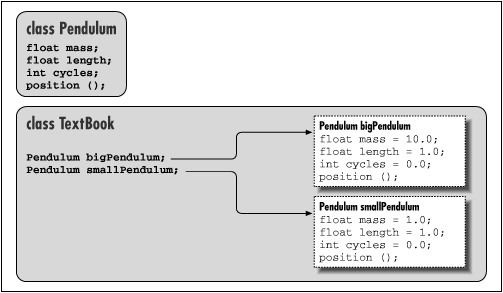
In Figure 5.1, we have a hypothetical
TextBook application that uses two instances of
Pendulum through the reference type variables
bigPendulum and
smallPendulum. Each of these
Pendulum objects has its own copy of
mass, length, and
cycles.
As with variables, methods defined in a class are instance methods. An instance method is associated with an instance of the class, but each instance doesn't really have its own copy of the method. Instead, there's just one copy of the method, but it operates on the values of the instance variables of a particular object. As you'll see later when we talk about subclassing, there's more to learn about method selection.
Inside of a class, we can access instance variables and call instance methods
of the class directly by name. Here's an example that expands upon
our Pendulum:
class Pendulum {
    ...
    void resetEverything() {
        cycles = 0;
        mass = 1.0;
        ...
        float startingPosition = position( 0.0 );
    }
    ...
}
Other classes access members of an object through a reference, using the C-style dot notation:
class TextBook {
    ...
    void showPendulum() {
        Pendulum bob = new Pendulum();
        ...
        int i = bob.cycles;
        bob.resetEverything();
        bob.mass = 1.01;
        ...
    }
    ...
}
Here we have created a second class, TextBook, that
uses a Pendulum object. It creates an instance in
showPendulum() and then invokes methods and
accesses variables of the object through the reference
bob.
Several factors affect whether class members can be accessed
from outside the class. You can use the visibility modifiers,
public, private, and
protected to restrict access; classes
can also be placed into packages that affect their scope. The
private modifier, for example, designates a variable
or method for use only by other members inside the class itself. In
the previous example, we could change the declaration of our variable
cycles to private:
class Pendulum {
    ...
    private int cycles;
    ...
Now we can't access cycles from
TextBook:
class TextBook {
    ...
    void showPendulum() {
        ...
        int i = bob.cycles;         // Compile time error
If we need to access cycles, we might add a
getCycles() method to the Pendulum
class. We'll look at access modifiers and how they affect the
scope of variables and methods in detail later.
Instance variables and methods are associated with and accessed
through a particular object. In contrast, members that are declared
with the static modifier live in the class and are
shared by all instances of the class. Variables declared with the
static modifier are called static
variables or class variables;
similarly, these kinds of methods are called static
methods or class methods.
We can add a static variable to our Pendulum example:
class Pendulum {
    ...
    static float gravAccel = 9.80;
    ...
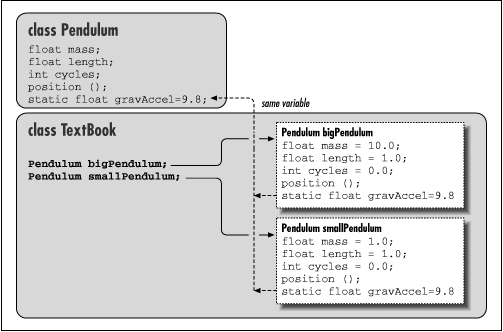
We have declared the new float variable
gravAccel as static. That means
if we change its value in any instance of a
Pendulum, the value changes for all
Pendulum objects, as shown in Figure 5.2.
Static members can be accessed like instance members. Inside
our Pendulum class, we can refer to
gravAccel by name, like an instance variable:
class Pendulum {
    ...
    float getWeight () {
        return mass * gravAccel;
    }
    ...
}
However, since static members exist in the class itself, independent
of any instance, we can also access them directly through the
class. We don't need a Pendulum object to set
the variable gravAccel; instead we can use the
class name as a reference:
Pendulum.gravAccel = 8.76;
This changes the value of gravAccel for any current
or future instances. Why would we want to
change the value of gravAccel? Well, perhaps we
want to explore how pendulums would work on different planets. Static
variables are also very useful for other kinds of data shared among classes
at run-time. For instance, you can create methods to register your objects
so that they can communicate, or you can count references to them.
We can use static variables to define constant values. In this
case, we use the static modifier along with the
final modifier. So, if we cared only about
pendulums under the influence of the Earth's gravitational pull,
we could change Pendulum as follows:
class Pendulum {
    ...
    static final float EARTH_G = 9.80;
    ...
We have followed a common convention and named our constant with
capital letters; C programmers should recognize the capitalization
convention, which resembles C #define
statements. Now the value of EARTH_G is a
constant; it can be accessed by any instance of
Pendulum (or anywhere, for that matter), but its
value can't be changed at run-time.
It's important to use the combination of static and final only for things
that are really constant. That's because the compiler is allowed to "inline" static and final values within classes
that reference them. This is probably okay for constants like PI, which aren't
likely to change for a while, but may not be ideal for other kinds of
identifiers.
Static members are useful as flags and identifiers, which can be
accessed from anywhere. They are especially useful for values needed in the
construction of an instance itself. In our example, we might declare a
number of static values to represent various kinds of
Pendulum objects:
class Pendulum {
    ...
    static int SIMPLE = 0, ONE_SPRING = 1, TWO_SPRING = 2;
    ...
We might then use these flags in a method that sets the type of a
Pendulum or, more likely, in a special constructor,
as we'll discuss shortly:
Pendulum pendy = new Pendulum();
pendy.setType( Pendulum.ONE_SPRING );
Remember, inside the Pendulum class, we can use
static members directly by name as well:
class Pendulum {
    ...
    void resetEverything() {
        setType ( SIMPLE );
        ...
    }
    ...
} |  | |
| 4.6 Arrays |  | 5.2 Methods |
