 | Chapter 4 The Java Language |  |

| Chapter 4 The Java Language | |
Do, or do not. . . . There is no try.
--Yoda (The Empire Strikes Back)
Java's roots are in embedded systems--software that runs inside specialized devices like hand-held computers, cellular phones, and fancy toasters. In those kinds of applications, it's especially important that software errors be handled properly. Most users would agree that it's unacceptable for their phone to simply crash or for their toast (and perhaps their house) to burn because their software failed. Given that we can't eliminate the possibility of software errors, a step in the right direction is to at least try to recognize and deal with the application-level errors that we can anticipate in a methodical and systematic way.
Dealing with errors in a language like C is the responsibility of the
programmer. There is no help from the language itself in identifying
error types, and there are no tools for dealing with them easily. In C
and C++, a routine generally indicates a failure by returning an
"unreasonable" value (e.g., the idiomatic
-1 or null). As the programmer,
you must know what constitutes a bad result, and what it
means. It's often awkward to work around the limitations of passing
error values in the normal path of data flow.[3]
An even worse problem is that
certain types of errors can legitimately occur almost anywhere, and
it's prohibitive and unreasonable to explicitly test for them at every
point in the software.
[3] The somewhat obscure
setjmp()andlongjmp()statements in C can save a point in the execution of code and later return to it unconditionally from a deeply buried location. In a limited sense, this is the functionality of exceptions in Java.
Java offers an elegant solution to these problems with
exception handling. (Java exception handling is similar to, but not
quite the same as, exception handling in C++.) An
exception indicates an unusual condition or an
error condition. Program control becomes unconditionally
transferred or thrown to a specially designated section of code where
it's caught and handled. In this way, error handling is somewhat
orthogonal to the normal flow of the program. We don't have to
have special return values for all our methods; errors are handled
by a separate mechanism. Control can be passed long distance from a
deeply nested routine and handled in a single location when that is
desirable, or an error can be handled immediately at its
source. There are still some methods that return
-1 as a special value, but these are generally
limited to situations where we are expecting a special value.[4]
[4] For example, the
getHeight()method of theImageclass returns-1if the height isn't known yet. No error has occurred; the height will be available in the future. In this situation, throwing an exception would be inappropriate.
A Java method is required to specify the exceptions it can throw (i.e., the ones that it doesn't catch itself); this means that the compiler can make sure we handle them. In this way, the information about what errors a method can produce is promoted to the same level of importance as its argument and return types. You may still decide to punt and ignore obvious errors, but in Java you must do so explicitly.
Exceptions are represented by instances of the class
java.lang.Exception and its subclasses.
Subclasses of Exception can hold specialized
information (and possibly behavior) for different kinds of exceptional
conditions. However, more often they are simply "logical" subclasses that
exist only to serve as a new exception type.
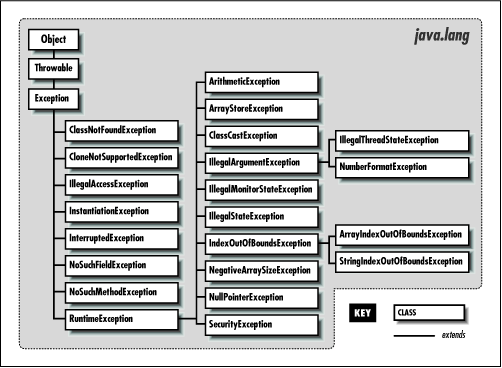
Figure 4.1 shows the subclasses of
Exception in the java.lang package. It should give you a feel for how exceptions are organized. Most other packages define their own exception types, which usually are subclasses of Exception itself, or of RuntimeException. The most important exception in the other packages is IOException, which belongs to java.io. IOException has many subclasses for typical I/O problems (like FileNotFoundException) and networking problems (like SocketException); network exceptions belong to the java.net package. Another important descendant of IOException is RemoteException, which belongs to the java.rmi package and is used when problems arise during remote method invocation (RMI). Throughout this book we'll mention the exceptions you need to be aware of as we run into them.
An Exception object is created by the code at
the point where the error condition arises. It can hold whatever information
is necessary to describe the exceptional condition, including a full stack
trace for debugging. The exception object is passed, along with the
flow of control, to the handling block of code. This is where the terms
"throw" and "catch" come from: the Exception object
is thrown from one point in the code and caught by the other, where execution
resumes.
The Java API also defines the
java.lang.Error class for unrecoverable errors. The
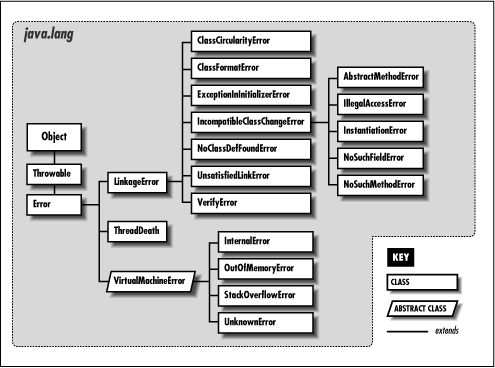
subclasses of Error in the java.lang package are shown in Figure 4.2. Although a few other packages define their own subclasses of Error, subclasses of Error are much less common (and less important) than subclasses of Exception. You needn't worry about these errors
(i.e., you do not have to catch them); they normally indicate linkage
problems or virtual machine errors. An error of this kind usually
causes the Java interpreter to display a message and exit.
The try/catch guarding statements wrap a block of
code and catch designated types of exceptions that occur within it:
try {
    readFromFile("foo");
    ...
}
catch ( Exception e ) {
    // Handle error
    System.out.println( "Exception while reading file: " + e );
    ...
}
In the above example, exceptions that occur within the body of the
try statement are directed to the
catch clause for possible handling. The
catch clause acts like a method; it
specifies an argument of the type of exception it wants to
handle, and, if it's invoked, the Exception object
is passed into its body as an argument. Here we receive the object in
the variable e and print it along with a message.
A try statement can have multiple
catch clauses that specify different specific types
(subclasses) of Exception:
try {
    readFromFile("foo");
    ...
}
catch ( FileNotFoundException e ) {
    // Handle file not found
    ...
}
catch ( IOException e ) {
    // Handle read error
    ...
}
catch ( Exception e ) {
    // Handle all other errors
    ...
}
The catch clauses are evaluated in order, and the
first possible (assignable) match is taken. At most one
catch clause is executed, which means that the
exceptions should be listed from most specific to least. In the above
example, we'll assume that the hypothetical
readFromFile() can throw two different kinds of
exceptions: one that indicates the file is not found; the other
indicates a more general read error. Any subclass of
Exception is assignable to the parent type
Exception, so the third catch
clause acts like the default clause in a
switch statement and handles any remaining
possibilities.
It should be obvious, but one beauty of the
try/catch statement is that any statement in the
try block can assume that all previous statements
in the block succeeded. A problem won't arise suddenly because a
programmer forgot to check the return value from some method. If an
earlier statement fails, execution jumps immediately to the
catch clause; later statements are never executed.
What if we hadn't caught the exception? Where would it have gone?
Well, if there is no enclosing try/catch statement,
the exception pops to the top of the method in which it appeared and
is, in turn, thrown from that method. In this way, the exception bubbles
up until it's caught, or until it pops out of the top of the program,
terminating it with a run-time error message. There's a bit more to it than
that because, in this case, the compiler would have reminded us to deal with
it, but we'll get back to that in a moment.
Let's look at another example. In Figure 4.3, the method getContent()
invokes the method openConnection() from within a
try/catch
statement. openConnection(), in turn, invokes the
method sendRequest(), which calls the method
write() to send some data.
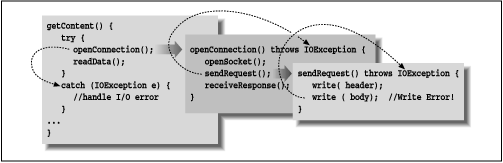
In this figure, the second call to
write() throws an
IOException. Since sendRequest()
doesn't contain a try/catch statement to handle
the exception, it's thrown again, from the point that it was called
in the method openConnection(). Since
openConnection() doesn't catch the exception
either, it's thrown once more. Finally it's caught by the
try statement in getContent()
and handled by its catch clause.
Since an exception can bubble up quite a distance before it is caught and
handled, we may need a way to determine exactly where it was thrown.
All exceptions can dump a stack trace that lists their
method of origin and all of the nested method calls that it took to arrive
there, using the printStackTrace() method.
try {
    // complex task
} catch ( Exception e ) {
    // dump information about exactly where the exception occurred
    e.printStackTrack( System.err );
    ...
}
I mentioned earlier that Java makes us be explicit about our error handling.
But Java is programmer-friendly, and it's not possible to require that every
conceivable type of error be handled in every situation. So Java exceptions are divided into two categories:
checked exceptions and unchecked exceptions.
Most application-level exceptions are checked,
which means that any method that throws one, either by generating it itself
(as we'll discuss below) or by passively ignoring one that occurs within it,
must declare that it can throw that type of exception in a
special throws clause in its method
declaration. We haven't yet talked in detail about declaring
methods; we'll cover that in Chapter 5. For now all you need know is that methods
have to declare the checked exceptions they can throw or allow to be thrown.
Again in Figure 4.3, notice that the methods
openConnection() and
sendRequest() both specify that they can throw an
IOException. If we had to throw multiple types
of exceptions, we could declare them separated with commas:
void readFile( String s ) throws IOException, InterruptedException {
    ...
}
The throws clause tells the compiler that a method is a possible source
of that type of checked exception and that anyone calling that method must be
prepared to deal with it. The caller may use a try/catch
block to catch it, or it may declare that it can throw the exception itself.
In contrast, exceptions that are subclasses of either the
class java.lang.RuntimeException or the class java.lang.Error are
unchecked.
See Figure 4.1 for the
subclasses of RuntimeException.
(Subclasses of Error are generally reserved for serious class
linkage or virtual machine problems.) It's not a compile-time error
to ignore the possibility of these exceptions;
methods don't have to declare they can throw
them. In all other respects, unchecked exceptions behave the same as
other exceptions. We are free to catch them if we wish; we
simply aren't required to.
Checked and unchecked exceptions can be summarized as follows:
Exceptions a reasonable application should try to handle gracefully.
Problems from which we would not expect our software to recover.
Checked exceptions include application-level problems
like missing files and unavailable hosts. As good programmers (and
upstanding citizens), we should design software to recover gracefully
from these kinds of conditions. Unchecked exceptions
include problems such as "out of memory" and "array index out
of bounds." While these may indicate application-level
programming errors, they can occur almost anywhere and usually aren't
easy to recover from. Fortunately, because there are unchecked exceptions,
you don't have to wrap every one of your array-index operations in a
try/catch statement.
We can throw our own exceptions: either instances of
Exception or one of its existing subclasses, or
our own specialized exception classes. All we have to do is create an
instance of the Exception and throw it with the
throw statement:
throw new Exception();
Execution stops and is transferred to the nearest enclosing
try/catch statement. (There is little
point in keeping a reference to the Exception
object we've created here.) An alternative constructor lets us specify a string with an error message:
throw new Exception("Something really bad happened");
By convention, all types of Exception have a String constructor like this.
The String message above is somewhat facetious and vague. Normally
you won't be throwing a plain old Exception, but a more specific subclass.
For example:
public void checkRead( String s ) {
    if ( new File(s).isAbsolute() || (s.indexOf("..") != -1) )
        throw new SecurityException(
           "Access to file : "+ s +" denied.");
}
In the above, we partially implement a method to check for an illegal path.
If we find one, we throw a SecurityException, with some information about
the transgression.
Of course, we could include whatever other information is useful in our own
specialized subclasses of Exception. Often, though, just having a new type of exception is good enough, because it's
sufficient to help direct the flow of control. For example, if we are building
a parser, we might want to make our own kind of exception to indicate a
particular kind of failure:
class ParseException extends Exception {
    ParseException() {
        super();
    }
    ParseException( String desc ) {
        super( desc ) };
}
See Chapter 5 for a full description of classes and class constructors.
The body of our exception class here simply allows a ParseException to be
created in the conventional ways that we have created exceptions above.
Now that we have our new exception type, we can guard like this:
// Somewhere in our code
...
try {
    parseStream( input );
} catch ( ParseException pe ) {
    // Bad input...
} catch ( IOException ioe ) {
    // Low level communications problem
}
As you can see, although our new exception doesn't currently hold any specialized information about the problem (it certainly could), it does let us distinguish a parse error from an arbitrary communications error in the same chunk of code.
Sometimes you'll want to take some action based on an exception and then
turn around and throw a new exception in its place. For example, suppose
that we want to handle an IOException by freeing up some resources
before allowing the failure to pass on to the rest of the application.
You can do this in the obvious way, by simply catching the exception
and then throwing it again or throwing a new one.
The try statement imposes a condition on the
statements they guard. It says that if an exception occurs within
it, the remaining statements will be abandoned. This has consequences
for local variable initialization. If the compiler can't determine
whether a local variable assignment we placed inside a
try/catch block will happen, it won't
let us use the variable:
void myMethod() {
    int foo;

    try {
        foo = getResults();
    }
    catch ( Exception e ) {
        ...
    }

    int bar = foo;  // Compile time error--foo may not have been initialized
In the above example, we can't use foo in the
indicated place because there's a chance it was never assigned a
value. One obvious option is to move the assignment inside the
try statement:
try {
    foo = getResults();

    int bar = foo;  // Okay because we only get here
                    // if previous assignment succeeds
}
catch ( Exception e ) {
    ...
}
Sometimes this works just fine. However, now we have the same problem
if we want to use bar later in
myMethod(). If we're not careful, we might
end up pulling everything into the try
statement. The situation changes if we transfer control out of the
method in the catch clause:
try {
    foo = getResults();
}
catch ( Exception e ) {
    ...
    return;
}

int bar = foo;  // Okay because we only get here
                // if previous assignment succeeds
Your code will dictate its own needs; you should just be aware of the options.
What if we
have some clean up to do before we exit our method from one of the
catch clauses? To avoid duplicating the code in
each catch branch and to make the cleanup more
explicit, Java supplies the finally clause. A
finally clause can be added after a
try and any associated catch
clauses. Any statements in the body of the finally
clause are guaranteed to be executed, no matter why control leaves the
try body:
try {
    // Do something here
}
catch ( FileNotFoundException e ) {
    ...
}
catch ( IOException e ) {
    ...
}
catch ( Exception e ) {
    ...
}
finally {
    // Cleanup here
}
In the above example the statements at the cleanup point will be
executed eventually, no matter how control leaves the
try. If control transfers to one of the
catch clauses, the statements in
finally are executed after the
catch completes. If none of the
catch clauses handles the exception, the
finally statements are executed before the
exception propagates to the next level.
If the statements in the try execute cleanly, or
even if we perform a return,
break, or continue, the
statements in the finally clause are executed. To
perform cleanup operations, we can even use try and
finally without any catch
clauses:
try {
    // Do something here
    return;
}
finally {
    System.out.println("Whoo-hoo!");
}
Exceptions that occur in a catch or
finally clause are handled normally; the search for
an enclosing try/catch begins outside the
offending try statement.
We mentioned at the beginning of this section that there are methods
in the core Java APIs that will still return "out of bound" values like -1 or
null, instead of throwing Exceptions. Why is this? Well, for some it is
simple a matter of convenience; where a special value is easily discernible,
we may not want to have to wrap those methods in try/catch blocks.
But there is also a performance issue.
Because of the way the Java virtual machine is implemented, guarding
against an exception being thrown (using a try) is free. It doesn't
add any overhead to the execution of your code. However, throwing
an exception is not free. When an exception is thrown, Java has
to locate the appropriate try/catch block and perform other time-consuming
activities at run-time.
The result is that you should throw exceptions only in truly "exceptional" circumstances and try to avoid using them for expected conditions, when performance is an issue. For example, if you have a loop, it may be better to perform a small test on each pass and avoid throwing the exception, rather than throwing it frequently. On the other hand, if the exception is only thrown one in a gazillion times, you may want to eliminate the overhead of the test code and not worry about the cost of throwing that exception.
|  | |
| 4.4 Statements and Expressions |  | 4.6 Arrays |
